This document provides a universal instruction manual for the VEVOR Voltage Converter, a device designed to provide power with competitive pricing. The brand emphasizes "Tough Tools, Half Price," suggesting a focus on durability and affordability. The manual includes essential information for safe and effective operation, technical support details, and an e-warranty certificate accessible via www.vevor.com/support.
The VEVOR Voltage Converter serves as a crucial tool for adapting electrical appliances to different voltage standards, making it suitable for international travel or use with imported electronics. Its primary function is to convert input AC voltage (either 110V-120V or 220V-240V) to a desired output AC voltage, ensuring compatibility with various devices. The converter is available in several models, including SV-500VA, SV-1000VA, SV-2000VA, SV-3000VA, and SV-5000VA, catering to different power requirements.
Usage Features:
The converter is designed for straightforward operation, but users must carefully follow instructions to ensure safety and prevent damage to the device or connected appliances.
-
Voltage Selection: A key feature is the input toggle switch, which allows users to select the appropriate input voltage (110V-120V or 220V-240V) to match the local mains supply. It is critical to verify that the switch position aligns with the mains voltage before powering on the device. Incorrect voltage selection can lead to electrical failure, fire, and electrocution. The manual provides clear visual aids for setting the switch to either "110" for 100V-120V input or "220" for 220V-240V input.
-
Connection Process: After setting the input voltage, the user connects the provided power cord to the converter and then plugs it into the mains outlet. The device features multiple output sockets, typically offering both 110V-120V and 220V-240V outputs, allowing for versatile use with different appliances.
-
Load Management: Users are advised to connect loads according to the voltage of the panel output socket. A crucial recommendation is that the load power must be less than the nominal power of the device. Furthermore, the recommended load power is 80% of the rated power to account for the converter's internal power loss and prevent damage. Exceeding the nominal power can lead to equipment damage.
-
Overload Protection: The VEVOR Voltage Converter incorporates robust safety features to protect against overloads.
- Overcurrent Fuse: For models like SV-500VA and SV-2000VA, an overcurrent fuse is included. If the load exceeds the equipment's capacity, this fuse will blow, disconnecting the output. Users are instructed to check and replace the fuse if there is no output.
- Overload Protection Switch: All models are equipped with an overload protection switch. If the load exceeds the equipment's capacity, this switch will automatically spring up, disconnecting the output. Once the overload issue is resolved, the user can manually press the switch to resume operation.
- Air Switch: The device also features an air switch, which acts as an additional layer of protection. In cases of prolonged overload or a short circuit, the air switch will immediately trip, turning off the output and safeguarding the equipment from damage. After resolving the fault, the user can reset the air switch to restore normal operation.
-
USB Output: For added convenience, the converter includes a panel USB output port that delivers 5V/1.5A DC. This feature allows users to charge smart devices in emergency situations, highlighting the converter's versatility beyond just voltage conversion.
Maintenance Features:
While the manual primarily focuses on operational safety and usage, it implicitly suggests certain maintenance practices through its warnings and instructions.
- Regular Checks: The emphasis on verifying the input voltage switch setting before each use serves as a critical maintenance check, preventing potential damage.
- Fuse Replacement: For models with overcurrent fuses, the instruction to check and replace the fuse when there is no output implies a user-level maintenance task. This requires users to be aware of the fuse's location and how to safely replace it, though detailed instructions for this specific task are not explicitly provided in the excerpt.
- Overload Resolution: The presence of an overload protection switch and an air switch means that users need to be able to identify and resolve overload conditions. This could involve disconnecting some appliances or ensuring that the total load does not exceed the converter's capacity. Resetting these switches after an overload event is a form of user-initiated maintenance to restore functionality.
- Environmental Considerations: The manual includes a "Correct Disposal" symbol (a crossed-out wheelie bin), indicating that the product should not be discarded with normal domestic waste. This highlights the importance of environmentally responsible disposal and encourages users to take the product to designated collection points for recycling electrical and electronic devices. This is a crucial aspect of long-term maintenance and environmental responsibility.
- Technical Support: The provision of technical support via CustomerService@vevor.com and an e-warranty certificate at www.vevor.com/support indicates that VEVOR offers professional assistance for troubleshooting and repairs. Users are encouraged to contact support if external switches fail to restart the device or for any product-related questions, suggesting that complex issues should be handled by qualified personnel rather than attempted by the user.
- Software and Technology Updates: The manual states that VEVOR reserves the right to update technology or software without prior notice. While this doesn't directly relate to user-performed maintenance, it implies that the product may evolve, and users should refer to the latest documentation or support for the most current information.
Safety and Warnings:
The manual places a strong emphasis on safety, using various symbols and explicit warnings:
- General Warning (i symbol): Users must read the instruction manual carefully to reduce the risk of injury.
- Danger (triangle with exclamation mark): Warns of risk of personal injury, environmental damage, and electric shock.
- Note (i in a circle): Provides additional information or important considerations.
- Precaution/Warning/Danger (exclamation mark in a triangle): Indicates a kind of precaution, warning, or danger, emphasizing that ignoring it may lead to accidents, injury, fire, or electrocution.
- Electrical Shock and Fire Hazard (triangle with lightning bolt): Specifically warns against electrical shock and fire hazards, stating that failure to comply with instructions could result in electrical failure, fire, and electrocution.
- High Voltage Device Warning: Users are explicitly warned that the equipment is a high voltage device and should not be disassembled at any time to avoid danger. In case of device failure, if external switches cannot restart it, users should contact their reseller for handling.
The VEVOR Voltage Converter is designed to be a practical and reliable tool for managing different voltage requirements, backed by clear instructions and safety protocols to ensure a safe user experience.

 Need help?
 General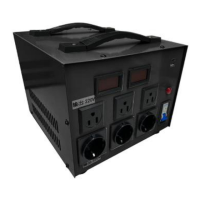

 To Next Page