This document serves as a manual for the TS-08 (TS-06) Tennis Ball Machine, a device designed to assist in tennis training by ejecting tennis balls. It is crucial to read this manual thoroughly before operating the machine to prevent potential damage to the user or the equipment.
Function Description
The Tennis Ball Machine is specifically engineered for use on a tennis court to project tennis balls for practice. It is designed to eject only tennis balls; no other types of balls should be used. The machine operates with a focus on safety, requiring users to maintain a safe distance of more than 7 meters (8 yards) from the front of the machine, even when it is paused, as balls can be ejected unexpectedly. Children must be supervised at all times and instructed on safe operating distances.
Usage Features
The machine's operation is primarily controlled via a mobile application, which connects to the device via Bluetooth.
Initial Setup:
- Software Installation: Begin by downloading and installing the mobile APP software. The download link is provided as
Http://www.tennismash.com.cn/ts0608.apk.
- Power On: Turn on the switch located on the machine's operation panel.
- Bluetooth Pairing: Access the Bluetooth settings on your mobile phone and scan for available devices. The machine will appear as either "TenniSmash08" or "TenniSmash06". Select the appropriate device to initiate pairing.
- PIN Code Entry: When prompted, enter the PIN code "1234" to complete the Bluetooth pairing process. A "Paired Connection Successful" message will confirm the connection.
Operating the Machine via the App:
- Launch App: Open the TenniSmash Remote application on your mobile device.
- Connect to Machine: Click on the Bluetooth icon within the app and select the paired machine (TenniSmash08 or TenniSmash06) from the list of available devices. A successful connection will be indicated by "Connect to TenniSmash08" or "Connect to TenniSmash06" displayed in the upper left corner of the app interface.
- Start Operation: Once connected, click the "ON" button in the app to start the machine.
Adjustable Settings:
The app provides various controls to customize the ball delivery:
- Depth: Adjusts the depth of the ball's landing on the court.
- Line: Controls the horizontal placement of the ball.
- Cross: Enables cross-court shots.
- Manual: Allows for manual control over certain parameters.
- Random: Initiates a random ball delivery pattern.
- Fix: Sets a fixed ball delivery position.
- Custom: Offers customizable ball delivery sequences.
- TopSpin: Adjusts the amount of topspin applied to the ball (ranging from 1 to a higher value).
- BackSpin: Adjusts the amount of backspin applied to the ball (ranging from 1 to a higher value).
- Frequency: Controls the interval between ball ejections.
- Speed: Adjusts the speed of the ejected balls, with "SPEED +" and "SPEED -" buttons for fine-tuning.
- L/R SWING & L/R ADJUST (for TS-06): These controls are specific to the TS-06 model and allow for left/right oscillation and adjustment of the ball's trajectory.
- U/D SWING & U/D ADJUST (for TS-06): These controls are also specific to the TS-06 model and enable up/down oscillation and adjustment.
Physical Setup:
- Placement: Position the ball machine correctly on the tennis court.
- Ball-Loading Frame: Fasten the ball-loading frame securely back onto the serve machine.
- Ball Direction: Manually adjust the direction of the ball exit wheel to aim the shots.
- Enjoy: Once set up, you can begin your tennis practice.
Charging Batteries:
The machine is equipped with a 16AH large-capacity lithium battery. A full charge typically provides about 6 hours of normal working time. It is recommended to charge the battery before initial use. During charging, the charger indicator light will be red, turning green when fully charged. If the battery is completely exhausted, a full charge takes approximately 8 hours. The charger connects to the machine via a dedicated port, and the charger itself has an indicator lamp. The input voltage for the charger is 110-240V.
Maintenance Features
Regular maintenance is essential to ensure the longevity and optimal performance of the tennis ball machine.
Cleaning:
- Internal Cleaning: Use a vacuum cleaner to remove any ball fluff that accumulates inside the machine.
- External Cleaning: The exterior of the machine can be wiped down with a mild detergent. Exercise caution to prevent water from entering the machine's internal components.
- Throwing Wheels: After each use, the throwing wheels should be wiped clean to prevent the buildup of residue from the tennis balls.
Troubleshooting:
- Battery Check: Verify that the battery is charging correctly.
- Fuse Check: Inspect the fuse to see if it has blown. The fuse is located on the operation panel.
Power Light Not Illuminating (After pressing power button):
- This may indicate excessive current or that the battery's protection mechanism has activated, locking the battery.
- Battery Unlock: If the battery protection lock occurs, turn off the machine. Charging the battery for 5 minutes should unlock it.
Clearing Ball Jams:
- If a ball becomes stuck behind the two throwing wheels, the machine may automatically shut down to protect the circuit board from damage.
- Jam Resolution: Turn off the machine immediately and carefully clear the jammed ball.
Other Fault Conditions:
- If you encounter problems that you cannot resolve through the provided troubleshooting steps, or if any other unusual fault conditions occur, contact customer service for further assistance.
Important Usage Notes:
- Avoid using the machine in the rain.
- Do not use wet balls, as this can affect performance and potentially damage the machine.
- For the best performance, it is recommended to use pressureless tennis balls.
- Mixing new and old balls can lead to inconsistent results in ball delivery.

 Need help?
 General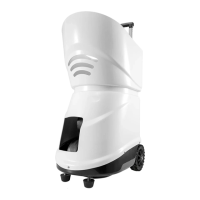

 To Next Page