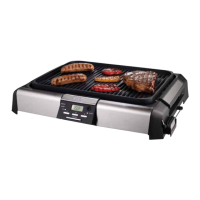
How to Use Your Grill/Griddle
Product Functions
9
1. Once the ON/OFF button is
pressed when the unit is working,
the power will be cut. If the unit is
turned ON again within 10
seconds, the previous setting will
maintain; but if the unit is turned
again after 10 seconds, the default
temperature will show.
2. Two-hour AUTO-SHUT-OFF. Three
5-second beep at 3-second interval
will sound before shout off.
1. Grill has eight temperature settings.
Choose the desired setting using the
temperature chart below.
2. The Probe measures food
temperature and can be set for the
desired temperature using the chart
below.
3. A beep will sound when the unit is
preheated or when the food
reaches the desired temperature at
Probe Mode II.
4. Two angles on the Control Panel
provide a clear view.
5. Use Grill Handles to easily remove
the Grill or Griddle.
6. Drip Tray catches grease and other
liquid.
7. A Glass Lid prevents spattering
during cooking.
8.
Cooking suggestions for the
Grill/Griddle:
Turn Off Mode
Grill
Griddle
Steaks, Hamburgers, Sliced Meats,
Green Peppers, Hot Dogs, Breads..
Omlets, Bacon, Waffles, Panini…
Temperature Setting Chart:
Mode Temperature Setting
Temperature Setting
Grill/Griddle
Probe
Keep-Warm Cooking
150ƭ/66ƫ 175ƭ/79ƫ
350ƭ/177ƫ
375ƭ/191ƫ
130ƭ/54ƫ 139ƭ/59ƫ 148ƭ/64ƫ 157ƭ/69ƫ 166ƭ/74ƫ 175ƭ/79ƫ 184ƭ/84ƫ
400ƭ/204ƫ
425ƭ/218ƫ
450ƭ/232ƫ
475ƭ/246ƫ


 To Next Page
 Loading...