5
• For maximum filter performance and for optimum
taste, it is important to change your MAVEA
MAXTRA Filter Cartridge (9) regularly. MAVEA
recommends that you replace the cartridge every
4 weeks.
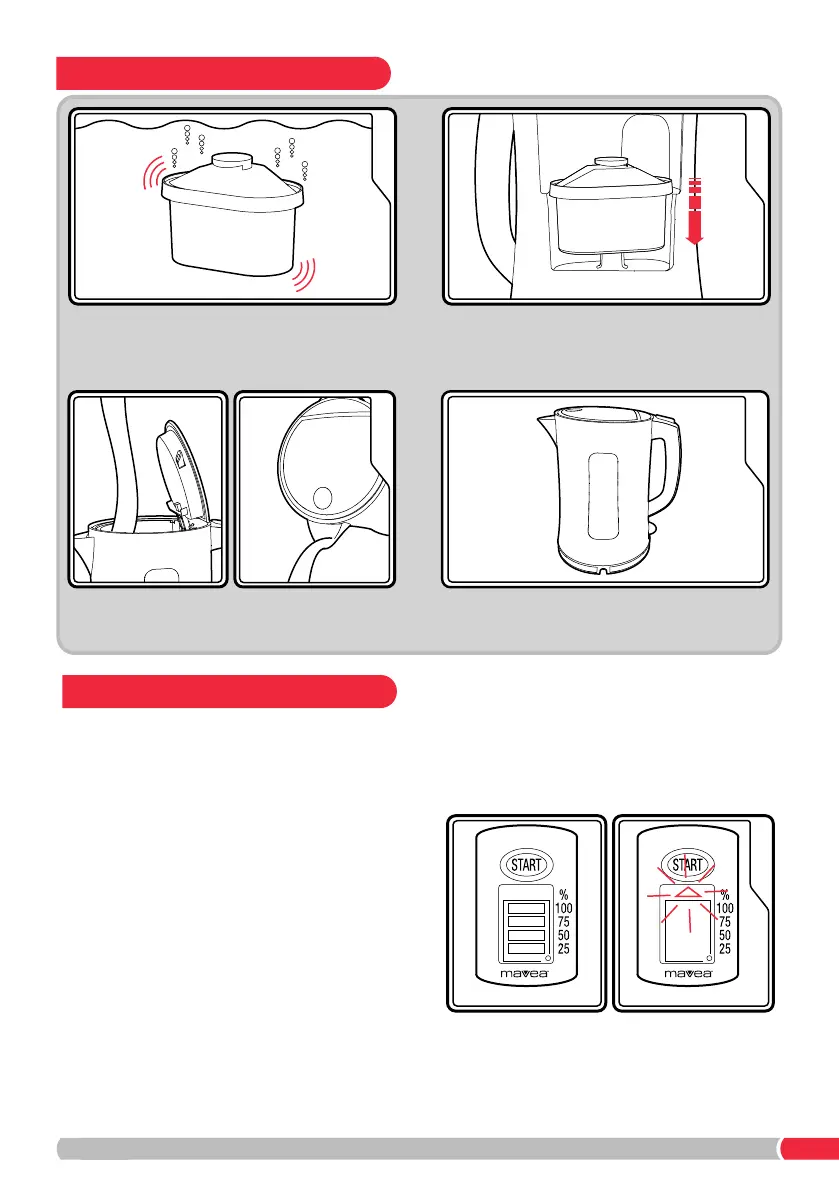
The unique MAVEA Memo
(11) measures the
recommended time of use of your cartridge. The
MAVEA Memo is located on the filter kettle
handle.
Setting the MAVEA Memo
• To start MAVEA Memo, please press and hold
down the Start Button (12) until all four bars
appear in the display and flash twice. The MAVEA
Memo is now set.
• The Cartridge Active Indicator Light (14) in the
bottom right corner of the MAVEA Memo
indicates that it is working.
• Every week, one bar will disappear on the
Cartridge Life Gauge (13) to show the remaining
cartridge life. After four weeks, all four bars will
disappear and a flashing arrow will indicate that
the cartridge should now be changed. Insert a
new cartridge according to the instructions, and
reactivate the Memo by following ‘Setting the
MAVEA Memo
Your Filter Cartridge is ready for use.
Fill the kettle to the MAX line as normal and
allow to filter through completely to flush the
cartridge. Repeat twice
Push the Filter Cartridge into the MAVEA
Hopper (10) until firmly in place. The Filter
Cartridge should stay in place if the kettle is
upside down.
Replacing the filter cartridge
Immerse the MAVEA MAXTRA Filter Cartridge
(9) in water. Shake gently to remove any air
bubbles.


 To Next Page