

EasyManua.ls Logo

ViaSat Powerline Online-kit - User Manual

ViaSat Powerline Online-kit
12 pages
Print Icon
To Next Page IconTo Next Page
Loading...
Powerline Online-kit
Anslut din Viasat-box till internet med hjälp av ditt befintliga elnät
Bredbands-TV
Question and Answer IconNeed help?

Do you have a question about the ViaSat Powerline Online-kit and is the answer not in the manual?

Summary

Adapter Indicator Lights

Power LED

Describes the power status indicator on the adapter.

Ethernet LED

Describes the Ethernet connection status indicator on the adapter.

Powerline LED

Describes the powerline network connection status indicator.

Setting Up the Powerline Kit

Step 1: Connect Network Cable to Adapter

Connect one adapter to a network cable.

Step 2: Connect Adapter to Router and Outlet

Connect the adapter to your router and a nearby electrical outlet.

Step 3: Connect Network Cable to Second Adapter

Connect a network cable to the second adapter.

Step 4: Connect Adapter to Viasat Box and Outlet

Connect the network cable to the Viasat box and a nearby outlet.

Step 5: Confirmation of Setup

Review the final connected state of the powerline adapters.

Adding More Adapters

Factory Reset All Adapters

Perform a factory reset on all adapters by holding the Factory Reset button for one second.

Pairing Additional Adapters

Pair adapters by pressing and holding the pairing button for 2 seconds.

Customer Support

Contact Viasat Customer Service

Contact Viasat Customer Service for assistance and support.
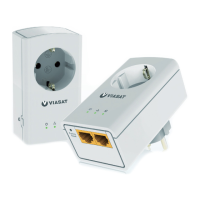
ViaSat Powerline Online-kit Specifications

General IconGeneral
BrandViaSat
ModelPowerline Online-kit
CategoryAdapter
LanguageEnglish