
 Need help?
Do you have a question about the Vibe Air and is the answer not in the manual?
Consult a physician if you doubt the device's appropriateness for your hearing needs.
Do not use if you have specific ear conditions like deformities, discharge, or sudden hearing loss.
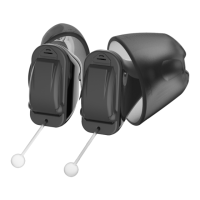
Familiarize yourself with the parts of your new hearing device.
Step-by-step guide on inserting batteries and powering the device on/off.
Instructions on how to properly insert the hearing aids into the ear canal.
Guidance on how to safely remove the hearing aids from your ears.
Instructions for replacing ear tips to ensure comfort and proper fit.
This document is a Quick Start Guide for the Vibe Air hearing aids, providing essential information for users to get familiar with their new device.
The Vibe Air hearing aids are intended to improve the hearing of individuals with hearing impairment. Diagnosis and prescription of these hearing aids must be carried out by qualified hearing health specialists, such as acousticians, audiologists, or ENT doctors.
The guide emphasizes that users should consult a licensed physician if they have any doubts about the device's suitability for them. It also lists contraindications for using the product, which include:
The package includes:
Each Vibe Air hearing aid has several key components:
To insert the battery:
To power on the hearing aid, simply close the battery door. A start-up jingle will indicate that the device is on. To power off, fully open the battery door.
Before insertion, ensure the hearing aids are held with the arrows pointing upwards and the removal cord at the bottom. Carefully push the hearing aid into the ear canal. The right hearing aid is marked with 'R', and the left with 'L'.
To remove the hearing aids, pull the removal cord towards the back of your head.
The hearing aids come with pre-installed Click Sleeves. If the current size is uncomfortable, users can change them. It's important to note that left and right ear sizes may differ.
To remove a Click Sleeve, grab and pull it off. To install a new one, ensure the flap of the Click Sleeve matches the printed line on the hearing aid. A click will be heard when the Click Sleeve is fully installed.
For more detailed information, users are directed to the Vibe Hearing website: www.vibe-hearing.com.
For USA and Canada, the certification information for the Vibe Air hearing instruments with wireless functionality is provided:
The legal manufacturer is WSAUD A/S, located in Denmark. The document also includes the document number, order/item number, and revision details.
 General
| Charging Time | 3 hours |
|---|---|
| Bluetooth | Yes |
| Noise Reduction | Yes |
| Water Resistance | IP67 |
| Category | Hearing Aids |

 To Next Page