10
3.3 Teach-in of a second dual
drive (optional)
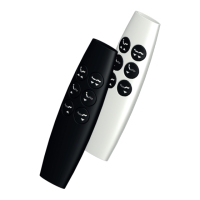
The radio transmitter VFF/CDL-BF-07
can operate two dual drives
simultaneously (Parallel function).
For this purpose, a teach-in process for
the second dual drive must be carried
out.
After you carried out the teach-in
process for the first dual drive (see
page 9), you carry out the same
process for the second dual drive:
• Press the buttons and on the 1 2
radio transmitter at the same time
and keep them pressed for approx.
3 seconds until the status LED s starts
flashing.
• Release the buttons now.
• The status LED and the keypad s
illumination flash alternately.
• Press button on the second dual l
drive for approx. 1 s.
• The back adjustment motor moves
briefly up/down.
• The status LED goes off, the s
keypad illumination lights up
constantly.
• The teach-in process has been
completed successfully.
This function can only be switched off
by resetting the radio transmitter to its
factory settings (see page 9).
The parallel function will not
synchronize the drives, they will just
move simultaneously. Depending on
the load of each drive, over time there
might show differences of the tilt
angles of the back and leg motors.
In this case use button to move all 1
drives completely up. After that the
motors should move parallel again.
Commissioning


 To Next Page