MODE
ST/STOP
SOUND ‚ON’ ICON
HOURLY ALERT ICON
AM/PM INDICATOR
SET/RESET
OPERATING MODES
1) Calendar/Clock 2) Alarm 3) Chrono (Stopwatch)
4) Timer 5) Option
Note: - To set Calendar/Clock, Alarms and Timer, the digits that you want to set MUST BE
FLASHING.
- When setting Calendar/Clocks, Alarms or Timer: if a delay of approx. 3 minutes
occurs without buttons being pushed, digits will stop flashing and watch will return to
Calendar/Clock mode.
1. CALENDAR/CLOCK MODE
Three Time Zones are available. Set Time Zone 1 for time of day of your home location. This
is the default Time and will show on the watch at all times when it is in the Calendar/Clock
mode. You have the option of setting Time Zones 2 and 3.
Note: Time Zone 1 must be set correctly for the time of day as the alarms will work based
on this time.
SETTING TIME OF DAY AND CALENDAR
1. Push MODE button to rotate to Calendar/Clock Mode.
2. Push and hold SET/RESET button. HOLD TO SET will show on display. Hold the button
for 3 seconds and T-ZONE 1 will show and flash.
3. Push MODE button. Hour digits will flash.
4. Push ST/STOP button to rotate hour to correct hour for Time 1 setting.
Note: If using a 12 Hr Clock, make sure that you select AM or PM correctly.
5. Push MODE button again. Minute digits will flash.
6. Push ST/STOP button to rotate minutes to the correct time.
7. Push MODE button again. Second digits will flash.
8. Push ST/STOP button to rotate seconds to the correct time.
9. Push MODE button again. Day of Week digits will flash.
10. Push ST/STOP button to rotate to correct day of the week.
(MO = Monday, TU = Tuesday, WE = Wednesday etc.)
11. Push MODE button again. Month digits will flash.
12. Push ST/STOP button to rotate to the correct number of the month
(1 = January, 2 = February, 3 = March etc.)
13. Push MODE button again. Day of Month digits will flash.
14. Push ST/STOP button to rotate to the correct day of the month
15. Push MODE button again. TIME 12 HR will show and flash.
16. Push ST/STOP button to switch between 12 Hour (AM/PM) and 24 Hour mode.
17. Push MODE button again. DATE MM-DD will show and flash.
18. Push ST/STOP button to switch between MM-DD and DD-MM mode.
19. Push MODE button again. T-ZONE 1 will show again and flash. While [1] is flashing you
can continue to set T-ZONE 2 or T_ZONE 3 if desired by pushing ST/STOP button to
enter T-ZONE 2 or 3. Just follow the same steps as for setting T-ZONE 1.
20. Push SET/RESET button to complete setting.
TO VIEW TIME IN TIME ZONE 2 OR 3
While in Calendar/Clock mode (Time Zone 1)
1. Push ST/STOP button. Time set will show for 3 seconds with T2 in upper left corner of
display.
2. Push ST/STOP button again within 3 seconds to view T3. Display will automatically
return to time set in Calendar/Clock (Zone 1).

 Need help?
 General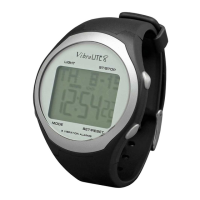

 To Next Page

