5
SETTINGS & USE
RemoveVibrapowerBeltfrompackagingand
carrycase.Undothebeltbypullingapartthe
hook&loopstrap.
WraptheVibrapowerBeltaroundthepart
ofyourbodyyouwishtoexerciseand
secureinplaceusingthehook&loopstrap
attached.TheVibrapowerBeltcanbeused
onavarietyofareasofthebodyfrom
stomach,back,arms,legs&buttocks.
Turnthemachineonbyensuringthe
suppliedpowercordispluggedintothe
machinerst,thenoncepluggedintoa
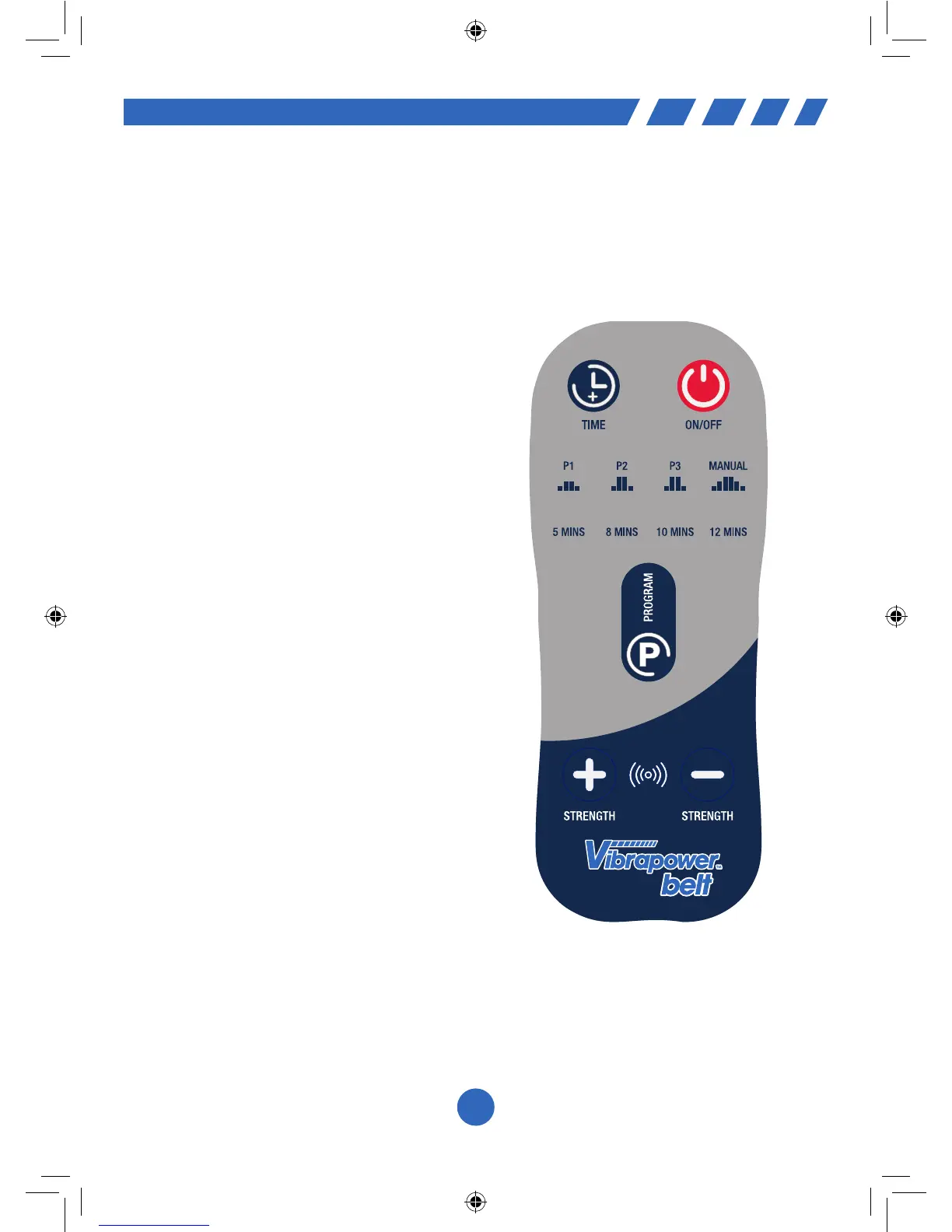
suitablepowersocketpressthe“On/Off”
buttonontheremotecontrol.Thiswill
automaticallystartthemachineaftera
coupleofsecondsinProgram1atthe
loweststrengthfortheshortesttime.
Tochangebetweenprogramspressthe
Program “P” buttonuntilyoureachyour
desiredprogram.OncewillchangeittoP2,
twicewillchangeittoP3andthreetimes
willchangeittoManualmode.
Tochangethedesiredworkouttimepress
theTimebuttoninthetopleftcornerof
theremote.TheVibrapowerBelthas4time
settings,5minutes,8minutes,10minutes
&12minutes.KeeppressingtheTime
buttonuntilyoureachyourdesired
workoutlength.
Wheninmanualmodeyoucanchangethe
strengthofthevibrationbyusingthe
+or–buttonsatthebottomoftheremote
control.Youwillhearabeepingsoundonce
pressedunlessyouhavereachedthe
maximum/minimumlevel,thennosound
willbeheard.Youcannotchangethe
strengthofvibrationwhenusingoneofthe
3presetprograms.
At the end of your workout, turn off
the machine by unplugging from the
mains supply.


 To Next Page