8
Viconics Technologies
028-0465-00 October 2015
ZigBee Settings
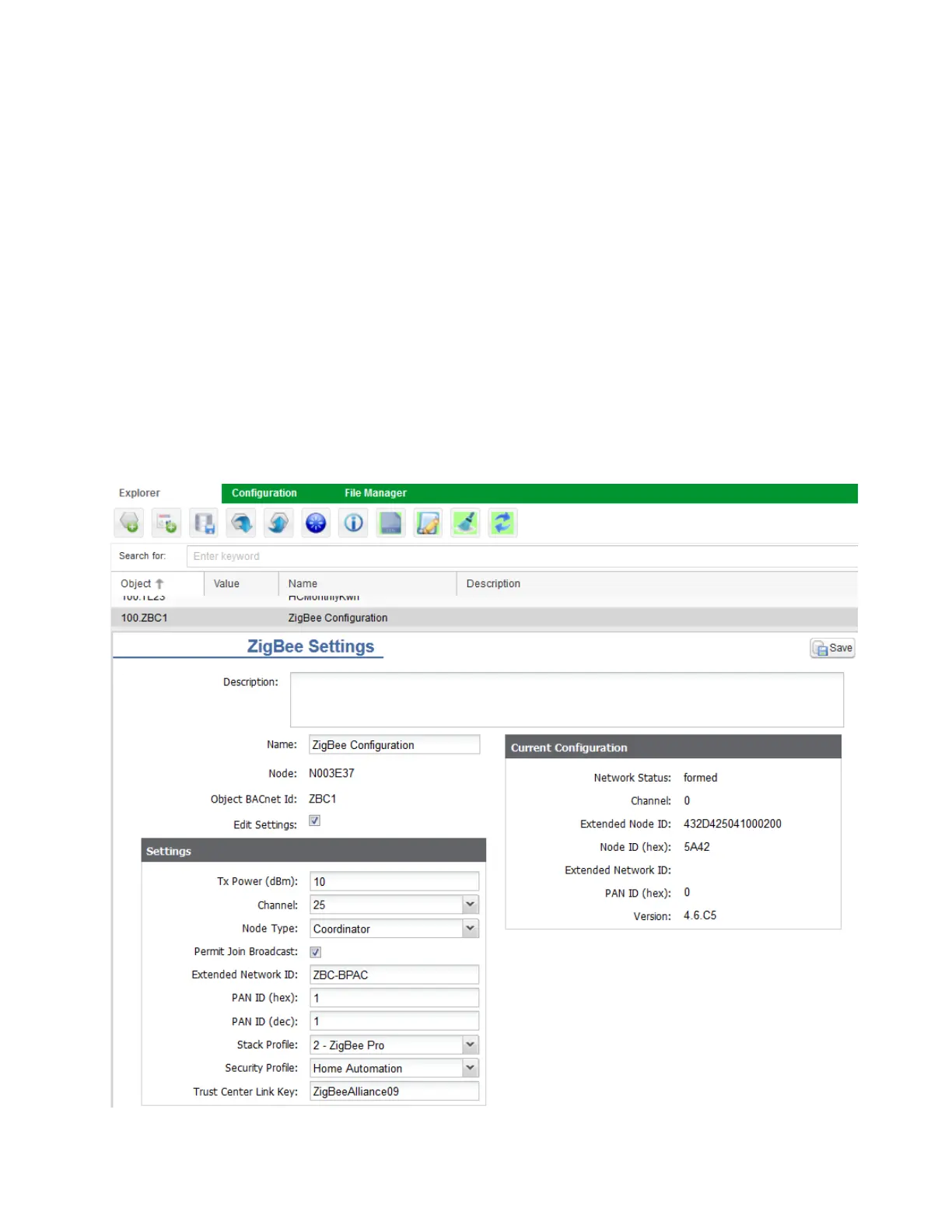
This procedure shows you how to create the ZigBee network that will be used by the Room Controllers.
1. Select ZigBee Conguration Object (ZBC1).
2. Toggle Edit Settings.
3. Set Node Type to Coordinator.
4. Set Channel to desired channel (recommended channels 15, 20 and 25).
5. Ensure Permit Join Broadcast is toggled.
6. Set Extended Network ID (up to 8 alpha-numeric characters).
7. Set PAN ID (dec) eld to value between 1 - 500.
8. Set Stack prole to ZigBee Pro.
9. Set Security Prole to Home Automation.
10. Click Save.
NOTE: write down channel number and PAN ID number and keep in a safe place. These values will be needed when pairing the
room controllers to the GW2.
NOTE: if using multiple networks, the following parameters must be unique on each network:
1. Channel
2. Extended Network ID
3. PAN ID (dec)


 To Next Page
 Loading...