KEY AND SLIDE SWITCH FEATURES
This section illustrates and describes the mode switches you can use to control your calculator’s operation.
OFF ON
· (OFF) The power is OFF.
· (ON) The power is ON.
P NP IP
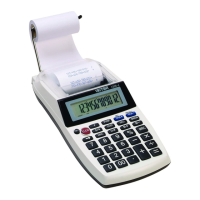
· (P) The printer is activated as long as the calculator is turned on.
· (NP) The printer is activated only when the paper feed key or the non-add / date key is pressed. This is also
called display only mode.
· (IC) Activates the Item Count so that when the Total key is pressed, the Item Count will automatically print on
the right hand side of the printed tape.
▲ 5/4 ▼
(▲) This setting causes an answer to a calculation to automatically round up.
(5/4) This setting causes automatic round off. If the last digit of the result that will be printed or printed /
displayed upon rounding is followed by a value of 0 to 4, the digit is unchanged. If the last digit
of the result that will be printed or printed / displayed is followed by a value of 5 to 9, the digit is
rounded up.
(▼) This causes an answer to be automatically rounded down. (Truncation)
∑ GT TAX SET
( ∑ ) When the slide switch is in the Sigma mode “∑” position, the results of the multiplication or
division calculations completed by the = or % keys are automatically added to the accumulator.
The accumulated answer can be recalled by pressing the * / ∑ key.
( GT ) Any total taken with the * / ∑ key is automatically accumulated to memory. The accumulated
Grand Total can be recalled by pressing the MT key.
(TAX SET) Selects set mode for programming the Tax rate.
A 0 2 3 4 F DECIMAL SET
(A) Monetary Add Mode: In this setting, amounts entered are assumed to be monetary. The
calculator automatically supplies a decimal point to the left of the last two digits entered.
(0,2,3,4) Fixed digit mode: These settings specify the number of digits to the right of the decimal
point that are shown in the result.
(F) Floating decimal point mode: This setting specifies that all digits of the result are shown,
up to a maximum of 12. If the result exceeds these capacities, excess digits to the right of
the decimal point are dropped. No rounding takes place.



 To Next Page