8 9
1 2
9
10. Monitor Trap
Stay up to date on trap activity from anywhere via your mobile device.
Getting Started: iOS Devices
1. Download the free Victor
®
Pest App from the Apple App Store
®
or Android Google Play™
store. Check that the unit is turned “OFF” by making sure the power button is not pressed
down. Insert batteries into the battery compartment and launch the Victor
®
Pest App
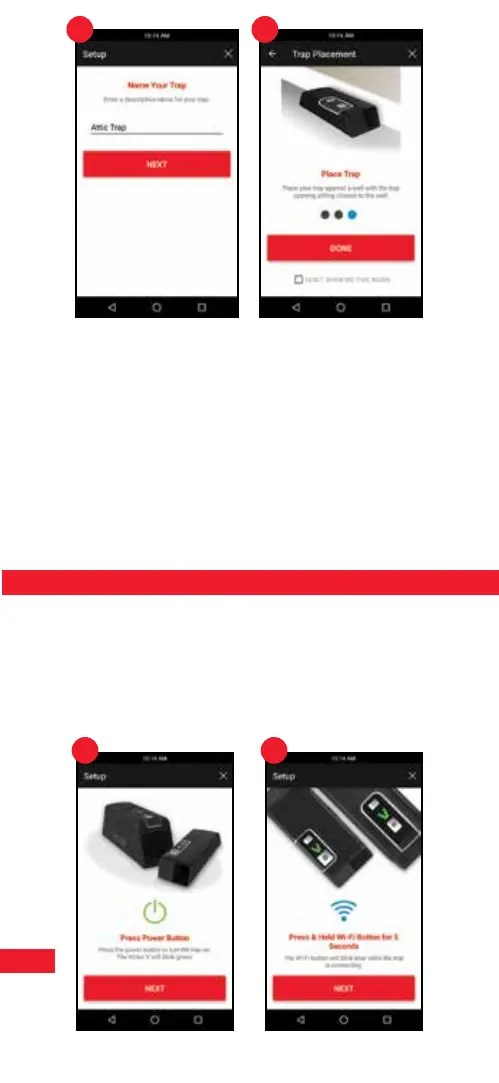
2. Connect your trap by following the instructions on screen. Step by step instructions are
also in this guide.
3. Once the power button and Wi-Fi button have been pressed during the initial setup, users
will have 5 minutes to successfully nish. Once 5 minutes have passed, the user should
power the trap off and start over if setup was not successful.
iOS Devices
Important Note: Some screens, instructions and settings may differ slightly depending
on what device you are using.
1.
Press Power Button
Press the power button to turn the trap on. The Victor
®
“V” will blink green 3 times.
2. Press and Hold Wi-Fi Button for 5 Seconds
The Wi-Fi button will blink blue 10 times while the trap is connecting.


 To Next Page
 Loading...