6.Fillingupthesandfilterwithafilterbed.
TheF400sandfilterisincludedinthestandardequipment. Thefilterisequippedwithasix-
functionvalvewhichcontrolsthefilter'swork. Thefilterprovidedisunfilled.Beforeplumbingin
fillthefilterwithhigh-silicasandthatactsasafilteringfactor. Tofillupthefilter:
a
b
1.Openthetorsionalcouplingsaandbshowedinthepicturebelow.
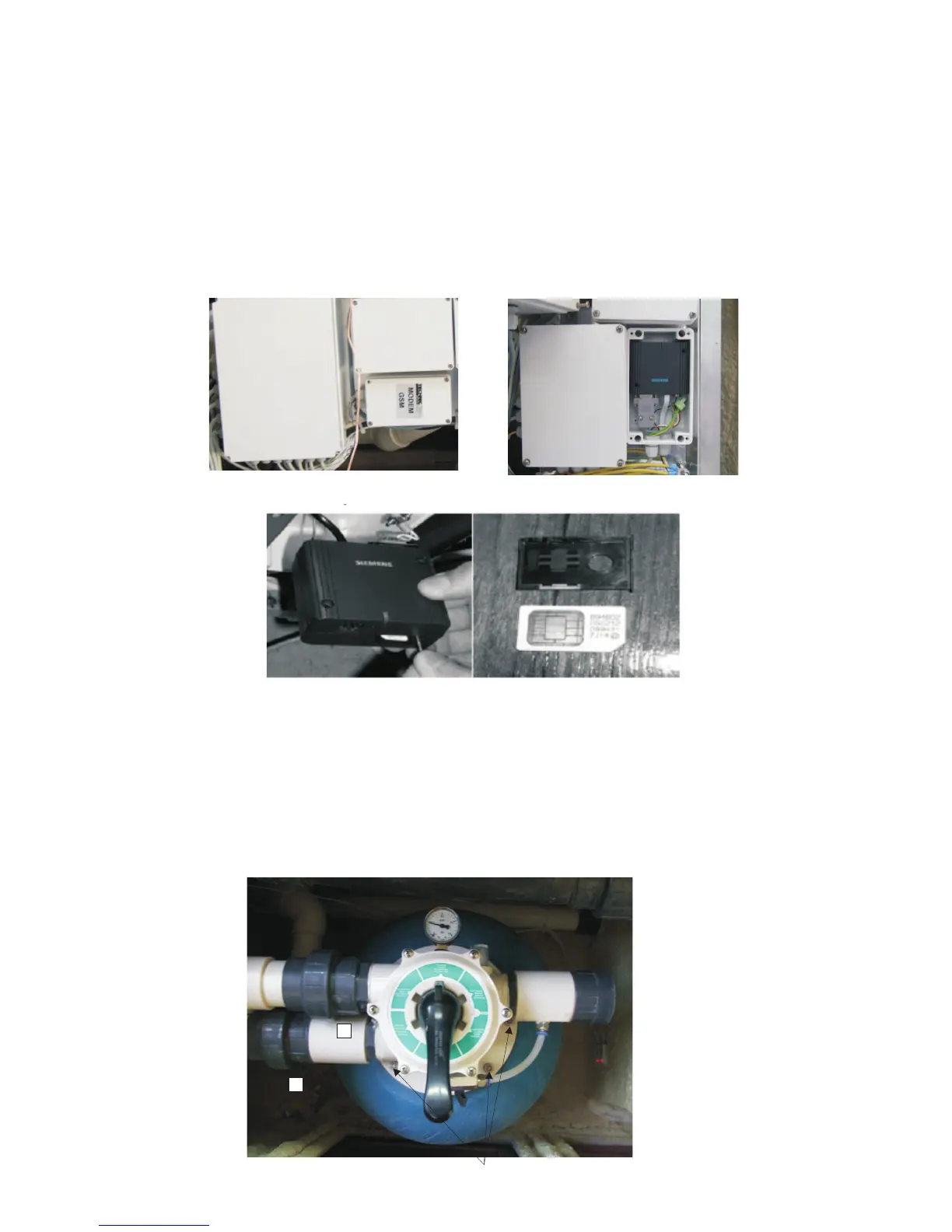
5.SIMcardinstallationofGSMoperator
GSMmoduleislocatedinthefront,inthesameplaceasotherelectronicelements. Theboxis
markedasGSMmodule.Inordertoinstallthecardyoushould:
Disconnectthebathtubfromthepowersource
Removewoodenpanelofthecover
RemovethelidfromtheboxcontainingGSMmodule
Removethemodulefromthebox
PressayellowkeywiththeuseofasharptoolinordertocauseSIMcardfeedtocomeout
InsertaSIMcardinthefeed
PushtheSIMcardfeedtoGSMmodule
Insertthemoduleinthebox,fix,screwthelidandinstallthewoodenpanelofthecover.
GSMmodulebox


 To Next Page
 Loading...