To get the MIDI working you will need a suitable MIDI Footcontroller. Connect this to the 5-PIN MIDI DIN
socket on the rear of the VX100 using a standard 5-PIN DIN cable.
Now we need to ensure that the VX100 is set to the same MIDI Channel as the MIDI Footcontroller. The
instructions that came with the MIDI controller will state which channel it is set to.
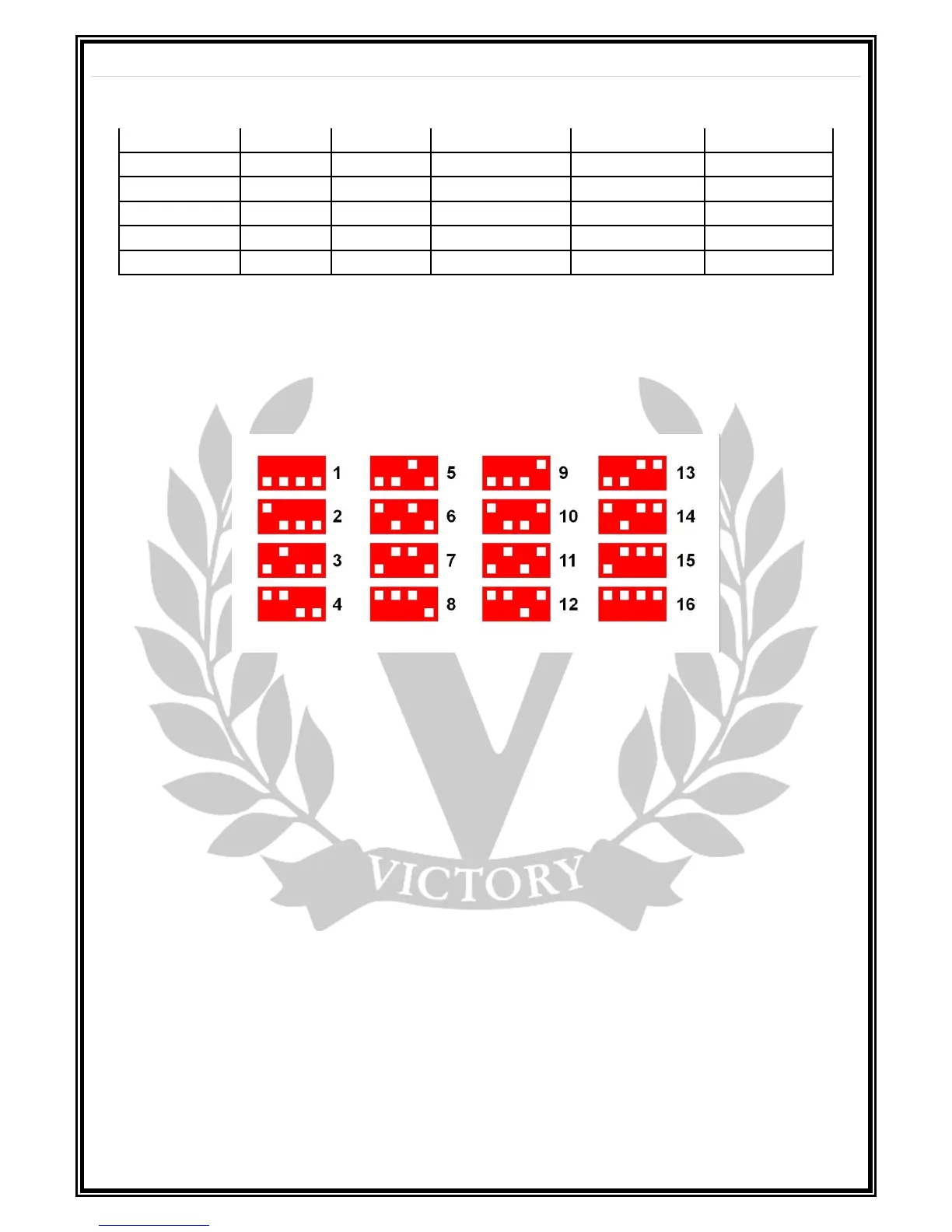
The following table shows the 16 possible channels that the VX100 can be set to, using the 4-PIN DIP
switch found next to the footswitch sockets, (labelled MIDI CHANNEL):
For example, if your MIDI controller is set to channel 4, then from the table above, the DIP switches on
the VX100 should be set with the first 2 up and the second 2 down.
Now turn the amplifier ON and check MIDI operation ensuring all mini front panel toggle switches are in
the centre, (NULL) position. For example, press Preset 5 and the amplifier should now be set to GAIN I,
MASTER II, CRUNCH, PREAMP FOCUS OFF and EFFECTS LOOP ON.
It is possible to alter the combination of presets out of the 24 available. To do this switch the MIDI
Footcontroller to your chosen Preset and then switch the front panel toggle switches ‘ON’ or ‘OFF’ for
your desired choice of function. Once you have done this, press the MIDI STORE button above the MIDI
DIP Switches. Now set all mini front panel toggle switches to the NULL centre position. Now when this
Preset is selected on the MIDI Footcontroller, the functions you have selected, (STORED) will be recalled.
The MIDI Reset button, accessible via a small hole next to the MIDI Store button, will reset the MIDI
Presets back to the original Fatory settings as found in the table at the beginning of this section.
Notes on operation:
To avoid any conflicting behavior, please do not use a MIDI Footcontroller in conjunction with the
latching footswitches.
FOOTSWITCH SECTION
FOOTSWITCH 1: Preamp Bass Focus, (Tip of TRS Jack) & Clean/Crunch, (Ring of TRS Jack).
Connect the supplied Dual latching footswitch here to switch the Preamp Bass Focus ON/OFF and
between Clean/Crunch for GAIN I.
FOOTSWITCH 2: GAIN I/II (Tip of TRS Jack) & MASTER I/II (Ring of TRS Jack)
Connect the supplied Dual latching footswitch here to switch between GAIN I & II and between MASTER
VOLUMEs I & II.



 To Next Page
 Loading...