Need help?
Do you have a question about the Victrola VS-120 and is the answer not in the manual?
Information to prevent danger to the user and property damage due to handling or product use.
Guidance on operation, configuration, and use of manufacturer-specified accessories.
Explains symbols for dangerous voltage, laser products, AC/DC, Class II equipment, and CE marking.
Comprehensive instructions for safe installation, operation, and handling of the apparatus.
Lists all the accessories that are provided with the Victrola VS-120 unit.
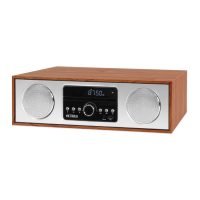
Identifies and describes all buttons, displays, and ports located on the front of the unit.
Details the input/output connections and power input port on the rear of the unit.
Instructions on how to operate the remote control and its effective range.
Step-by-step instructions for installing batteries into the remote control.
Explains the specific function of each button on the Victrola remote control.
Describes the function of primary buttons and controls on the main unit.
Instructions for setting the clock and adjusting the screen's brightness.
Details playback modes like Random, Repeat, TUNE, FOLD, EQ, and FM radio tuning.
Provides steps for pairing external Bluetooth devices with the unit.
Instructions for connecting and using external audio sources via the LINE IN port.
Guide on how to insert and play music files from a USB drive.
 General
| Power source type | AC |
|---|---|
| AC adapter frequency | 50 / 60 Hz |
| AC adapter input voltage | 100 - 240 V |
| Power consumption (typical) | 30 W |
| Operating temperature (T-T) | -10 - 35 °C |
| CD changer | - |
| Device type | Personal CD player |
| Product color | Grey, Wood colour |
| Clock function | Yes |
| Disc loading type | Tray |
| Playback disc types | CD |
| Number of optical discs | 1 discs |
| Frequency range | 20 - 20000 Hz |
| Signal-to-Noise Ratio (SNR) | 75 dB |
| Volume control | Rotary |
| Programmable tracks | 20 |
| USB 2.0 ports quantity | 1 |
| Antenna type | External |
| Number of built-in speakers | 2 |
| Display type | LED |
| Playback disc formats | CD audio, MP3 |
 Weight and Dimensions
| Depth | 275 mm |
|---|---|
| Width | 405 mm |
| Height | 119 mm |
| Weight | 4300 g |

 To Next Page