4 5
2. Light Adjustment
9 Light Colors: 7 single colors + 1 RGB static color + 1 RGB
dynamic color, Short press light button to switch 10 modes
among Static RGB, Green, Red, Blue, Yellow, Cyan, Purple,
White, Dynamic RGB and Light Off.
Memory Function: It’ll remember the light mode before power
off and display the same light mode when you reboot it.
3. Connection Instructions of Bluetooth/FM Tun-
ing/AUX Out
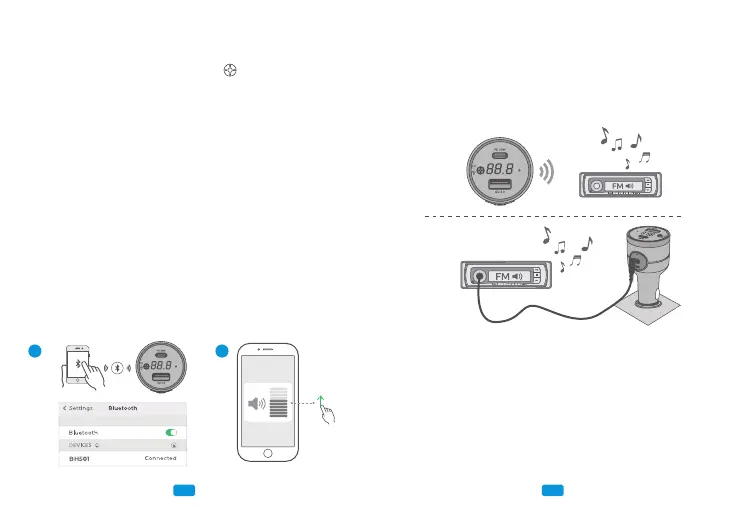
A. Enable the Bluetooth function on your smart devices (eg.
Phone, Pad, etc.), and search “BH501” and connect it.
You can use it after successful connection. When you use
BH501 again, it’ll reconnect the last-connected device auto-
matically.
B. After successful Bluetooth connection, please appropriately
turn up the volume of your device.
After your device is connected to BH501’s Bluetooth success-
fully, there are 2 ways for music output: AUX Out and FM
Tuning. If your car is equipped with AUX In port, we suggest
you connect BH501 to your car via the included AUX cable, so
that you could get a better audio experience.
Output 1: FM Tuning (If your car doesn’t have AUX port,
please choose this way to connect)
When you use BH501 for the first time, please adjust its
blank FM frequency to be the same as that of your car (Not
a frequency of local broadcast/A frequency without any
broadcast/A frequency only with white noise). For seeking a
Output 1:
FM Tuning
Output 2:
AUX Cable
Connection
Step 1: Bluetooth Connection
Step 2: AUX Out/FM Tuning
A B
If you have connected product with your car with a AUX cable,
the default music output turns to AUX Out.
AUX



 To Next Page