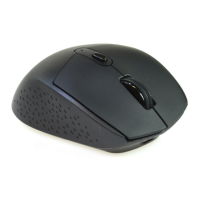
User Manual
Model: PC132A-1
Product feature
2.4G wireless connection, operating range 10 meters
3065 sensor, low power and high performance
3 switchable CPI 800/1200/1600
IR light tracing technology, work with many of surface
Energy saving design with low power indicator and power switch on mouse body
Plug & play Nano receiving adapter
Before use:
1. Find the wireless mouse and Nano receiver in package
2. Plug Nano receiver to USB port on PC
3. Switch the button at the bottom of mouse body, battery cover can be open (check
the pictures), Install 1PCS AA battery into Mouse body Properly
4. Put on power switch at the bottom of Mouse, LED indicator will keep flash for
few second, the Mouse is ready to work.
Product Advanced function
1. CPI adjustable function
With 3 adjustable CPI 800/1200/1600, factory setting is 1200CPI. Press the switch
button at bottom of Mouse can easy to adjust CPI(check picture for the button).
LED indicator( will flash one time while it converting to 800CPI, LED will flash
twice while it converting to 1200CPI, LED will flash three times while it
converting to 1600CPI.)
2. Sleep mode for saving power
3. Nano receiver
A very small size design for Nano receiver, it can be plug and stay on USB port
of PC/Notebook without interference.
Portable design for travel, Nano receiver can be plug into the slot next to the
battery position.
Reconnection
Both of mouse and Nano receiver has a built-in code, It can be setting one mouse
to one receiver, or few of mouse to one receiver. Mouse and receiver need to
reconnect under the condition of High temperature, high magnetic, strong vibrate.
1. Plug off the Nano receiver from USB port, and plug it on
2. Move RF mouse within 50CM to Nano receiver, re-install the battery, Press any
key to reconnect, the above operation must be completed in 15 seconds.
3. Mouse will ready to work after reconnection.

 Need help?

 To Next Page
 General