The Vie Ol Sunrise Alarm Clock (OLID2082) is a multi-functional device designed to enhance daily routines with its alarm, lighting, and charging capabilities. This instruction guide provides comprehensive details on its operation, from initial setup to advanced features and compliance information.
Function Description:
The primary function of the Vie Ol Sunrise Alarm Clock is to provide a gentle wake-up experience through its sunrise light simulation, which gradually increases in brightness 20 minutes before the set alarm time. It also serves as a standard alarm clock with snooze functionality and offers a bedside light with adjustable brightness and color-changing modes. Additionally, the device includes a USB power output port for charging other devices.
Important Technical Specifications:
- Model Number: OLID2082
- Power Input: 5V/2A via Type-C USB Power Input Port
- Power Output: USB Power Output Port (specifications not explicitly detailed, but implies standard USB charging capability)
- Display Modes:
- Mode 1: Shows time for 10 seconds, then date and temperature for 2 seconds.
- Mode 2: Shows time, alarm, date, and temperature at all times.
- Temperature Units: Degrees Fahrenheit (°F) and Celsius (°C)
- Battery Backup: Saves time and settings for 60 seconds when disconnected from power.
- Compliance: FCC Part 15 compliant (Class B digital device)
Usage Features:
Getting Started:
The device features a clear clock display on the front. The back panel houses several control buttons and ports:
- [SNOOZE/LIGHT] Button (Top): Controls bedside light (ON/OFF, brightness, color-changing modes) and activates snooze function.
- [SET] Button: Used for setting time, alarm, date, and saving settings.
- [UP] Button: Adjusts values upwards during settings, switches display modes.
- [DOWN] Button: Adjusts values downwards during settings, turns alarm ON/OFF, switches temperature units.
- [ALARM] ON/OFF Button: Toggles the alarm function.
- LED Indicator: Provides visual feedback (specific functions not detailed).
- USB Power Output Port: For charging external USB devices.
- Type-C Power Input Port: For connecting the clock to power.
Connecting to Power:
To power the clock, connect the small end of the included Type-C USB power cable to the power input port on the back of the clock. Plug the large end into a USB port on a computer or a compatible 5V/2A USB power adapter (not included), then into a wall outlet. The clock display will illuminate upon successful connection.
Display Modes:
Users can switch between two display modes by pressing the [UP] button on the back of the clock. The preferred mode can be saved as the default by pressing the [SET] button.
Setting the Time:
- Press the [SET] button until the time is displayed.
- Press and hold the [SET] button to enter time setting mode. The hour digits will flash.
- Use the [UP] and [DOWN] buttons to adjust the hour. A dot in the upper left corner indicates PM.
- Press [SET] to save the hour. The minute digits will flash.
- Use the [UP] and [DOWN] buttons to adjust the minutes.
- Press [SET] to save the minutes and return to the default display mode.
Setting the Alarm Time:
- Press the [ALARM] button to toggle the alarm ON or OFF. A dot in the lower left corner of the display indicates the alarm is ON.
- Press the [SET] button until the alarm time is displayed.
- Press and hold the [SET] button to enter alarm time setting mode. The alarm hour digits will flash.
- Use the [UP] and [DOWN] buttons to adjust the alarm hour.
- Press [SET] to save the alarm hour. The alarm minute digits will flash.
- Use the [UP] and [DOWN] buttons to adjust the alarm minutes.
- Press [SET] to save the alarm minutes and return to the default display mode.
Setting the Date:
- Press the [SET] button until the date is displayed.
- Press and hold the [SET] button to enter date setting mode. The year digits will flash.
- Use the [UP] and [DOWN] buttons to adjust the year.
- Press [SET] to save the year. The month digits will flash.
- Use the [UP] and [DOWN] buttons to adjust the month.
- Press [SET] to save the month. The day digits will flash.
- Use the [UP] and [DOWN] buttons to adjust the day.
- Press [SET] to save the day and return to the default display mode.
Changing Temperature Units:
- Press the [SET] button until the temperature is displayed.
- Press the [DOWN] button to switch between Fahrenheit (°F) and Celsius (°C).
- Press [SET] to save the selection and return to the default display mode.
Using the Bedside Light:
- Press the [SNOOZE/LIGHT] button to turn the bedside light ON in white light mode.
- Press the [SNOOZE/LIGHT] button repeatedly to cycle through low, medium, and high brightness settings.
- Press and hold the [SNOOZE/LIGHT] button to switch to color-changing light mode.
- In color-changing mode, press the [SNOOZE/LIGHT] button to select a specific light color.
- Press and hold the [SNOOZE/LIGHT] button again to switch back to white light mode.
- The bedside light can only be turned OFF from white light mode.
- Note: The bedside light cannot be used simultaneously with sunrise mode or snooze mode.
Using the Sunrise Light:
The sunrise light function activates 20 minutes before the set alarm time, gradually increasing in brightness until the alarm sounds. To use this feature, ensure the alarm is set before going to sleep.
Snooze Function:
- When the alarm sounds, press the [SNOOZE/LIGHT] button to activate the snooze function. The alarm will ring again after 5 minutes, and the sunrise light will remain at full brightness during this period.
- To completely turn off the alarm and sunrise light for the day, press and hold the [SNOOZE/LIGHT] button when the alarm is ringing. They will reactivate as normal the following day.
Using the USB Power Output:
The USB power output port on the back of the clock allows users to power or charge other USB devices. Simply plug the device's USB connector into this port while the clock is connected to power.
Maintenance Features:
The manual emphasizes several safety and maintenance guidelines:
- Read the manual carefully and keep it for future reference.
- Do not expose the unit to extreme temperatures, open flames, or humid conditions.
- Do not submerge the device in water.
- Do not attempt to open or repair the product yourself.
- Prevent dust, water, or conductive materials from entering the USB ports, power jack, or other inputs.
- Only use manufacturer-approved batteries, chargers, accessories, and supplies.
The device complies with Part 15 of the FCC Rules, indicating it is a Class B digital device designed to provide reasonable protection against harmful interference in a residential installation. Users are advised to reorient or relocate the receiving antenna, increase separation between equipment and receiver, connect the equipment to a different circuit, or consult a dealer/technician if interference occurs. The device is also evaluated to meet general RF exposure requirements for portable use without restriction. Rating label definitions include a direct current symbol and the FCC compliance symbol.
The product comes with a 90-day limited warranty for the original consumer purchaser against defects in materials and workmanship, provided by Southern Telecom, Inc. Warranty service can be obtained by visiting www.customersupport123.com, selecting the brand and model, and filling out a service request form. Exchanges require dated proof of purchase. The warranty does not cover damage from accident, misuse, abuse, improper installation, lack of care, or unauthorized modification. The warranty is void if unauthorized persons open, alter, or repair the product. All products returned for repair must be suitably packaged. The warranty explicitly disclaims implied warranties of merchantability or fitness for a particular purpose beyond the express warranty period and limits remedies to repair, replacement, or refund of the original purchase price at the distributor's sole discretion. It also disclaims liability for incidental, direct, indirect, special, punitive, or consequential damages. The warranty is non-transferable and applies only to the original consumer.

 Need help?
 General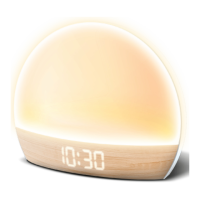

 To Next Page