Please read this user manual carefully before using the product as your smartphone’s manual
regarding the use and activation of the Bluetooth function.
Pay attention to the device safety and maintenance recommendations and for safety reasons,
keep the product out of the reach of children. Keep it in a safe place for future reference.
Safety Information
d. There are voltage zones inside this unit that can cause injuries. Please do not open the
unit. In case of technical failure, please contact the authorized service center.
e. Never place the unit in the rain or in moist zones so as to avoid a fire or an electric shock.
f. If technical maintenance is required, please contact the authorized service center.
Caution
e. Do not place the unit on an unstable surface as it may fall and break or cause damage to
people or pets.
f. Disconnect the unit from the mains before cleaning it. Do not use cleaning liquids or
sprays. Use only a soft, damp cloth.
g. To avoid possible damage to the equip ment, pl ease unplug it du ring storms or whe n it will
not be used for a long time.
h. Do not insert any object into the unit through the loading ports as this could cause a short
circuit and start a fire. Do not pour liquid on the earphone.
d.
Fully charge the built-in battery before using for the first time, which will prolong the
battery lifespan.
e.
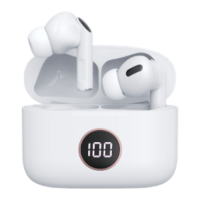
Check on LED display the battery information to see the remaining battery level when
it is turned on.
f.
Battery icon on LED Display informs about the level of the percentage of charge it has.
6.
Put the earphones inside the charge box.
7.
Connect your smartphone's power adapter 5V to charge box using USB Type C
cable (included in the pack).
8.
Verify that the charge box is charging: LED Display show the blinking charge.
If the charging box is turned off due to running out of battery, the screen will take
between 3 or 5 minutes to enter the charging state.
9.
The LED Display informs about the battery percentage. When it reaches 100%, you can
disconnect the USB Type C cable.


 To Next Page
 Loading...