EasyManua.ls Logo

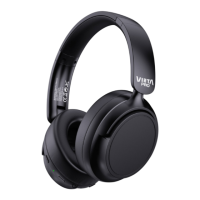
VIETA PRO SILENCE VHP-NC399 - User Manual

VIETA PRO SILENCE VHP-NC399
2 pages
Print Icon
To Next Page IconTo Next Page
Loading...
VAQ-TWS41
What’s
In The
Box
Charging
x1
QUICK
START
GUIDE
QuickStart
Guide
SILENCE
VHP-NC399
LED ON - Charging
LED OFF - Charged
Bluetooth
Connection
Connectors
Buttons
Aux Line IN
1. Hold press: Turn ON/OFF
Short Press: Play / Pause
Doble press: Voice Assistant.
1. Mantener pulsado: Encender / Apagar
Pulsación corta: Reproducir / Pausar
Doble pulsación: Voice Assistant.
2. Short press: Volume Up
Hold press: Next Song.
2. Pulsación corta: Subir Volumen
Mantener pulsado: Siguiente Canción.
3. Short press: Decrease Volume
Hold press: Previous Song.
3. Pulsación corta: Bajar Volumen
Mantener pulsado: Anterior Canción.
4. Active Noice Cancelling (ANC) ON/OFF.
4. Encender / Apagar el modo Cancelación de Ruido.
5. Indicator Light.
5. Luz indicadora.
6. Charging port.
6. Puerto de carga.
7. Aux Line IN (3.5mm Jack).
8. Microphone.
Vieta Pro
#SILENCE
x1
x1
2
3
4
5
6
7
8
1
Question and Answer IconNeed help?

Do you have a question about the VIETA PRO SILENCE VHP-NC399 and is the answer not in the manual?

Summary

Whats In The Box

Charging

Charging Indicator Lights

Displays the status of the charging process via LED indicators.

Bluetooth Connection

Connectors

Buttons

Power and Playback Controls

Manage power, play/pause, and voice assistant functions.

Volume and Track Navigation

Adjust volume and navigate between tracks.

Noise Cancelling Activation

Activate or deactivate Active Noise Cancelling (ANC) modes.

Ports and Indicators

Identifies indicator lights, charging port, and auxiliary input.

Tech Specs

VIETA PRO SILENCE VHP-NC399 Specifications

Bluetooth IconBluetooth
Bluetooth versionV5.3 JL AC6955F
Transmission distance10-15 m
Battery IconBattery
Charge box capacity800 mAh
Music + ANC ON battery life20 hours
Music + ANC OFF battery life30 hours
Music OFF + ANC ON battery life60 hours
Power IconPower
Input powerDC 5 V/ 0.4 A USB Type C
Audio IconAudio
Supported audio formatsMP2, MP3, WMA, APE, FLAC, AAC, MP4, WAV, AIFF, AIFC

Related product manuals