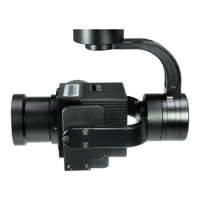
2.6 Install TF Card
2.7 Image Output Interface
11.
TF (Micro SD card): Install the TF card to the card slot (Re. 2.1
Overview). Support max 128GB. Request Class 10 (10m/s) transmis-
sion speed or higher and FAT32 or exFAT format.
HDMI: micro HDMI output, HD 1080P 60/50/30/25fps, 1080P 60fps
as default. (Optional)
SDI: SMA outer screw inner hole interface, 1080P 30fps output.
(Optional)
AV: no AV output
Network: Ethernet output interface, support RTSP/RTMP/UDP/ON-
VIF video streaming. Default: RTSP output, IP address: RTSP:
//192.168.2.119:554, output resolution: 720P (record in 1080p),
frame rate: 25fps, bit rate: 2M. (Optional)
Make sure device is power off when inserting the TF
card, hot plugging is not supported.


 To Next Page