ViewSonic VA2238w-LED/VA2238wm-LED 7
Wall Mounting (Optional) For use only with UL Listed Wall Mount Bracket
To obtain a wall-mounting kit or height adjustment base, contact ViewSonic
®
or your local
dealer. Refer to the instructions that come with the base mounting kit. To convert your LCD
display from a desk-mounted to a wall-mounted display, do the following:
Step 1. Verify that the power button is turned Off, then disconnect the power cord.
Step 2. Lay the LCD display face down on a towel or blanket.
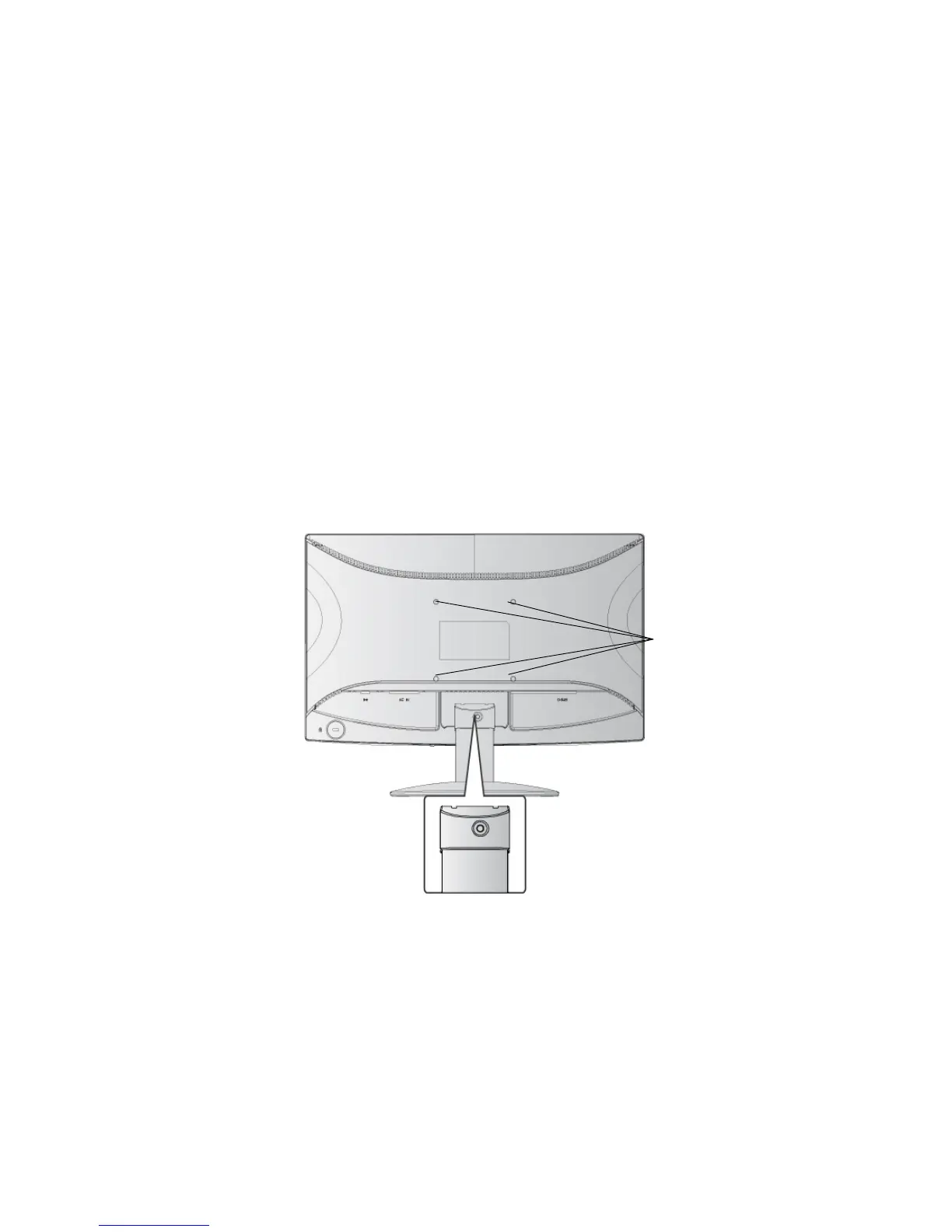
Step 3. Remove the screw attaching the base.
Step 4. Attach the mounting bracket from the VESA compatible wall mounting kit (100 mm
x 100 mm distance), using screws of correct length.
Step 5. Attach the LCD display to the wall, following the instructions in the wall-mounting
kit.
Step 4. Four VESA
screw holes
Step 3. 1 screw
attaching the base




 To Next Page