EasyManua.ls Logo

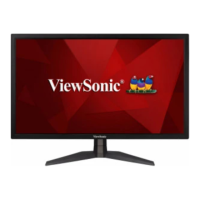
ViewSonic VX2458-P-MHD - User Manual

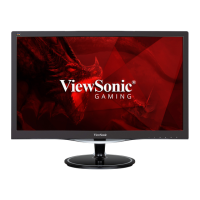
ViewSonic VX2458-P-MHD
45 pages
Print Icon
To Next Page IconTo Next Page
Loading...
VIEWSONIC
Ecran Gamer
VX2458-P-MHD

Questions and Answers

  • D
    Donald SchmidtAug 19, 2025
    How to troubleshoot a ViewSonic VX2458-P-MHD that has no power?
    • W
      William WashingtonAug 19, 2025
      First, ensure that you have turned on the ViewSonic Monitor by pressing the Power button. Next, check that the power cord is properly and securely connected to both the monitor and the power outlet. Finally, plug another electrical device into the power outlet to confirm that the outlet is supplying power.
  • J
    Joseph StantonAug 21, 2025
    What to do if ViewSonic Monitor has power but no image on screen?
    • S
      sjohnsonAug 21, 2025
      First, verify that the video cable connecting your ViewSonic Monitor to the computer is properly and securely connected. Then, adjust the brightness and contrast settings. Also, make sure the correct input source is selected.
  • L
    lthomasAug 25, 2025
    How to fix a blurred screen image on ViewSonic VX2458-P-MHD?
    • C
      Carrie DavisAug 25, 2025
      If the screen image on your ViewSonic Monitor is blurred, adjust the resolution to the correct Aspect Ratio. If the issue persists, reset the monitor to factory settings.
  • C
    Cassandra RobersonAug 27, 2025
    What causes the screen image to cut in and out on a ViewSonic VX2458-P-MHD Monitor?
    • S
      Stacy DickersonAug 27, 2025
      If the screen image on your ViewSonic Monitor cuts in and out, first ensure that the correct input source is selected. Then, check the video cable connector for bent or broken pins, as these can cause an improper connection. Also, make sure the video cable connecting the monitor to the computer is properly and securely connected.
  • A
    Allison PerezAug 28, 2025
    Why does my ViewSonic VX2458-P-MHD have wrong or abnormal colors?
    • S
      Samuel BowmanAug 28, 2025
      If your ViewSonic Monitor is displaying wrong or abnormal colors, and any colors (red, green, or blue) are missing, check the video cable to ensure it is properly and securely connected, as loose or broken pins in the cable connector could cause an improper connection. You can also connect the monitor to another computer to test it. If you have an older graphics card, contact ViewSonic® for a non-DDC adapter.
  • M
    Michelle CraigAug 30, 2025
    What to do if the external device is connected to ViewSonic Monitor, but no image appears on the screen?
    • B
      Bonnie NelsonAug 30, 2025
      If you've connected an external device to your ViewSonic Monitor but no image appears, first ensure that the power is on. Next, adjust brightness and contrast via the OSD Menu. Also, check the connecting cable and make sure it is properly and securely connected, as loose or broken pins in the cable connector could cause an improper connection.
  • C
    christineloveSep 1, 2025
    How do I fix a ViewSonic VX2458-P-MHD screen that is too light or dark?
    • A
      Andrew WilkinsonSep 1, 2025
      If the screen image on your ViewSonic Monitor is too light or dark, adjust brightness and contrast settings via the OSD Menu. If that doesn't work, reset the monitor to factory settings.
  • S
    Steven DavidSep 3, 2025
    How do I center the screen correctly on my ViewSonic Monitor?
    • T
      twelchSep 4, 2025
      If the screen isn’t centered correctly on your ViewSonic Monitor, adjust the horizontal and vertical controls via the OSD Menu. Also, check the Aspect Ratio. If that doesn't work, reset the monitor to factory settings.
  • P
    Paul BonillaSep 6, 2025
    Why is there no audio output from my ViewSonic VX2458-P-MHD Monitor?
    • S
      Sharon Perry MDSep 6, 2025
      If you're not getting any sound from your ViewSonic Monitor, and you are using ear-/headphones, ensure the mini stereo jack is properly connected. Also, make sure the volume is not muted or set to 0. Finally, check the Audio Input setting.
  • R
    Renee OrtegaSep 8, 2025
    Why are USB devices not working when connected to my ViewSonic VX2458-P-MHD?
    • J
      josebradfordSep 8, 2025
      If USB devices connected to your ViewSonic Monitor aren't working, first make sure the USB cable is connected properly. If applicable, try changing to another USB port. If some USB devices require a higher electric current, connect the device directly to the computer.

ViewSonic VX2458-P-MHD Specifications

General IconGeneral
Screen Size24 inches
Refresh Rate144 Hz
Panel TypeVA
Brightness250 cd/m²
Contrast Ratio3000:1
Aspect Ratio16:9
Color Support16.7 million colors
VESA Mount100 x 100 mm
Resolution1920 x 1080
Response Time1 ms
ConnectivityHDMI, DisplayPort
Viewing Angle178° horizontal / 178° vertical
Ports1 x HDMI 1.4, 1 x DisplayPort 1.2, 1 x VGA

Related product manuals