B. Programming Desired Features (after accessing Programming Mode above)
Select the Feature: Momentarily touch the Green (Control) wire to the Black (-) wire 1 to 10 times to select which
feature to program (see Programming Features List, section C). The strobe should momentarily flash each time
the Green (Control) wire has touched the Black (-) wire.
Features 1-3 & 6-10: After selecting Programming Features 1-3 or 6-10, wait 3 seconds and the strobe should
flash 2 times indicating that feature has been programmed. You can now exit programming or move on to pro-
gramming the Beacon or Strobe brightness settings.
Setting Strobe Brightness (factory set to 6/Brightest): After selecting Programming Feature 4 (Strobe Bright-
ness), wait 3 seconds and the strobe should begin flashing in the preprogrammed flash pattern. Touch and hold
the Green (Control) wire to the Black (-) wire. The SL-2 will begin flashing the strobe cycling through 6 different
brightness settings from lowest to highest. When the SL-2 flashes at the desired brightness level immediately re-
move the Green wire from the Black. The SL-2 should flash twice indicating the selected brightness level has
been set.
Setting Beacon Brightness (Factory set to 6/Brightest): After selecting Programming Feature 5 (Beacon Bright-
ness), wait 3 seconds and the beacon will light at its preprogrammed beacon brightness setting. Touch and hold
the Green (Control) wire to the Black (-) wire. The SL-2 will begin stepping through 6 different beacon brightness
settings from lowest to highest. When the SL-2 lights at the desired beacon brightness level immediately remove
the Green wire from the Black. The SL-2 should flash twice indicating the selected brightness level has been set.
Exiting Programming: To exit programming simply wait 20 seconds from the last programming command and
the unit will flash 3 times. This indicates the SL-2 has exited the programming mode and is now in the Run mode.
Note: To eliminate waiting 20 seconds, you can also exit programming after the last programming command by
touching and holding the Green (Control) wire to the Black (-) for 3 seconds. The strobe will flash 3 times indicating
the unit has exited the programming mode and is now in the Run mode.
A. Accessing the Programming Mode
(Optional, the SL-2 is factory programmed to the Beacon/Strobe Mode and brightest Beacon/Strobe settings).
Step 1. Apply 10-15 VDC power to the Red (+) and Black (-) wires.
Step 2.
Touch and hold the Green (Control) wire to the Black (-) wire for 3 seconds. The strobe should flash
twice. You are now in Programming mode. Note: Once in the programming mode, if a programming
command has not been entered for 20 seconds the strobe will flash 3 times indicating the unit has
exited programming and returned to the Run Mode.
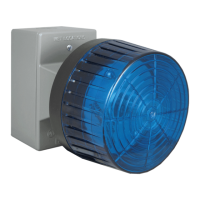
Programming the SL-2 Strobe / Beacon
The SL-2 can be user programmed as a Beacon only, Strobe only or Beacon/Strobe. The brightness setting can be
programmed separately for the Strobe or Beacon and one of 4 different Flash Patterns can be programmed for the
Strobe (See Strobe Flash Patterns, section D). Note: The SL-2 is factory default programmed as a steady on beacon
with a single flash strobe when activated. The beacon and strobe are set to their brightest settings. All programming
should be done prior to connecting to the BLK-4 control module.
6


 To Next Page
 Loading...