Background
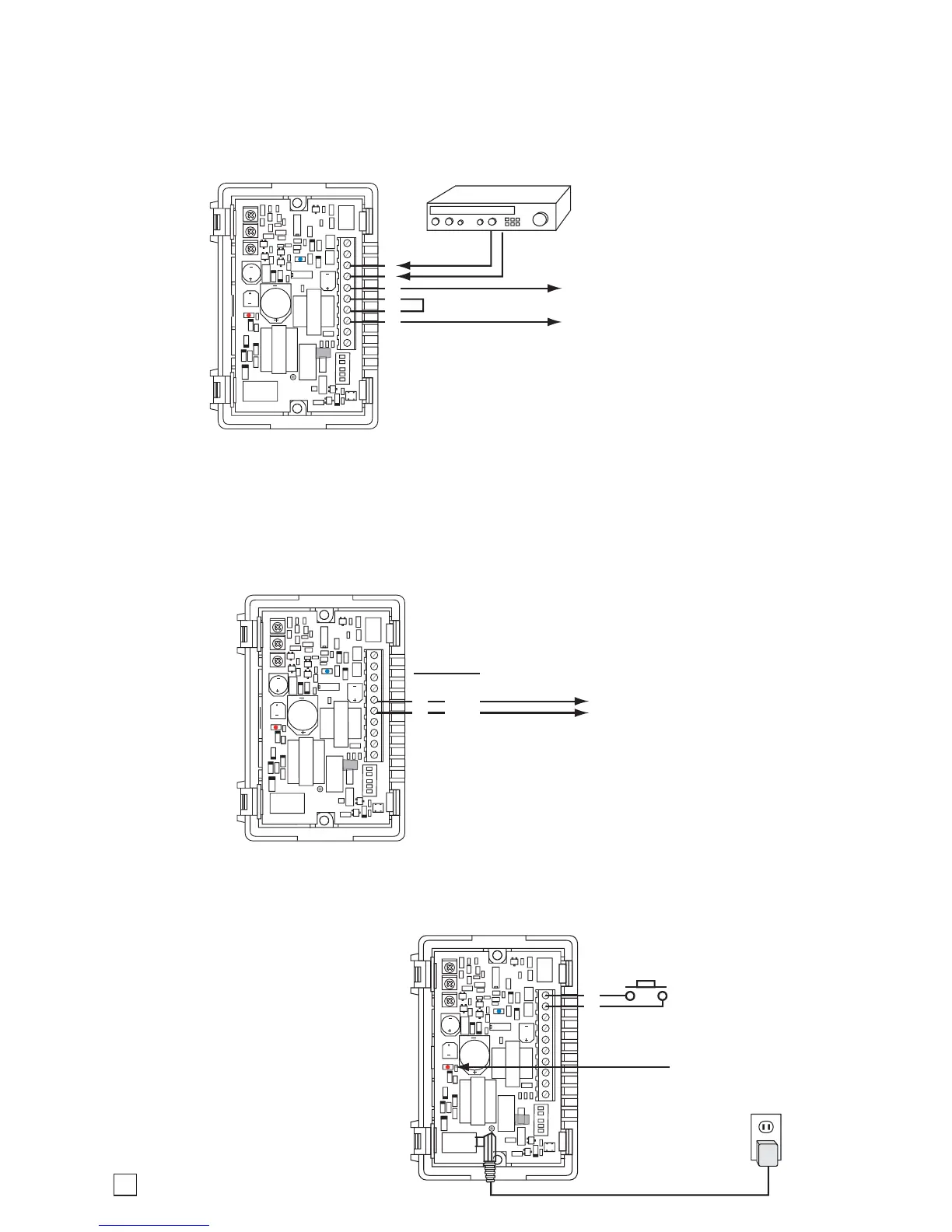
Music Source
(not included)
To Paging Amplifier: Floating
600 Ohm output. Connect to
input of paging amplifier.
Internal View of the FXI-1A
8
7
6
5
4
3
To Paging Amplifier’s
Page Trigger Input
Relay
Contacts
Internal View of the FXI-1A
7
6
5
N.C.
COM
N.O.
Internal View of the FXI-1A
Red power LED
must be ON
10
9
Phone System N.O.
Ring Contact Closure
12V DC Adapter
(provided)
If there is not a background music input on the paging amplifier, the FXI-1A relay contacts can be
used as shown below to add a background music source. This application works with all paging
input types (FXS, FXO, and VOX), and the music is suppressed during paging.
If the FXI-1A relay contacts are not being used for adding background music (as shown above),
they can be used as a page trigger. Connect the common and normally open contacts to the paging
amplifier’s Page Trigger input. The contacts will provide a contact closure when paging is active.
If the phone system provides a
“Night Bell” contact closure output,
it can be connected as shown
below. The FXI-1A will produce a
loud ringing warble tone on contact
closure. Not compatible with FSX
(Ring Trip) Mode. See Operation
section D for more details.


 To Next Page