1. BEFORE FIRST USE
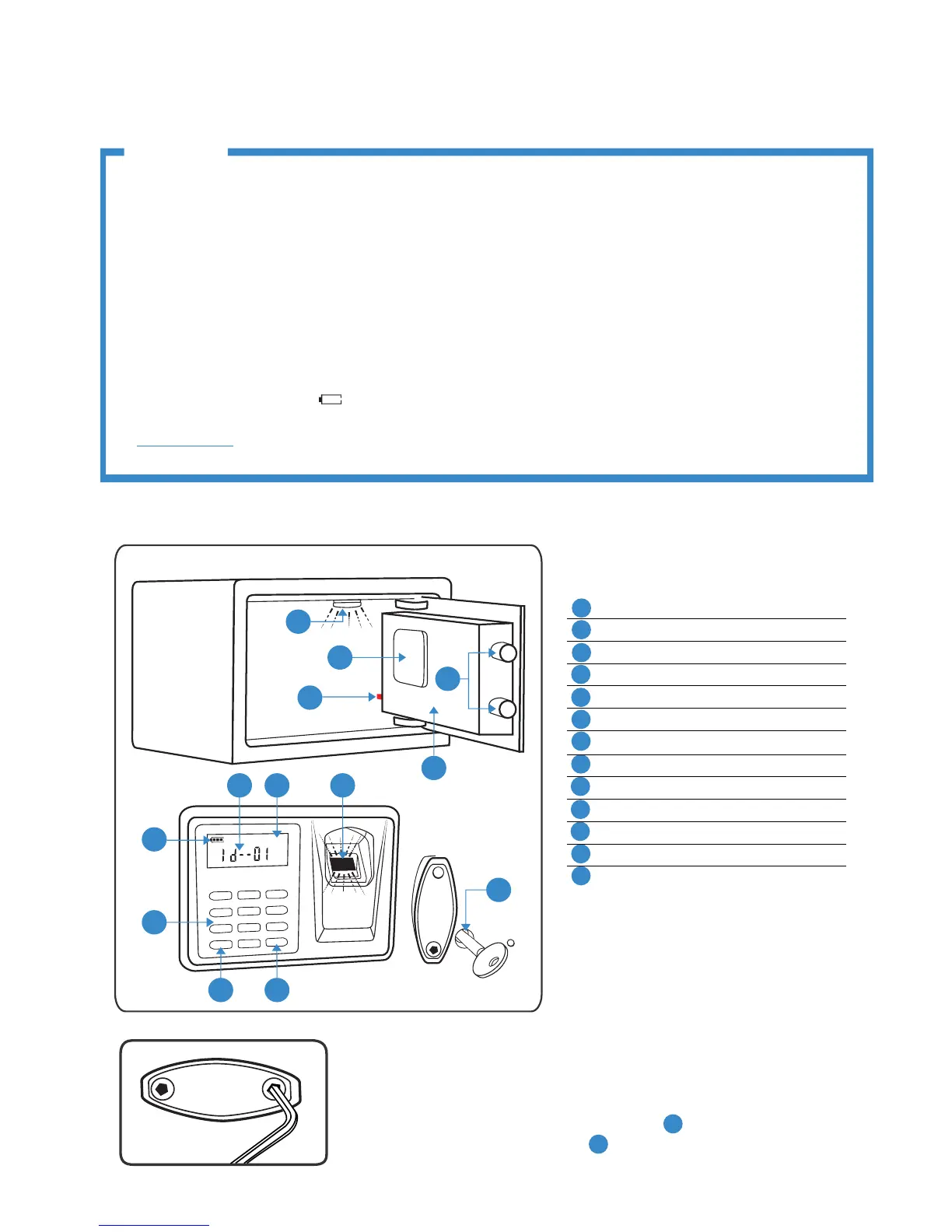
1.1. Unlock the safe with key. Keyhole is located under the Logo Plate. Remove
using Allen Key.
1.2. Install 4 AA batteries in battery compartment
B .
1.3. Install 2 AA batteries in LED light
D (see point 9 for instructions).
VIKING SECURITY SAFE
USER'S MANUAL
IMPORTANT
• Operational sounds can be switched ON and OFF. However, Warning Beep sounds if safe is left UNLOCKED
for longer than 1 minute.
• If the safe is in lock state, locking bars sticking out, Red Button (A) is NOT functional. You cannot erase
ngerprint data, program the safe nor do any operation.
• Remember to program the same ngerprint in multiple positions.
• Remember to register new PIN code, so safe can no longer be open with factory default PIN “1234”
• If safe is reset to factory default mode, any ngerprint and default PIN code can open the safe.
• Test with non-registered ngerprints and PIN code. If safe opens, the safe is still in factory default mode.
• Time Out Period locks the safe for 2 minutes if multiple incorrect PIN codes or ngerprints are input. LCD
displays “HOLD-Err”.
• Test the keys and store them in a secure place, NOT inside of the safe.
• When the screen shows " ", please change the battery. All registered ngerprints and PIN will be
saved.
DISCLAIMER: Not recommend for age groups 55 and above. Due to thinning ngerprints ALL ngerprint
readers will lose accuracy with increasing age.
GENERAL DESCRIPTION
A
Initialization/Reset Red Button
B
Battery Compartment
C
Locking Bars
D
LED light
E
Motorized Door
F
Fingerprint Scanner
G
LCD display
H
Data Count Indicator
I
Battery Indicator
J
Key Pad
K
Star Button (*)
L
Pre-Scan Pound Button (#)
M
Logo Plate and Key Access
VIKING
page 2/4
www.vikingsecuritysafe.com | vikingsecuritysafes@live.com | 650-539-9482


 To Next Page
 Loading...