Lens release lever
EF-S Lens mount index
EF Lens mount index
Camera lens mount index
Contacts (camera side)
Contacts (lens side)
Tripod mount socket
Tripod mount screw
Tripod mount knob
Tripod socket
Certification/
Regulatory logos
Thank you for purchasing a Viltrox product.
The Lens Mount Adapter EF-EOS M is designed to allow Canon EF
serieslenes to be used with EF-M lens compatible interchangeable-
lens digital cameras lenses.Before using this adapter, please make
sure that the camera and the lens is compatible.
*1 Does not include EF-M lenses or CN-E lenses (EF Cinema Lenses).
◎ This adapter is connected to the lens and also affect the performance
of the lens.
1 .
on the lens.
2. Please use the switch on the lens to set the lens function. If the settings
in the camera menu and set on the lens, and is subject to the settings on
the lens.
3. When you use the lens is much heavier than the camera, be sure to
move the camera and shoot holding the lens. Will increase the minimum
focusing distance of the lens adapter is connected, so the maximum
magnification and field of view may change.
It will not affect the performance of lens after seting the adapter ring
1.Attach the included tripod mount to the adapter by firmly turning the
tripod mount knob.
Please make sure that the tripod mount is facing in the correct direction
in relation to the adapter.
2. Attach the tripod using the tripod mount socket.
Securely attach the tripod while firmly hoding the adapter.
The size and weight listed are for the adapter only.All data listed is measured according to Viltrox standards.
Specifications subject to change without notice.For more information, please visit www.viltrox.com
-
Mount Adapter EF EOS
Instructions
M
User manual
When using a tripod with EF lenses that are equipped with a tripod mount, such as
super telephoto lenses,please be sure to use it to mount the lens to the tripod.
① ② ③
④ ⑤
Compatible lenses:
Compatible cameras:
Front mount:
Rear mount:
Tripod Socket:
Max.Diameter and Length:
Weight:
Front Cap:
Rear Cap:
JYC Technology(HK)Co.,Ltd.
10
N118
EF series lenses (Does not include EF-M
lenses or CN-E lenses)
◎
Detaching
Procedures
◎ Mounting Procedures
1. Turn the camera OFF,and detach teh adapter from the camera while
the EF lens is still attached to it.
Turn the adapter counter clockwise the while pressing the camera's
lens release button.(fig. )
Detach the adapter once it has stopped turning.
Interchangeable-lens digital cameras that
are compatible with Canon EF-M lenses
Canon EF mount compliant
Canon EF-M Mount compliant
Cu1/4×1
66.6×26 mm
Approx. 119 g
Camera Cover
Lens Dust Cap
①
②
③
④
⑤
Nomenclature
Attention
Specifications
Attaching the tripod mount
Mounting and Detaching the Adapter
2. Mount the adapter to the camera.
Insert the adapter into the camera by aligning the EF-M lens mount
index found on the adapter (white circle) with the same mark found
on the camera,and turn the adapter counter clockwise until you
hear a click.(fig. )
1.Attach the EF lens to the EF mount side of the adapter.
Insert the lens into the adapter by aligning the mount index found
on the EF lens (red circle) with the same mark found on the adapter,
and turn the EF lens clockwise until you hear a click.(fig. )
When attaching an EF-S mount index marks (white squares) and turn
the lens clockwise.(fig. )
2. Detach the EF lens from the adapter.
Turn the EF lens counter clockwise while pushing the lens release
lever found on the adapter.(fig. )
Detach the EF lens once it has stopped turning.
3. Precautions when using this adapter with a tripod
When shooting with a tripod,do not use the camera’s tripod mount
socket while the adapter is attached.Be sure to use the tripod
mount included with the adapter.

 Need help?
 General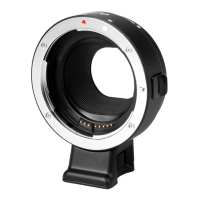

 To Next Page