23
EN
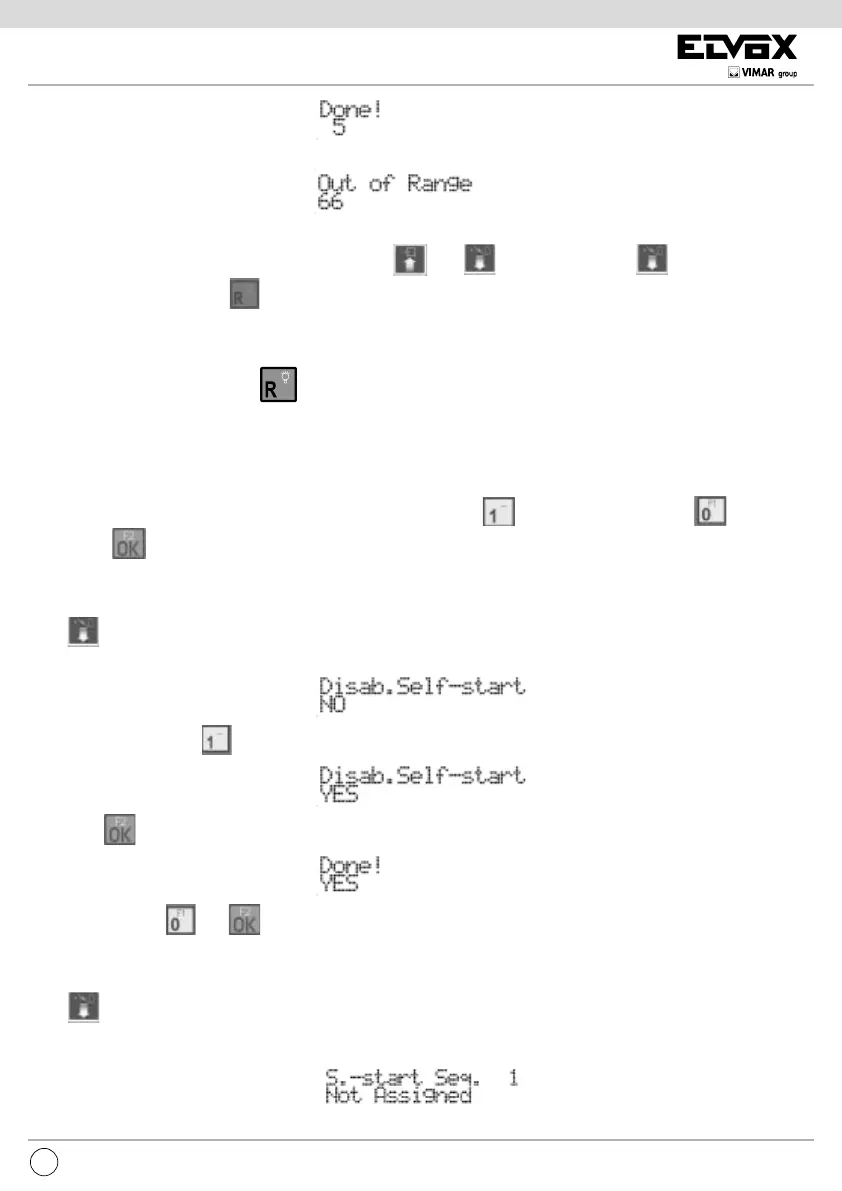
If the ID is outside the limit, the rst line of the display will signal the incongruity:
To cancel the assignment, enter 0 for the ID.
It is possible to move from one index to another also by using
and .From position 1, press to move to the next item
of the programming menu. Press
to move quickly, skipping all the intermediate steps, to the previous item of the programming
menu.
Entering numbers between 21 and 36, then the programmed object will not be an electronic unit, but an operator or relay module.
Number 21 identies the 1st relay of the 1st operator. Unlike the lock, F1 or F2, operators are not governed by any kind of disabling, as
described under heading “ENABLING
(Dis)Abilitazioni
12 34
12 34
12 34
12 34
12 34
12 34
12 34
12 34
12 34
12 34
12 34
12 34
12 34
12 34
12 34
12 34
NON ASSEGNATO
1234
ID TARGA
ON
NON VALIDO
ON 2
ON ON
3
ON
4
ON ON 5
ON ON 6
ON ON ON 7
DIP SWITCH
8
1234
ID TARGA
ON 9
ON 10
ON ON 11
ON 12
ON ON
13
ON ON 14
ON ON ON 15
DIP SWITCH
ON
ON
ON
ON
ON
ON
ON
ON
Italiano
(Lingua locale)
Lingua
DIP SWITCHDEFAULT
VOCE
SUCCESSIVA
VOCE
PRECEDENTE
SOTTO
VOCE
Numero cifre
codifica
Numero iniziale
Numero finale
Numerazione
dispositivi
Numero cicli
suoneria
Serratura
comune
F1
comune
F2
comune
8
Vuoto
Vuoto
Vuota
Vuota
2
Vuota
Vuota
Vuota
200 xO
204 xO
4 xO
4 xO
4 xO
+
D
On\Off
+
D
+
D
+
D
+
D
+
D
+
D
+
D
+
D
+
D
+
D
Select Function:
Terminal Mode
Entering
Terminal Mode
Program. 69DM OK
GG/MM/AA SW 000
Entering
Terminal Mode
Lingua Messaggi
Italiano
Lingua Messaggi
Inglese
Done !
Inglese
Messag. Language
English
N. Cifre Codifica
Codifica 8 Cifre
Fatto !
Codifica Sequen.
N. Cifre Codifica
Codifica 4 Cifre
Numero Iniziale
.... ..... ..... ....
Numero Iniziale
Numero Iniziale
1234567....
Controlla Altro
12345678
Numero Finale
Numero Iniziale
1234567 .....
Controlla Altro
12345677
Numeraz. Disp 1
Numeraz. Disp . 45
1500
Fuori limite
888
Numeraz. Disp . 45
0.... .....
Fatto !
0 .......
Numeraz. Disp . 45
789...
Numeraz. Disp . 45
0000
Numeraz. Disp . 45
7856
Numeraz. Disp . 45
78....
Codice 7856
usato d a 99
Fatto !
7856
1= Reset Numeraz.
SI
Digita ID disp.
45
Numeraz. Disp . 45
........
Attendere . . .
Fatto !
Attendere . . .
N. Cicli Suoner.
1
N. Cicli Suoner.
5
Fatto !
5
Serratura Com. 1
5
Fatto !
5
Fuori limite
66
F1 Comune 1
Non Assegnato
F1 Comune 1
5
Fatto !
5
Fuori limite
66
F2 Comune 1
Non Assegnato
F2 Comune 1
5
Fatto !
5
Fuori limite
66
( Dis ) Abilit . 1
- - - - - - - -
Digita ID disp.
5
( Dis ) Abilit . 5
Se - - - - -
( Dis ) Ab. per 5
Se - - - - -
( Dis ) Ab. per 5
- - F1 - -
Fatto !
- - F1 - -
Serratura
PROGRAMMAZIONE DEFAULTTASTO
F1
F2
F1
F2
Se
6
SERIGRAFIA DESCRIZIONE
8
9
Linea dati
5
M
V
Linea fonica
Massa dati / fonica
N.C.
Massa video
Video, anima cavo coassiale
CN5 MORSETTIERA LATO DIGIBUS
B1
SERIGRAFIA DESCRIZIONE
B2
~
Bus DUE FILI ELVOX
~
12
M
Bus DUE FILI ELVOX
Eventuale alimentazione ausiliaria,
che può essere sia continua
(per esempio da art. 6923)
che alternata (circa 20Vc.a.
+12 max 100mA sempre presente
Massa riferimento di 12 e +C
CN1 MORSETTIERA LATO DUE FILI ELVOX
+C
+12V max 100mA presente solo
quando l’interfaccia e attiva
”. For display purposes, entrance panels have a letter “P” prex, and operators a letter
“A”.
DISABLE SLAVE PANEL SEARCH
This parameter is present only if the entrance panel is the Master. It can be used to disable the search for Slave electronic units via the
Master electronic unit, on start-up or after pressing the RESET button. Press
to deactivate the search, and to activate the
search. Press
to confirm the change.
SELF-INSERTION / SELF-START DISABLING
Press to move to the next item by which the main speech unit can be congured so as not to perform the self-insertion / self-start
function at the system level. By default the function is on, do disabling is NO:
To activate the setting, press :
Followed by :
To deactivate it, press and .
SELF-INSERTION / SELF-START SEQUENCE
Press to move to the next item by which you can program the self-insertion / self-start sequence of the speech units, interphone
by interphone. By default there is no sequence and so only the MASTER speech unit is used. The item appears only if the programmer
is connected to a MASTER speech unit, otherwise you move to the next function.


 To Next Page
 Loading...