24
EN
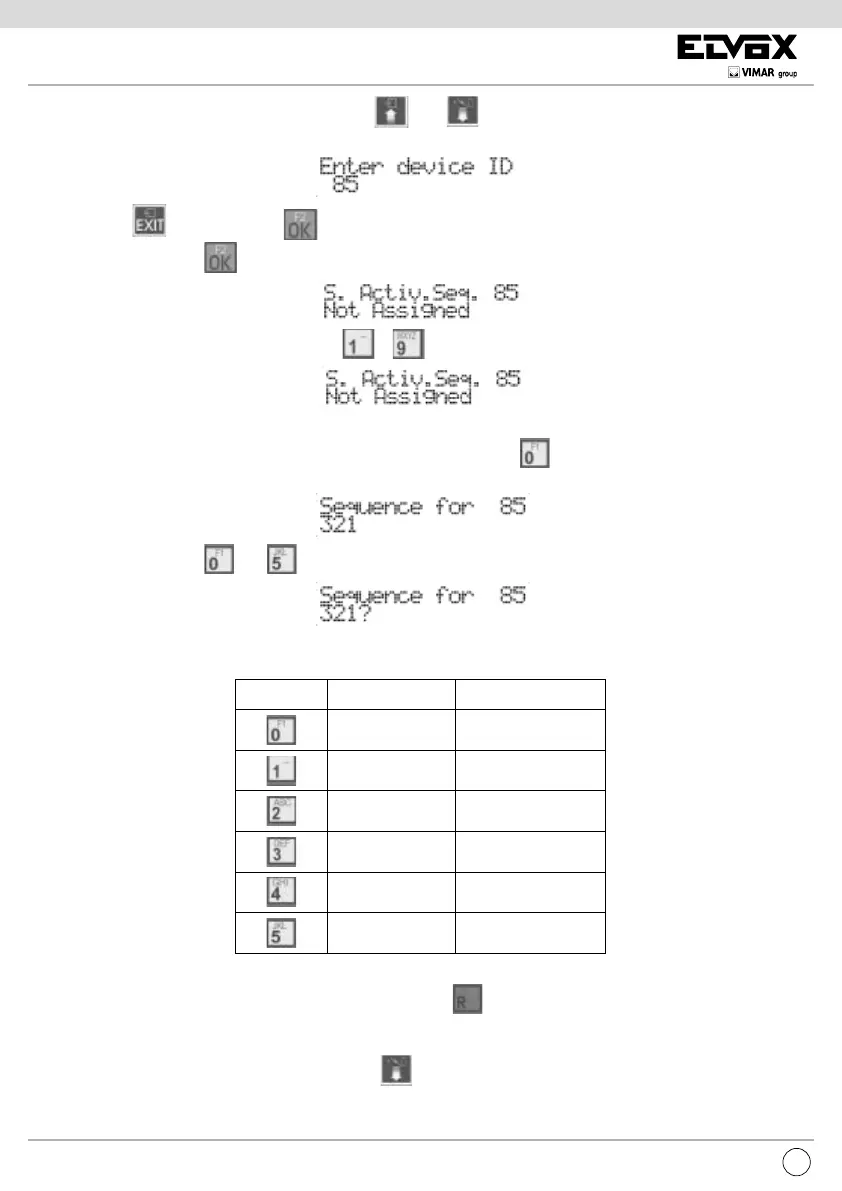
To change the ID of the interphone/monitor press buttons and . Otherwise, enter the number of the interphone/monitor,
from 1 to 200:
To cancel, press . To conrm, press . To change the sequence of the selected interphone/monitor, starting from where the
current value is shown, press
.
To specify the sequence of entrance panels, use the .. buttons for the rst 9 entrance panels.
For panels with ID greater than 9, a prex mechanism is used with the aid of button . Press it a rst time, in place of a digit the ‘?’
symbol appears
Now, press a button between and so as to form the ID between 10 and 15
.
Given that only one location is used on the display to show these values, the letters A to F are used, according to the following table:
BUTTON ID LETTER LETTER
10 A
11 B
12 C
13 D
14 E
15 F
The last ID present in the sequence can be cancelled by means of the key . IDs may be duplicated within a sequence. The maximum
limit is 15 per interphone/monitor.
To help compose equal sequences, for this programming there is the concept of “notebook” or “clipboard”. During editing mode, and when
there is no ‘?’ symbol displayed, if the user presses the key
, the sequence shown on display is copied into a temporary memory
zone.



 To Next Page