EasyManua.ls Logo

Virtual Reality VRCD500-SDU - User Manual

Default Icon
24 pages
Print Icon
To Next Page IconTo Next Page
Loading...
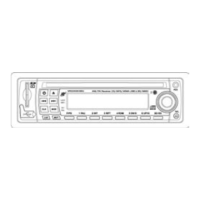
VRCD500-SDU
AM/FM Receiver, CD/MP3/WMA Player with
SD Card Slot, USB Port, Aux In, & Detachable Face
AM/FM MPX STEREO
• MP3 / WMA WITH ID3 DISPLAY
• F/PS MEMORY CONTROL
AUTO SEEK UP / DOWN
• FM STEREO / MONO
• 30 PRESET MEMORY
• VOL/ BAS / TRE / BAL / FAD
AUTO CD PLAY / RADIO
• LOUDNESS CONTROL
• MUTE SOUND CONTROL
• USB PORT
• SD CARD SLOT
• WIRE HARNESS ON PLUG
• DIGITAL LCD DISPLAY
DUAL CHANNEL LEVEL METER
• TIME CLOCK DISPLAY
• PRESET EQ (POP, ROCK,
FLAT, CLASSIC)
• BUILT IN NOISE FILTER
• BUILT IN RCA OUTPUT
• SUBWOOFER OUTPUT
• AUXILIARY INPUT
• AUTO ANTENNA ACTIVATOR
• INFRA RED REMOTE CONTROL
OWNER’S MANUAL

Questions and Answers

  • L
    Lisa RodriguezAug 13, 2025
    How to troubleshoot no power on Virtual Reality VRCD500-SDU?
    • L
      Leslie WilsonAug 13, 2025
      If your Virtual Reality Car Receiver has no power, check the wiring connections and ensure they are secure. Also, check the fuse and replace it if it's blown, using the correct rating/size fuse.
  • M
    Mrs. Cheryl JohnstonAug 16, 2025
    What to do if Virtual Reality VRCD500-SDU is unable to receive stations?
    • R
      Rhonda YoungAug 16, 2025
      If your Virtual Reality Car Receiver is unable to receive stations, check and make sure the antenna is connected properly.
  • S
    Sarah BarnettAug 20, 2025
    Why is the radio reception poor on my Virtual Reality Car Receiver?
    • J
      Jack AndersonAug 21, 2025
      Poor radio reception on your Virtual Reality Car Receiver can be due to several antenna-related issues. Check that the antenna is the correct length and not broken. If it is broken, replace it. Also, ensure the antenna is properly grounded at the mounting location.
  • J
    Julie KramerAug 25, 2025
    What causes songs to keep skipping on Virtual Reality VRCD500-SDU?
    • D
      Debbie WheelerAug 25, 2025
      If songs keep skipping on your Virtual Reality Car Receiver, the CD may be dirty or damaged.
  • A
    Angela MejiaAug 27, 2025
    Why MP3/WMA files on USB/SD flash memory do not play on Virtual Reality Car Receiver?
    • Z
      zsotoAug 27, 2025
      If MP3/WMA files on your USB/SD flash memory do not play on the Virtual Reality Car Receiver, it could be due to a few reasons. First, the flash memory might be formatted as NTSC; format it as FAT or FAT32. Second, the files may have Digital Rights Management (DRM), and this unit is not DRM compatible. This often happens if the files were purchased online.
  • A
    Angela BergerAug 31, 2025
    What to do if errors occur in the LCD or buttons don't function on Virtual Reality Car Receiver?
    • D
      Dillon WalshSep 1, 2025
      If you are experiencing errors on the LCD or the buttons are not functioning on your Virtual Reality Car Receiver, press the RESET Button.
  • T
    Taylor FrazierSep 4, 2025
    What to do if CD can't be loaded into Virtual Reality VRCD500-SDU Car Receiver?
    • E
      Eric SmithSep 4, 2025
      If a CD can't be loaded into your Virtual Reality Car Receiver, it could be because the transport screws have not been removed or a CD is already loaded in the player. Try ejecting the CD.
  • S
    Sandra WhitakerSep 8, 2025
    Why do I hear multiple files playing at the same time on Virtual Reality Car Receiver?
    • F
      Frank EllisonSep 8, 2025
      If you hear multiple files playing at the same time on your Virtual Reality Car Receiver, it might be because you have both types of memory connected to the unit simultaneously.

Summary

Precautions and Disc Care

Installation Notes

Pre-Installation Steps

Remove Existing Head Unit

Procedure for removing the existing car stereo unit from the dashboard.

Mark Speaker Wire Polarity

Steps to identify and mark speaker wire polarity for correct installation.

Installation Methods

DIN Front Mount Installation Guide

Instructions for installing the unit using the DIN front-mount method.

DIN Rear Mount Installation Guide

Instructions for installing the unit using the DIN rear-mount method.

Wiring Connections Diagram

Diagram and explanation of electrical connections for the car stereo unit.

Remote Control Usage

Remote Control Operation

Guidance on how to operate the remote control effectively and safely.

Basic Operation

Audio Controls

Adjusting volume, loudness, bass, treble, balance, fader, and subwoofer settings.

Radio Tuning and Features

CD Playback Operations

MP3;WMA Operation

MP3;WMA CD Playback

Basic playback functions for MP3/WMA CDs including insert/eject, play/pause, repeat, random.

MP3;WMA File Search Modes

Utilizing various search modes to find specific MP3/WMA files.

USB Drive Operation

USB Drive Basic Playback

Basic playback functions for files from a USB drive including play/pause, repeat, random.

SD Card Operation

SD Card Basic Playback

Basic playback functions for files from an SD card including play/pause, repeat, random.

Troubleshooting Common Issues

Virtual Reality VRCD500-SDU Specifications

General IconGeneral
BrandVirtual Reality
ModelVRCD500-SDU
CategoryCar Receiver
LanguageEnglish

Related product manuals