We make audio lovers audiophiles.
TM
Better Sound by Design.
TM
Virtue ONE & TWO Owner’s Manual
http://www.virtueaudio.com Page 5 of 11
Plug in audio inputs and outputs
Plug in audio inputs and outputsPlug in audio inputs and outputs
Plug in audio inputs and outputs
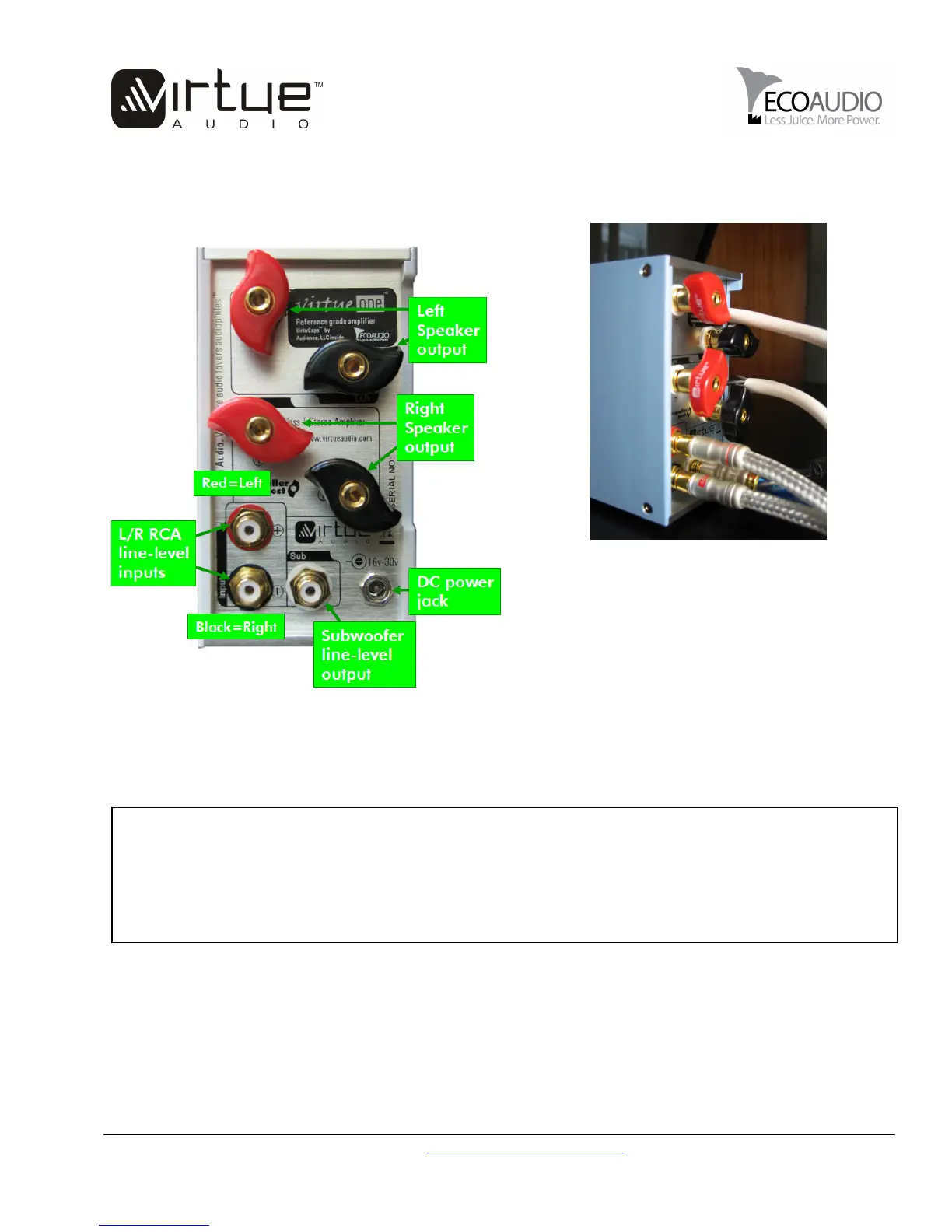
The following diagram shows how the unit is configured for stereo (2 channel) play.
For use as a mono
For use as a monoFor use as a mono
For use as a mono-
--
-block amplifier
block amplifierblock amplifier
block amplifier, simply
use one channel of the amplifier (left or
right). The unit will automatically dedicate
all available current to the channel you
choose: left, right or both (if both channels
are attached). That’s it.
Connect your audio source to the L/R RCA input connectors. Your CD/DVD player, DAC, MP3 player, tuner,
TV audio, preamp, and other inputs can be connected here. The unit supports high level inputs such as MP3
players on maximum volume.
WARNING
WARNINGWARNING
WARNING
o NOT connect
o NOT connect o NOT connect
o NOT connect
the high
the highthe high
the high-
--
-level
level level
level speaker outputs to your sub
speaker outputs to your subspeaker outputs to your sub
speaker outputs to your sub-
--
-woofer high
woofer highwoofer high
woofer high-
--
-level inputs
level inputslevel inputs
level inputs
and use the subwoofer amp to cross-
over the high and low frequencies. With Tripath™ amps such as this one, there is a decent chance that
your subwoofer amplifier will bridge the amp’s speaker outputs, blowing up your Virtue amp. If you want
to prevent low frequencies from reaching your main speakers, follow the instructions below about changing
the main input capacitors.


 To Next Page
 Loading...