EN - 9
User Manual
3.1 THE MAIN MENU
The Main Menu contains several lower-level menus with all the settings of the instrument, divided into
groups.
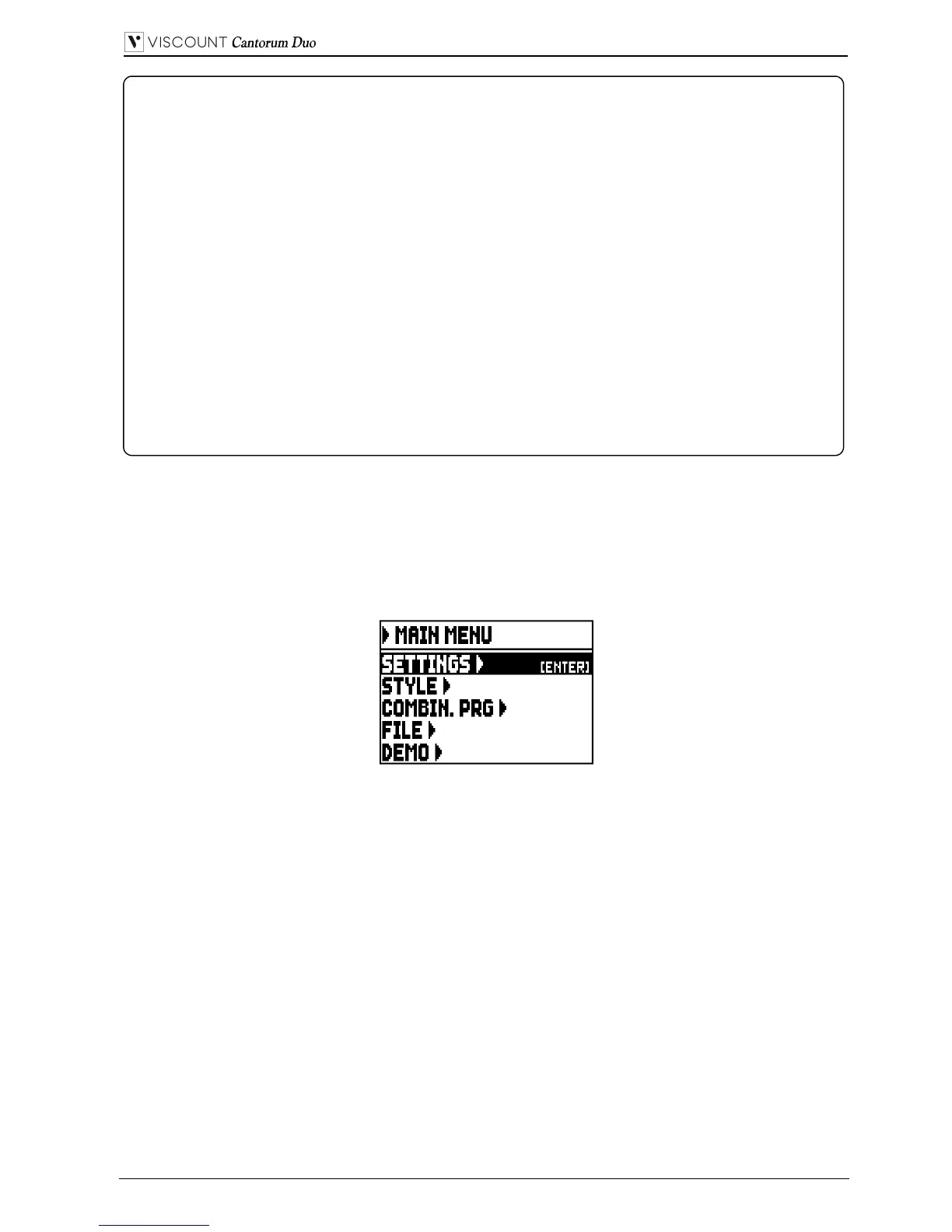
Select the MAIN MENU field from the main video page. This page will appear:
As in the main video page the cursor is represented by the field with inverted colours. To move it, press
the buttons [FIELD ] and [FIELD ].
Here and in all the following video pages, some fields are used to access different pages. Select one of
these fields and press the [ENTER] button to access the corresponding page; when these fields are
selected, the name of the button appears on the right side of the field. Instead, when a field represents a
parameter that can be adjusted, the display shows the current value. To adjust a value, press the buttons
[VALUE +] and [VALUE -].
The fields of the MAIN MENU allow access to the following functions:
o SETTINGS: general instrument settings, equalizers, MIDI interface settings, audio outputs settings
(rear panel), factory settings reset and operating system update. These functions are described in
chapter 5.
o STYLE: program organ Styles. This function is described in chap. 6.
o COMBIN. PRG (Combination Program Change): add Program Change and Bank Select MIDI
messages to combinations. This function is described in chap. 5.8.
o FILE: save and load files to and from an USB drive. Settings, Styles and combinations can be saved to
an external memory, the procedure is explained in chapter 7.
o DEMO: the instrument plays a demo song. This function is described in par. 10.1.
NOTES
- When the instrument is switched on, its transposition value is set to zero.
- Transposition does not have any effect on playback of songs with the internal sequencer
(unlike recording, where the notes are acquired with the current transposition). A specific
transposer is provided for this purpose (see chapt. 8).
- If after the power on the system displays the error message “OP.SYS FAILURE PLEASE
INSERT USB PEN WITH RELEASE FILE”, please insert the USB drive with the udpate
file in the [USB] connector under the manuals, then press [ENTER] and execute the update as
described in the par. 5.12.
- If after the power on the system displays the error message “RELESE CHECKSUM
ERROR”, contact the technical support at service@viscount.it reporting the error type as it
appears on the second line (SYSTEM or MODEL) and the numbers in the “M:”, “V:”, “S:”
and “Release” fields. You will receive the files and information necessary to restore the
instrument.
- At power up, if you see the message "PERIPHERALS UPDATE REQUESTED", press
[ENTER] to perform the required operations to complete the update. If the message was
displayed again contact the technical support at service@viscount.it, specifying the
information displayed.


 To Next Page