EN - 15
User Manual
containing the following fields:
o CHANNELS: set up the receiving and transmitting MIDI channels.
o FILTERS: set up the MIDI filters for data reception and transmission.
o NOTES TO COUPL. (Note to Couplers): this control allows to select the notes to send through
MIDI. By selecting YES and playing, for example, on the first manual with the II/I coupler switched
on, the notes are transmitted on both channels of the Manual I and Manual II sections.
Select NO to send only the notes physically played (in this example, notes will be transmitted only on
the Manual I channel).
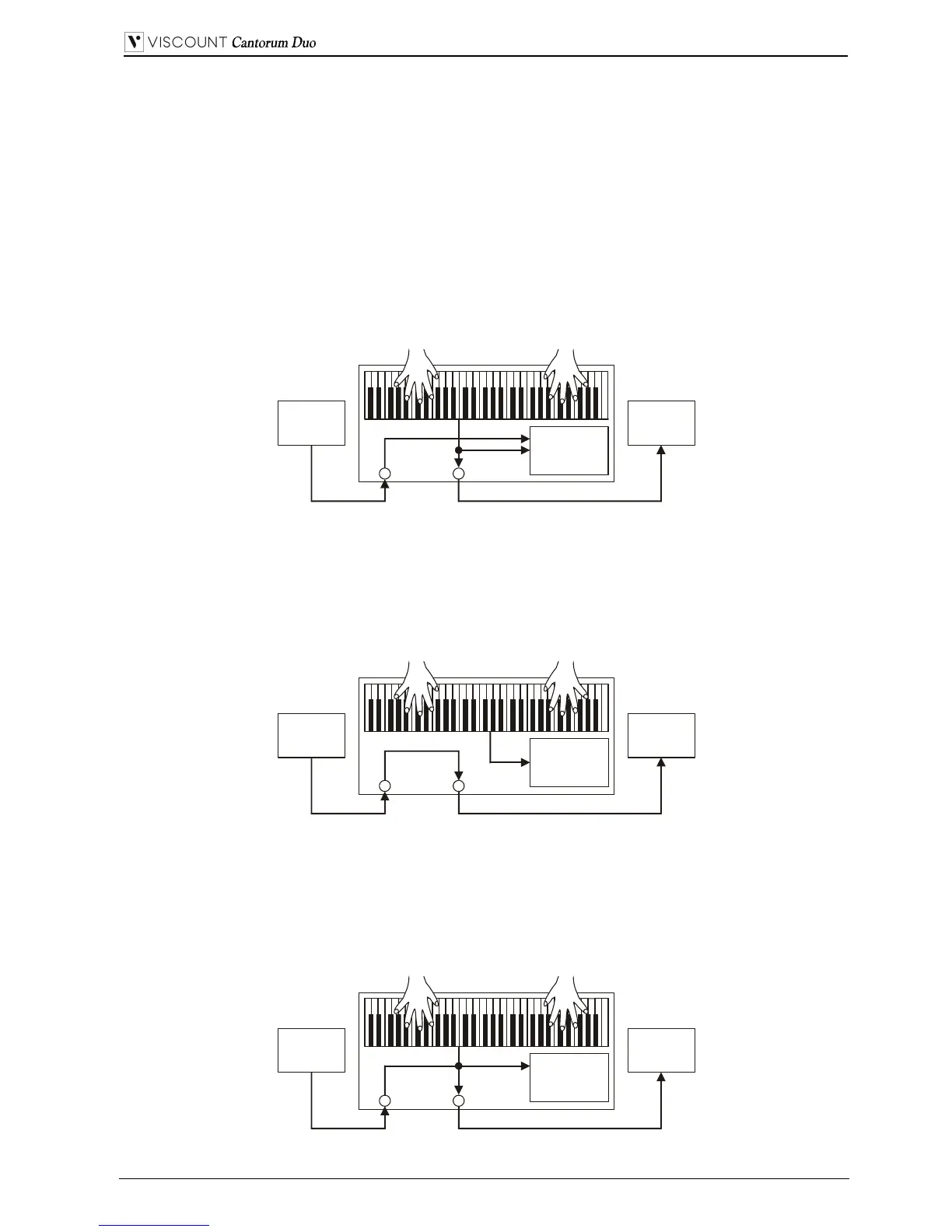
o OUT MODE: select the operating mode of the [MIDI OUT] port. The following modes can be
selected:
- OUT: standard operating mode, MIDI data is transmitted after the organ senses an action (e.g.
when keys are played, stops selected, volume and expression pedal used, combinations recalled
etc...).
- THRU: the [MIDI OUT] port transmits only MIDI data received by the [MIDI IN] port and
does not transmit any data about the actions applied on the organ. Use this option when the organ
is part of a MIDI system; the instrument connected to the MIDI output of the organ does not
respond to any action applied to the Cantorum Duo itself, but only receives the data from the
instrument sending data to the Cantorum Duo [MIDI IN] port.
- OUT+THRU: the [MIDI OUT] port transmits MIDI data about actions applied to the organ,
and the data received through the [MIDI IN] port.
Use this function when the organ is part of a MIDI system; the receiving instrument will respond
to data generated by the Cantorum Duo and also to data from the instrument connected to the
[MIDI IN] port.
Sound
generator
[MIDI IN] [MIDI OUT]
Cantorum Duo
MIDI
player
MIDI OUT
Expander
MIDI IN
Sound
generator
[MIDI IN] [MIDI OUT]
Cantorum Duo
MIDI
player
MIDI OUT
Expander
MIDI IN
Sound
generator
[MIDI IN] [MIDI OUT]
MIDI
player
Cantorum Duo
MIDI OUT
Expander
MIDI IN


 To Next Page