1
—
USING THE REMOTE
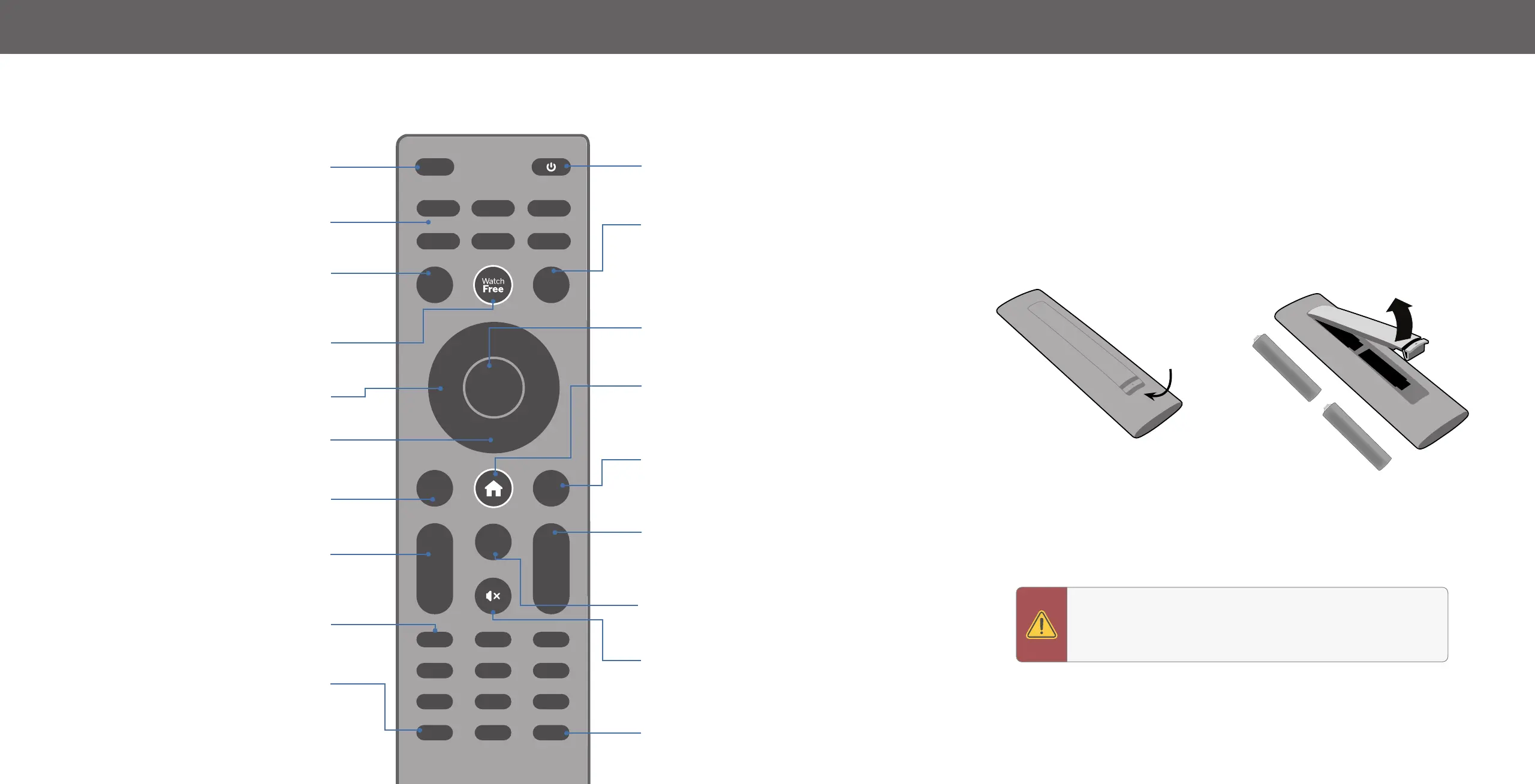
Input
Change the currently displayed input
App Launcher
Quickly launch the pictured app
Menu
Display the settings menu
WatchFree
TM
Access WatchFree channels
(not available in Canada)
Navigation Buttons — Left / Right
Navigate the on-screen menus
Navigation Buttons — Up / Down
Navigate the on-screen menus
Back
Go to the previous on-screen menu
Volume Up/Down
Increase or decrease the loudness
of the audio
Number Pad
Manually enter a channel
Pic
Cycle through the different picture setting modes
Long press to enabled/disable talk back feature
*
INPUT
MENU INFO
BACK CC
OK
VOL
PIC
CH
1 2 3
4 5 6
7 8
0
9
+
_
+
_
PREV
Power
Turn television on or off
Info
Display the info window
OK/Play/Pause
Select the highlighted menu option and
play or pause content
Home Button
Launch SmartCast Home
SM
/Return to
SmartCast Home Screen
Closed Caption
Enable or disable close captions
Long press to open Accessibility menu featuring captions, talk
back, speech rate, and zoom mode
*
Channel Up/Down
Change the channel
Last
Return to the channel last viewed
Mute
Turn the audio on or off
Dash
Use with number pad to manually enter a digital sub-
channel (for example, 18-4 or 18-5)
Replacing the Batteries
1. Push the bottom of the battery compartment and lift battery cover to open.
2. Insert two batteries into the remote control. Make sure that the (+) and (-)
symbols on the batteries match the (+) and (-) symbols inside the battery
compartment.
3. Replace the battery cover and click to close.
Lift
Push
+
AAA
+
AAA
Batteries not included*
WARNING: Keep the remote control batteries away from
children. It may cause choking and/or lead to a fire or chemical
burn if misha
ndled. Do not dispose of batteries in fire. Replace
only with batteries of the correct type.
—
Note: The picture of remote controller is only for reference
an
d is subject to the real one.


 To Next Page