7
2
Français
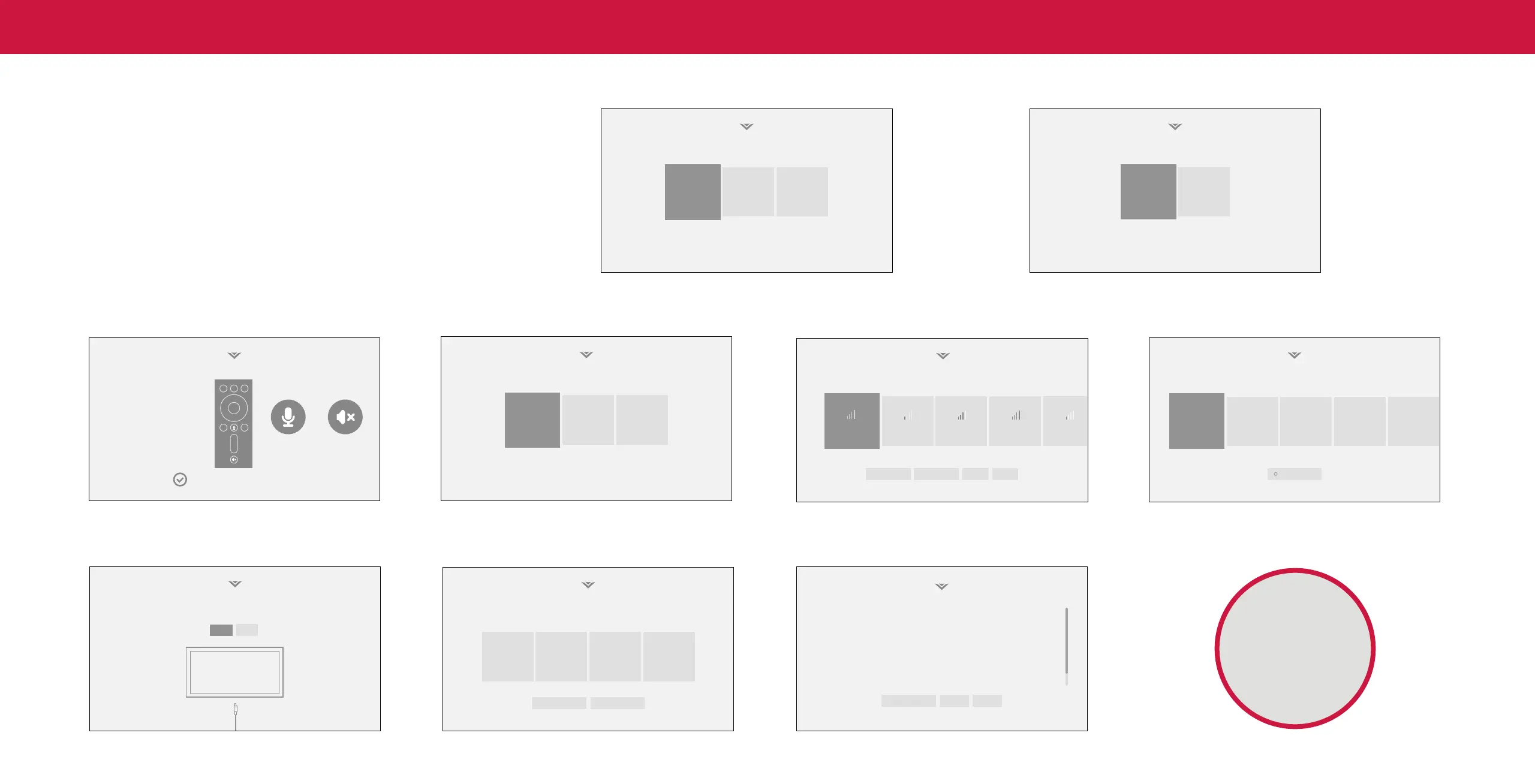
Completing the First-Time Setup
Before you begin the rst-time setup:
• Your TV should be installed and the power cord should be connected to an
Choose a language for your TV.
How are you using your TV?
electrical outlet.
• If you have a wireless network, have the network password ready.
• If you are connecting to your network with an Ethernet cable, connect it to the
Ethernet port on the TV.
English
Español Français
Home Use
Store Demo
The first time you turn on the TV, the on-screen instructions will guide you through
each of the steps necessary to get your TV ready for use:
1. Choose your language.
Pressing the CC button will 2. Choose home use.
enable TTS (text-to-speech) functionality.
Pair Your Remote
Where is you VIZIO TV located?
USA
Mexico Canada
Choose a Wi-Fi Network.
Which room is your VIZIO TV Located?
To begin pairing, press and hold the
Microphone and Mute buttons on your voice
remote for three secons, until the light on
Living Room
Master
Bedroom
+
the remote begins to flash.
Family Room
Public Wi-Fi John’s Network Ana’s Network Encrypted
Home Network
Rescan Networks Hidden Netwok Help Skip
Your Voice Remote has been paired
Add Custom Location+
3. Pair your voice remote. 4. Choose your country. 5. Choose your Wi-Fi network and enter the password. 6. Name your TV.
Viewing Data
This unit is equipped with Automated Content Recognition (”ARC”) Technology also known as Viewing Data.
WHAT DO WE DO WITH VIEWING DATA?
VIZIO or its authorized data partners may combine Viewing Data with household
demographic data, or other data about your digital actions, like smartphone
location, web histories or offline purchases, in order to determine the effectiveness
of a particular ad, or choose which ads are likely to be useful or timely, including
during broadcast, cable, satellite, or internet based television programming. VIZIO
and its authorized data partners also use the information to generate summary
analysis and reports of how users engage with content on their TVs and other
devices.
WHAT ELSE DOES VIEWING DATA SHARING MEAN FOR YOU?
Viewing Data is also used to help content publishers, broadcasters or content
distribution services create or recommend more relevant entertainment based on
summary insights. For example, if devices sharing your IP address suggest an
interest in music, fitness, or sports related topics, advertisers might deliver tailored
Decline Accept
8. Accept the Terms & Conditions. 9. View and accept VIZIO Viewing Data Policy.
Game Room
Let’s set up local channels.
To search for local broadcast channels, make sure the cable from the
antenna, wall or cable box is properly connected to your VIZIO TV.
7. Scan for channels.
Next
Skip
Terms & Conditions.
Skip For Now Accept All
Your use of this device and software functionality are covered by VIZIO and Google ‘s respective Terms of Service and Privacy Policies.
By pressing “Accept All”, you agree to be bound by the (i) VIZIO Terms of Service and Privacy Policy and (ii) the Google Terms of Service and
Privacy Policy. NOTE: Accepting the terms and policiesis a condition of using the Cast functionality of this device.
Viewing Data Policy
WHAT DATA DOES ACR TECHNOLOGY COLLECT?
When enabled, ACR technology will collect information about the audio and video
programing content playing on this internet-connected display unit including
broadcast television, advertisements and other commercially available content. We
associate this Viewing Data with the IP address for the unit, and a unique device
number we assign. You may change your Viewing Data settings at any time within
the Settings Menu of your TV. Declining Viewing Data collection will not change the
functionality of your device.
WHO DO WE SHARE VIEWING DATA WITH?
When enabled, we share Viewing Data with authorized data partners. We license
Viewing Data to analytics companies, media companies, advertisers, ad agencies,
and other ad tech companies who measure ad effectiveness or aid personalization
of ads. Our authorized cloud service providers may also store this data on and
solely on our behalf, and for no other purposes.
Now you're all set.
Enjoy!
VIZIO Terms &
Conditions
VIZIO Privacy
Policy
Google Privacy
Policy
Google Terms &
Conditons



 To Next Page