32
4
Playing USB Media: Music
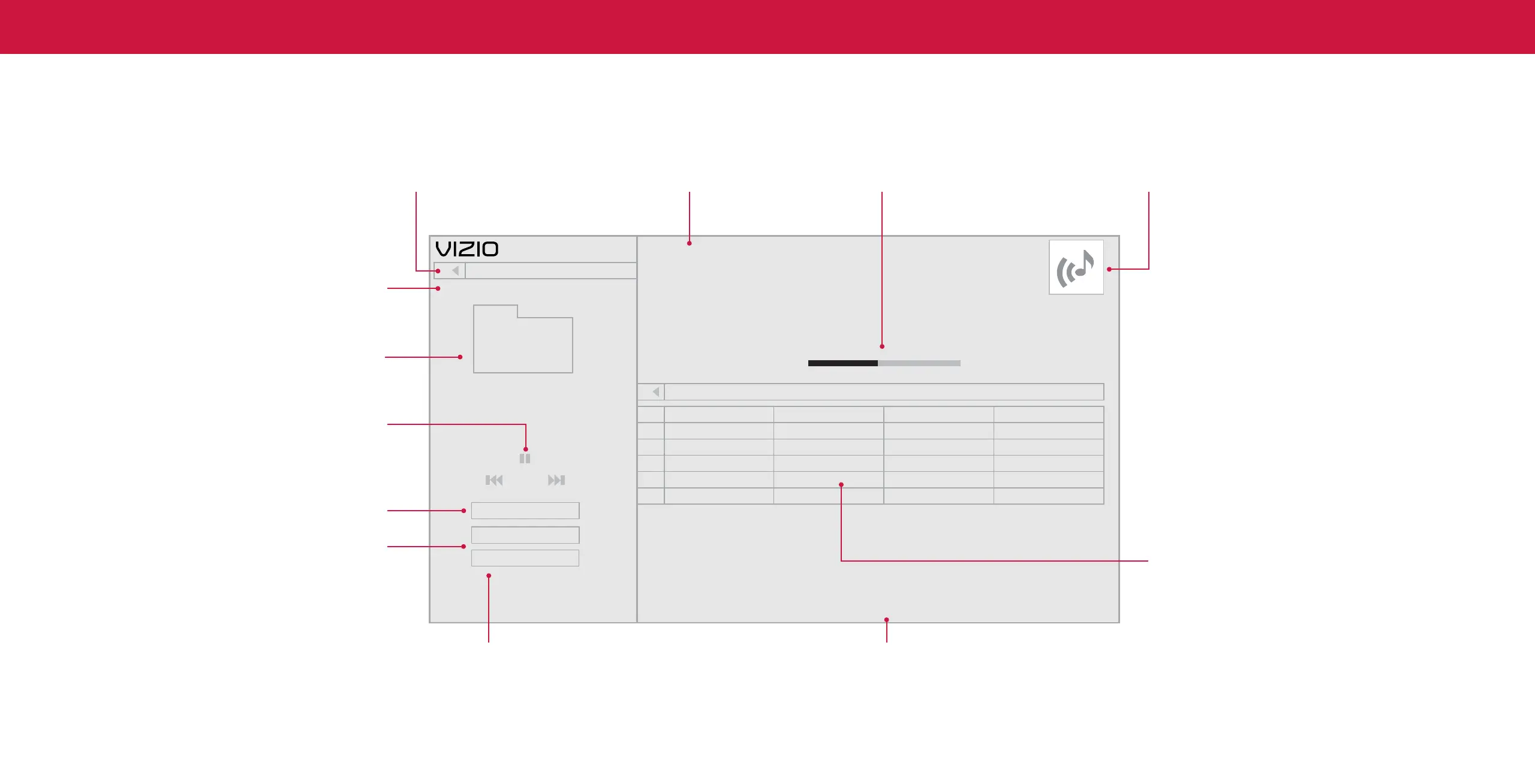
Back Button
Highlight this button and press OK to
return to the previous screen.
Now Playing Information
Displays song title, album title, and
other information.
Progress Bar
Displays the duration of the currently-
playing song. The bar will lengthen as
the song progresses.
Album Art
If included on the USB thumb drive and
associated with your music, the album art
will display here.
Connected Sources
Displays connected USB devices.
Current Folder
Playback Control
Toggle Music/Photos
Browse Photos
Artist A-Z
Music
All
#
1
2
3
4
5
MyFlashDrive\Audio\root\My Music
Name:
Title:
Artist:
Album:
Duration:
Director:
Genre:
Year:
Protected:
File Size:
02 Summer Nights
Summer Nights
DJ Sunset
Summer
00:03:11
-
Electro
Summer Nights DJ Sunset 3:11Summer
Artist: A - Z
View:
Sort:
Copyright:
2020
-
No
8.3M
1:50 3:11
Track Album Artist Duration
Starry Summer
Summer JCheesy 2:42
Mango Dream Ana Banana 8:46
Crystal Waters The Dash 4:21
Smooth Waves Rio Steve 7:58
Beach Mix
Beach Mix
Breezy Mix
USB1: MyFlashDrive
My Music
Folders
Page 1 of 1
Folder Contents/Playlist
Sort by Album/Artist/Track
This area displays the contents of the currently
selected folder. You can browse among files using
the Arrow and OK buttons on the remote.
View All or View Folders Page Information
Toggle between viewing all content If your USB thumb drive has more files than
and only viewing folders. can be displayed on a single screen, the page
number is displayed here.


 To Next Page