EasyManua.ls Logo

VisionTrack VT-MM-AHD - User Manual

VisionTrack VT-MM-AHD
7 pages
Print Icon
To Next Page IconTo Next Page
Loading...
www.visiontrack.com
THE NEXT GENERATION OF TELEMATICS
AND INTEGRATED CAMERA SOLUTIONS
USER MANUAL
THE UK'S MOST AWARD-WINNING CAMERA TELEMATICS COMPANY
CHL
1
7”
SCREEN
SIZE
BUILT-IN
SPEAKER
REMOTE
CONTROL
VT-MM-AHD
MIRROR MOUNTED
MONITOR
Question and Answer IconNeed help?

Do you have a question about the VisionTrack VT-MM-AHD and is the answer not in the manual?

Summary

Introduction to VisionTrack Monitor

Product Description

Details the VT-MM-AHD as a rear-view mirror-mounted full-colour monitor with three video inputs and 1280x720p resolution.

Important Precautions and Safety

Provides essential warnings, precautions, and maintenance advice for safe and optimal unit operation, including installation and power guidelines.

Installation Guide

Unpacking and Contents Verification

Guides users on verifying the presence of all monitor package contents, including the monitor, remote, cables, and bracket.

Wiring Diagram and Connections

Illustrates the connection points for power, ground, and trigger inputs for cameras, detailing the wiring harness.

Monitor Operation and Controls

On-Screen Buttons Explained

Identifies and explains the function of each physical button located on the monitor's bezel.

Remote Control Usage

Details the operation and functions of the included remote control for navigating and controlling the monitor's features.

Menu Configuration and Settings

Picture and Language Settings

Explains how to adjust brightness, contrast, color, language, and perform a system reset via the menu.

Function, System, and Clock Settings

Covers monitor functions like rotation and light sensor, system settings like guide lines and reverse delay, and sleep timer.

Overview

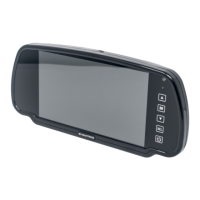
The VT-MM-AHD is a rear-view mirror-mounted full-colour monitor designed as a driver reversing aid, offering advanced telematics and integrated camera solutions. This device is a product of VisionTrack, a UK-based, award-winning company specializing in camera telematics.

Function Description:

The primary function of the VT-MM-AHD is to provide drivers with a clear rear-view image, enhancing safety during reversing maneuvers. It supports multiple video inputs, allowing for comprehensive camera coverage. The monitor is designed to be user-friendly, featuring both touchscreen and remote control operation for easy navigation through its settings and video feeds. Its robust design and adherence to safety regulations ensure reliable performance in various operational environments.

Important Technical Specifications:

  • Screen Size: 7-inch digital screen
  • Resolution: 11024RGB(H)x600(V)
  • System: AUTO
  • Video Inputs: 3-way video inputs, with 2-way trigger wires for AV2/AV3
  • Brightness: 450cd/m²
  • Contrast: 450:1
  • Voltage: DC12V~32V
  • Operation Mode: Remote control (6#) / Touch Keystroke
  • Mounting Options: Available with a short bracket (VT-MM-AHD-BRCT-S, 100mm L) or a long bracket (VT-MM-AHD-BRCT-L, 150mm L).

Usage Features:

The VT-MM-AHD offers a range of features designed to optimize its use as a reversing aid:

  • Multi-language OSD Menu: Supports English and other languages for easy navigation.
  • Image Adjustment: Allows separate adjustment of camera mirror/normal image.
  • Reversing Image Delay: Users can separately adjust the reversing image delay time from 0 to 15 seconds.
  • Trigger Wires: AV2 and AV3 inputs are equipped with trigger wires, enabling automatic switching to specific camera views when triggered (e.g., when reversing).
  • Power Supply: The unit features reverse polarity protection and can separately supply DC12V power to each connected camera.
  • Control Interface: The monitor can be controlled via physical buttons on the unit (Power on/off, V1/V2/V3 switchover, Analog decrease, Menu, Analog increase) or through the included remote control.
  • Remote Control Functions: The remote control provides buttons for Power on/off, Video switchover, Analog decrease, Analog increase, and Mode selection. It also includes an insulation sheet for battery preservation.
  • Menu Operation: The "MENU" button accesses the main settings, which are categorized into PICTURE, FUNCTION, System, and CLOCK.
    • PICTURE Menu: Allows adjustment of Brightness (0-100), Contrast (0-100), Color (0-100), Language, and Reset settings.
    • FUNCTION Menu: Includes settings for Rotate (Up/Down/Left/Right), Light Sensor (On/Off), VIV2 (Playback), and Blue Screen (On/Off).
    • System Menu: Provides options for Guide Lines (1-4, On/Off) and Reverse Delay (1-4, 0-15 seconds).
    • CLOCK Menu: Features a Sleep setting (0-00Min).

Maintenance Features:

To ensure the longevity and safe operation of the VT-MM-AHD, several precautions and maintenance guidelines are provided:

  • Installation: Installation must be performed by authorized and skilled personnel in compliance with local safety regulations.
  • Power Supply: The system should only be operated with a 12V-32V DC power supply.
  • Environmental Conditions: The mirror-monitor should be used in a dry and dust-free location, away from heat sources.
  • Intended Use: The device is designed specifically as a reversing aid and should not be used for other purposes.
  • Obstruction: Avoid covering the mirror-monitor with other devices to ensure proper ventilation and functionality.
  • Liquid Exposure: In case of liquid ingress into the unit, immediately disconnect it from the power supply and have it inspected by a dealer before reuse to prevent electric shock.
  • Safety Warning: A critical safety warning advises against watching video content while driving to prevent distractions and ensure road safety.

Unpacking and Installation:

Upon unpacking, users should verify the presence of the following items: Touchscreen Monitor, Remote Control, Connecting Cable, User Manual, and Mounting Bracket. The wiring diagram illustrates the connections for DC12V~32V (Red), GND (Black), Trigger Cam2 (Green), and Trigger Cam3 (Blue), along with separate DC12V power supply connections for each camera.

Support:

VisionTrack provides dedicated support services:

  • Technical Support: Available Monday-Friday, 7:00 am – 7:00 pm, at 01246 223 152.
  • Commissioning Support: Available Monday-Friday, 8:00 am – 6:00 pm, and weekends, 9:00 am – 5:00 pm, at 01246 225 858.

VisionTrack VT-MM-AHD Specifications

General IconGeneral
BrandVisionTrack
ModelVT-MM-AHD
CategoryMonitor
LanguageEnglish