EasyManua.ls Logo

VISTATECH RX-TX-10 - User Manual

VISTATECH RX-TX-10
2 pages
Print Icon
To Next Page IconTo Next Page
Loading...
2 IN 1 WIRELESS AUDIO
TRANSMITTER RECEIVER
Instruction Manual
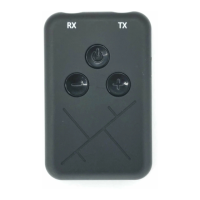
RX in TX in
Power
on/off
Vol - /
Previous Track
Vol + /
Next Track
USB
charging
port
1. Product Introduction
This compact wireless 3.5mm audio
adapter lets you manage audio signal
freely according to your needs. All
devices with an AUX 3.5mm audio port
are supported - the possibilities are
limitless!
Receiver mode
When used as a wireless receiver, the
RX-TX-10 transforms any traditional car
or home system with an AUX connection
into a contemporary piece of audio
equipment. Use it in this mode to play
music from a smartphone on your trusty
non-Bluetooth stereo system.
Transmitter mode
As a transmitter, this Bluetooth audio adapter allows you to send audio from a
device with an AUX port to any Bluetooth headphones or set of speakers. Use it in
this mode to cast TV audio to your wireless headset when gaming or
binge-watching your favourite series late at night.
2. Specification
- Bluetooth version: 5.0
- Bluetooth frequency: 2.402-2.480GHz
- Bluetooth protocol support: A2DP and AVRCP
- Support multi-format decoding. MP3, WAV, WMA, APE, FLAC
- Transmission distance: > 20M (open place)
- Charge input voltage: DC 5V
- Power supply: 3.7V
- Power consumption: play in less than 20mA, standby in 0.64 – 4.5mA,
shut down in 2 microamps
- Battery capacity: 200mAh
- Working time: about 3 - 5 hours
- Charging time: 2 hours
- Signal-Noise Ratio: more than 95db
3. Package
- 2 in 1 Wireless Audio Transmitter Receiver
- Instruction Manual
- USB charging cable
- 3.5mm audio cable
4. Charging
The 2 in 1 Wireless Audio Transmitter Receiver has built-in rechargeable battery for
long standby and use time. It is recommended that you fully charge before its
first-time use.
- Plug one end of the Micro USB charging cable into the 2 in 1 Wireless Audio
Transmitter Receiver charging port. The other end plugs into any standard USB
power outlet (such as the phone charger, computer USB interface).
- Charging time is approximately 2 hours
- The red light is on when charging. The red light is off after fully charged.
- Music transmission is still available when charging.
Receiving mode:
- Connect to your Non-wireless speaker or headphones to the 2 in 1 Wireless
Audio Transmitter Receiver RX audio in port via 3.5mm audio jack.
- Hold Down the power On/Off button to turn on the 2 in 1 Wireless Audio
Transmitter Receiver.
- Place the 2 in 1 Wireless Audio Transmitter and the Bluetooth device that you
would like to pair within the operating distance. We recommend keeping the
two devices no further than 10 feet apart.
- Ensure Bluetooth is enabled on your phone or music device. Refer to the
manufacturer’s instructions for how to enable Bluetooth on your device.
- Once you have activated Bluetooth on your device, select the “RX-TX-10” from
the list of available Bluetooth devices.
Transmitting mode:
- Connect to your sound or music source to the 2 in 1 Wireless Audio Transmitter
Receiver TX audio in via 3.5mm audio jack.
- Turn on the music source device.
- Hold down the power On/Off button to turn on the 2 in 1 Wireless Audio
Transmitter Receiver.
- To activate the transmitter mode, press Vol + and Vol - buttons at the same time
upon powering on the device.
- Turn on your Bluetooth device, ensure it is in pairing mode.
- 2 in 1 Wireless Audio Transmitter Receiver will automatically connect with your
Bluetooth device.
In Receiving mode:
You can Hold down + or - to adjust the volume.
Short press + for next track or - for previous track.
5. Operation
Printed in China
2AUIF-NV-07001
Front100 x 150 mm Back
Instruction Manual

Question and Answer IconNeed help?

Do you have a question about the VISTATECH RX-TX-10 and is the answer not in the manual?

Summary

Product Introduction

Technical Specifications

Package Contents

Charging Guide

Operation

Receiving Mode

Connect to non-wireless speakers or headphones via AUX for audio reception.

Transmitting Mode

Send audio from AUX source to Bluetooth headphones or speakers for transmission.

FCC Compliance

Overview

This document describes the VISTATECH 2-in-1 Wireless Audio Transmitter Receiver, model RX-TX-10, a compact device designed to manage audio signals wirelessly.

Function Description:

The device serves as both a wireless audio receiver and a wireless audio transmitter, offering versatility for various audio setups. It supports all devices with a 3.5mm AUX audio port.

Receiver Mode:

In receiver mode, the RX-TX-10 transforms traditional car or home stereo systems with an AUX connection into contemporary audio equipment. This allows users to stream music from a smartphone to their non-Bluetooth stereo system.

Transmitter Mode:

In transmitter mode, the device enables sending audio from an AUX-equipped device to any Bluetooth headphones or speakers. This is useful for casting TV audio to wireless headsets for gaming or binge-watching.

Important Technical Specifications:

  • Bluetooth Version: 5.0
  • Bluetooth Frequency: 2.402-2.480GHz
  • Bluetooth Protocol Support: A2DP and AVRCP
  • Decoding Support: Multi-format (MP3, WAV, WMA, APE, FLAC)
  • Transmission Distance: >20M (in open places)
  • Charge Input Voltage: DC 5V
  • Power Supply: 3.7V
  • Power Consumption:
    • Play: less than 20mA
    • Standby: 0.64 – 4.5mA
    • Shut down: 2 microamps
  • Battery Capacity: 200mAh
  • Working Time: Approximately 3 - 5 hours
  • Charging Time: Approximately 2 hours
  • Signal-Noise Ratio: More than 95db

Usage Features:

Package Contents:

  • 2-in-1 Wireless Audio Transmitter Receiver
  • Instruction Manual
  • USB charging cable
  • 3.5mm audio cable

Charging:

The device features a built-in rechargeable battery. It is recommended to fully charge the device before its first use.

  1. Plug one end of the Micro USB charging cable into the device's charging port.
  2. Plug the other end into any standard USB power outlet (e.g., phone charger, computer USB interface).
  3. Charging time is approximately 2 hours.
  4. The red light indicates charging; it turns off when fully charged.
  5. Music transmission is still available during charging.

Operation in Receiving Mode:

  1. Connect your non-wireless speaker or headphones to the RX audio in port of the 2-in-1 Wireless Audio Transmitter Receiver via the 3.5mm audio jack.
  2. Hold down the power On/Off button to turn on the device.
  3. Place the 2-in-1 Wireless Audio Transmitter Receiver and the Bluetooth device (e.g., smartphone) within operating distance, preferably no further than 10 feet apart.
  4. Ensure Bluetooth is enabled on your phone or music device.
  5. Once Bluetooth is activated, select "RX-TX-10" from the list of available Bluetooth devices.

Operation in Transmitting Mode:

  1. Connect your sound or music source to the TX audio in port of the 2-in-1 Wireless Audio Transmitter Receiver via the 3.5mm audio jack.
  2. Turn on the music source device.
  3. Hold down the power On/Off button to turn on the 2-in-1 Wireless Audio Transmitter Receiver.
  4. To activate transmitter mode, press the Vol + and Vol - buttons simultaneously upon powering on the device.
  5. Turn on your Bluetooth device and ensure it is in pairing mode.
  6. The 2-in-1 Wireless Audio Transmitter Receiver will automatically connect with your Bluetooth device.

In Receiving Mode (Controls):

  • Volume Adjustment: Hold down the Vol + or Vol - buttons.
  • Track Navigation: Short press Vol + for the next track or Vol - for the previous track.

Maintenance Features:

The device is designed for ease of use and portability. Regular charging as described above ensures optimal performance and battery longevity. The compact size and simple interface make it easy to integrate into existing audio setups. The multi-format decoding support means broad compatibility with various audio files, reducing the need for format conversion.

VISTATECH RX-TX-10 Specifications

General IconGeneral
BrandVISTATECH
ModelRX-TX-10
CategoryReceiver
LanguageEnglish