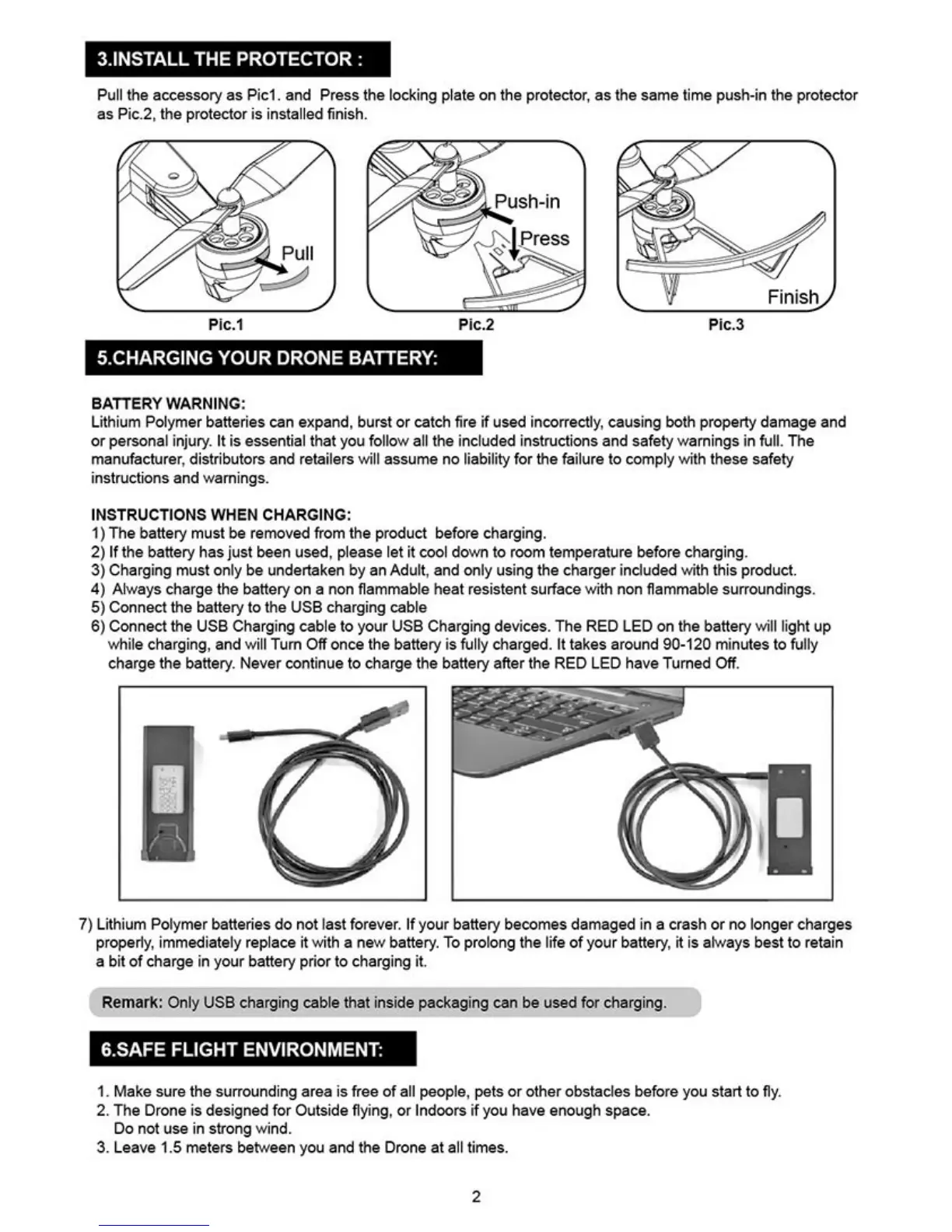
Finish}
Fic.3
Pic.1
Pic.2
3.INSTALL THE PROTECTOR
Pull the accessory as Pict and Press the Locking plate on the protector, as the same time push-in the protector
as Pic.2, the protector is installed finish.
5_CHARGING YOUR DRONE BATTERY:
BATTERY WARNING
Lithium Polymer batteries can expand, burst or catch fire if used incorrectly, causing both property damage and
or personal injury, It is essential that you follow
all
the included instructions and safety warnings in full. The
manufacturer
r
distributors and retailers will assume no liability for the failure to comply with these safety
instructions and warnings.
IN
WHEN CHARGING:
1)
The battery must be removed from the product before charging.
2)
If the battery has just been used, please let it cool down to room temperature before charging.
3)
Charging must only be undertaken by an Adult, and only using the charger included with
this
product.
4)
Always charge the battery on a non flammable heat resistant surface
with
non flammable surroundings.
5)
Connect the battery to the USB charging cable
8) Connect the USE Charging cable to your USB Charging devices. The RED LED
on the
battery will light up
while charging, and will Turn Off once the battery is fully charged. It takes around 90-120 minutes to fully
charge the battery. Never continue to charge the battery after the RED
LED have
Turned Off.
7) Lithium Polymer batteries do not last forever. If your battery becomes damaged in a crash or no longer charges
properly, immediately replace it with a new battery. To prolong the life of your battery. it is always best to retain
a bit of charge in your battery prior to charging it,
Remark: Only USE charging cable that inside packaging can be used for charging.
CAFE FLIGHT ENVIRONMENT:
1.
Make sure the surrounding area is free
of all
people, pets or other obstacles before you start to fly.
2.
The Drone is designed for Outside flying. or Indoors if you have enough space.
Do not use in strong
wind.
3.
Leave 1.5 meters between you and the Drone at all times.
2


 To Next Page
 Loading...