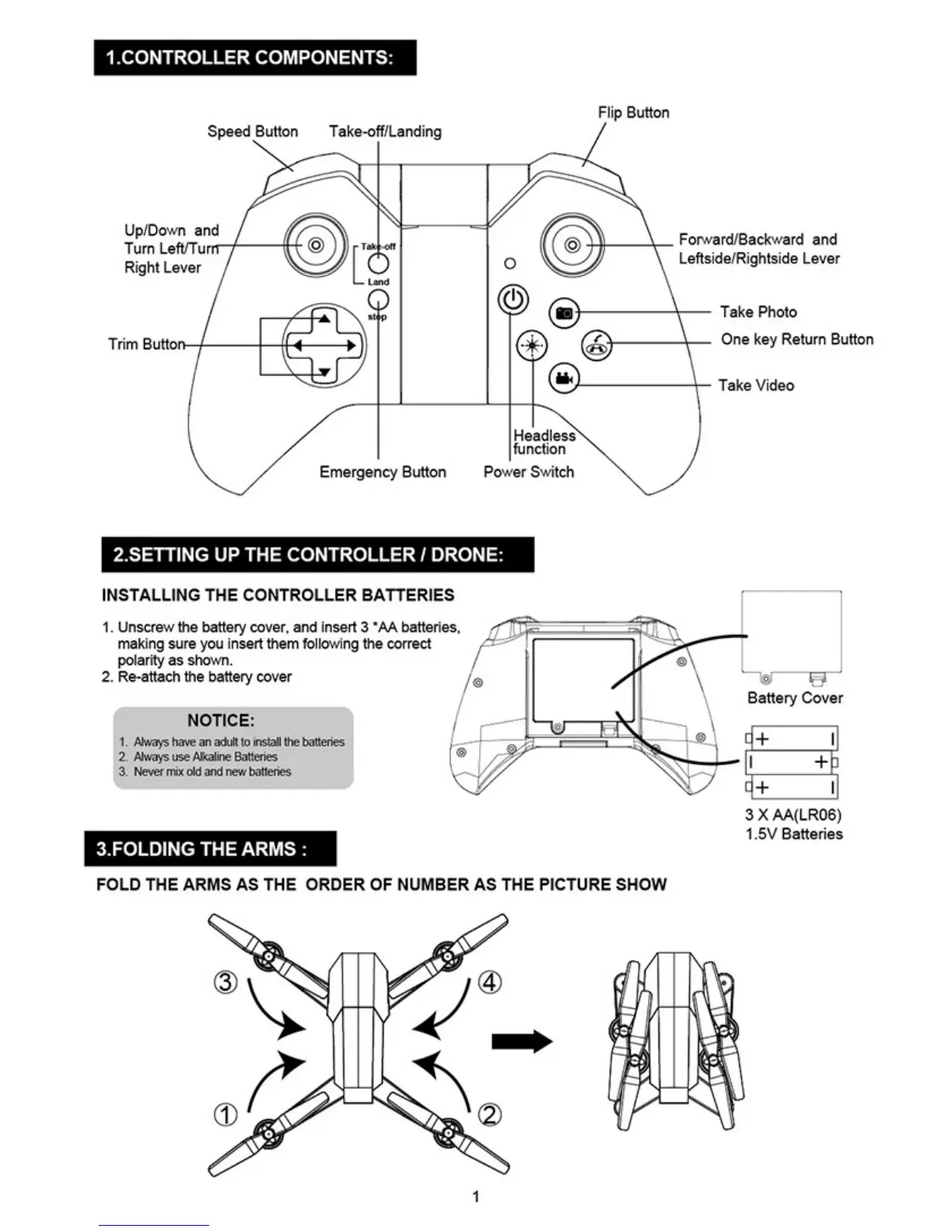
UpiDown and
Turn LeftiTur
Right Lever
Forwardieackward and
LeftsidetRightside Lever
Trim Butto
Take Photo
One key
Return Button
Speed Button
Take-off/Landing
Take
Video
Headless
function
Emergency Button
Power Switch
1.CONTROLLER COMPONENTS:
Flip Button
2_SETTING UP THE CONTROLLER I DRONE:
INSTALLING THE CONTROLLER BATTERIES
1.
Unscrew
the battery cover, and insert 3 'AA batteries.
making
sure you Insert them following the
correct
polarity as
shown.
2.
Re-attach the battery cover
t
1
Battery Cover
NOTICE:
1.
Malays have an WO to lostall the Nineties
2.
Always trse Moline Batteries
3.
Never rrix old and
new batteries
3 X AA(LR06)
1.5V Batteries
3.FOLD1NG THE ARMS
FOLD THE ARMS AS THE ORDER OF NUMBER AS THE PICTURE SHOW
1


 To Next Page