EasyManua.ls Logo

Vitagoods VGP-3050 SERIES - User Manual

Vitagoods VGP-3050 SERIES
24 pages
Print Icon
To Next Page IconTo Next Page
Loading...
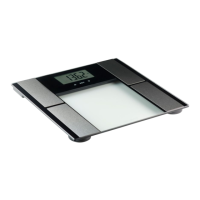
Enhanced Body Analysis System
VGP-3050 SERIES
Digital Body Analyzer
MODEL: VGP-3050
MADE IN CHINA

Questions and Answers

  • M
    mathewsullivanAug 2, 2025
    Why does my Vitagoods VGP-3050 power off automatically?
    • B
      Brian BrewerAug 3, 2025
      If your Vitagoods scale powers off automatically, it could be due to several reasons. First, try replacing both batteries simultaneously with the correct type. Second, ensure you are stepping onto the platform barefoot, making full contact with the electrodes. Finally, if the system can't identify your User ID, assign one following the instructions in the 'Set Up Your Profile' section.
  • M
    Michael RodriguezAug 8, 2025
    What to do if my Vitagoods Scales shows abnormal measuring results?
    • P
      paynechelseaAug 8, 2025
      Abnormal measuring results from your Vitagoods scales can occur for several reasons. Make sure you step on the platform barefoot and stand still. Ensure the device is on a flat, hard surface, not a carpet or rugged surface. If your body is cold, warm up your hands and feet to improve blood circulation before measuring again.
  • D
    Daniel BoyerAug 15, 2025
    How to fix abnormal measuring results on Vitagoods Scales?
    • H
      harriskatherineAug 15, 2025
      In case of abnormal measurements on your Vitagoods scales, cold electrodes may be the cause. Try placing the device in a warm room for a while before measuring again. Also, dry hands or feet can affect the results; wipe your feet with a damp cloth to keep them slightly damp during measurement.
  • P
    Patrick LopezAug 20, 2025
    What to do if Vitagoods VGP-3050 Scales shows low battery?
    • C
      Chris Jones DDSAug 20, 2025
      If your Vitagoods Scales displays a 'Low Battery' message and powers off, replace both batteries simultaneously with the correct type.
  • J
    Justin BallAug 27, 2025
    What to do if Vitagoods VGP-3050 shows overload?
    • J
      Jose SmithAug 27, 2025
      If your Vitagoods scale indicates an overload and powers off, stop using the scale for measurement.

Summary

Safety Information

Device Purpose and Limitations

Outlines intended use, age restrictions, home use only, and contraindications like arrhythmia or implants.

General Safety Precautions

Covers adult use, monitoring vs. diagnosis, medication effects, emergency use, electromagnetic fields, and accessory use.

Device Components Identification

LCD Display Explained

General Instructions

User Profile Setup

Assigning User ID and Gender

Step-by-step guide to assigning a user ID (P1-P10) and selecting the user's gender.

Setting Activity Level and Height

Instructions for selecting the activity level (1-5) and inputting the user's height.

Profile Configuration Details

Setting Age and Target Weight

Guide for inputting the user's age (10-80) and desired target weight.

First Measurement Guide

Pre-measurement Steps

Instructions on proper scale placement on a flat surface and foot preparation.

Measurement Process and Results

Details on how to stand on the scale, maintain contact, and interpret initial measurement displays.

Daily Measurement Process

Warranty and Support

Understanding Your Readings

Your Readings Explained

Troubleshooting Guide

Error Prompts and Solutions

Addresses common error messages like 'Overload' and 'Low Battery' with corresponding solutions.

Measurement Problems and Fixes

Provides solutions for issues like abnormal results, incorrect posture, and device powering off.

Product Specifications

Vitagoods VGP-3050 SERIES Specifications

General IconGeneral
BrandVitagoods
ModelVGP-3050 SERIES
CategoryScales
LanguageEnglish