
 To Next Page
И
игорьMar 14, 2026
как отключить звуковые сигналы на беспроводной метеостанции VITEK VT-6411?

как отключить звуковые сигналы на беспроводной метеостанции VITEK VT-6411?
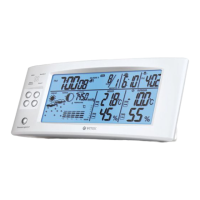
Details the main unit, digital displays for ambient temp/humidity, and comfort/weather symbols.
Explains sensor signal, battery indicators, channel numbers, and functions of MODE, UP, DOWN, MAX/MIN, °C/°F, LIGHT/SNOOZE buttons.
Identifies battery lids, power socket, plug, adapter, sensor, hanging spot, indicator, and channel tuner.
Covers warnings about water, electromagnetic fields, battery usage, power adapter handling, and keeping the unit dry.
Steps for unpacking, removing packaging, and initial setup before operating the unit.
Guides on channel selection, battery installation, placement, temperature limits, range, and interference for the external sensor.
Instructions for installing batteries in the main unit and pairing it with the external sensor.
How to switch data reception channels between the main unit and external sensor.
Step-by-step guide to set the year, month, and day using the unit's buttons.
Instructions for selecting the 12/24-hour format and setting the current hour and minute.
Notes on the 8-second timeout for inputting settings before reverting to default.
How to set the alarm hours, minutes, and the duration of the snooze function.
Procedures for turning the alarm on/off and how to snooze it when it sounds.
How to switch between °C/°F and view maximum/minimum temperature readings.
How to reset MAX/MIN temperature values and interpret weather forecast symbols.
Explains the symbols indicating dry, good, and humid comfort levels based on temp and humidity.
How to turn on the display illumination when the unit is battery-powered.
Guidance on checking voltage compatibility and connecting the power adapter.
Advice on battery checks, cleaning, avoiding abrasives, and not immersing the unit in liquids.
Recommends removing batteries for long-term storage and keeping the unit in a cool, dry place.
Lists the items included in the weather station delivery set.
Details transmission frequency, number of channels, and transmission range.
Outlines power requirements for the main unit, external sensor, and power adapter.
Provides instructions for recycling the unit and batteries, avoiding household waste.
Details how to obtain warranty conditions and make a claim.
 General
| Indoor temperature | Yes |
|---|---|
| Outdoor temperature | Yes |
| Indoor humidity | Yes |
| Outdoor humidity | Yes |
| Weather forecast | Yes |
| Clock | Yes |
| Calendar | Yes |
| Alarm clock | Yes |
| Moon phase | Yes |
| Temperature display units | °C/°F |
| Wireless outdoor sensor | Yes |
| Transmission frequency | 433 MHz |