7
weather conditions, in this case we rec-
ommend trusting the local weather fore-
cast;
–
the symbol “Sunny” means sunny
weather at night as well.
Comfort level dislpaying
–
The comfort level is shown on the display
with the symbols (3).
«DRY» – dry: temperature within any
range, humidity is less than 40%;
«GOOD» – comfortable: temperature is
within +20 °С, +28 °С, humidity is 40-70%;
«HUMI» – humid: temperature within any
range, humidity is more than 70%;
“no indication”: temperature is beyond
+20 °С, +28 °С, humidity is 40-70%.
Switching the display illumination on
–
When the weather station is battery
powered, press the button (13) “LIGHT/
SNOOZE” to switch the display illumi-
nation on, the illumination will go out in
5 seconds.
Using the power adapter
–
Before using the power adapter make
sure that your home mains voltage cor-
responds to the power adapter operat-
ing voltage.
–
Insert the power adapter cord plug (16)
into the socket (15), plug the power
adapter in, the display illumination will
light up.
Note: - when the main unit (1) is powered by
the adapter (17), the batteries in the battery
compartment switch off.
–
Place the main unit (1) in the desired
place.
MAINTENANCE
•
Do not disassemble the unit by yourself,
there are no parts inside the weather sta-
tion body which require replacement.
•
Check the external sensor (18) batteries,
if the symbol (7) “ ” appears on the dis-
play, replace the batteries.
•
Use only new batteries, do not install new
and old batteries together.
•
Insert the batteries, strictly following the
polarity.
•
After changing the batteries set the cur-
rent time on the main unit (1) and recon-
nect it with the external sensor (18).
•
Clean the main unit (1) body and the
external sensor (18) with a soft, slightly
damp cloth, and then wipe them dry.
•
Do not use abrasives or solvents.
•
Do not immers the main unit (1) and the
external sensor (18) into water or any
other liquids.
STORAGE
•
If you are not going to use the weather
station for a long time, it is recommended
to remove the batteries from the main unit
(1) and the external sensor (18).
•
Keep the unit in a dry cool place out of
reach of children and disabled persons.
DELIVERY SET
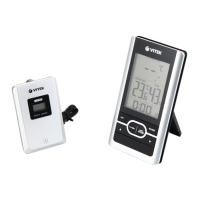
Weather station – 1 pc.
External wired sensor – 1 pc.
Instruction manual – 1 pc.
TECHNICAL SPECIFICATIONS
Main unit
от -9,9 °C до + 50 °C
(от 14,2°F до 122,0°F)
External sensor
from -35 °C to +60 °C
(from -31,0°F to +140,0°F)
Temperature measurement precision 0.1 °C
Relative humidity measurement limits from 20% to 95%
Relative humidity measurement precision 1%
IM VT-6411.indd 7 20.02.2018 10:20:45


 To Next Page