‡
NOTE: Installation in a non-climate-controlled space with excessive ambient heat, such
as a garage or attic, will reduce useful/service life and should be avoided if possible
Technical / Hardware Specifications
164mm x 185mm x 63mm (6.5 x 7.3 x 2.5 inches)
2.4GHz: +20dBm; 5GHz: +24dBm
2.4GHz: -93dBm; 5GHz: -92dBm
Bands, Network Standards,
Tri-band 2.4GHz (access point only), 5GHz low and high
(access point, station, or mesh); 801.11 a/b/g/n/ac/ax;
2x2 MU-MIMO; NFC; 10/100/1000 WAN
SED Canada Regulatory Compliance Declarations*
Unauthorized changes or modifications could void the user’s authority to operate the equipment.
This device has been tested and found to comply
with the limits for a Class B digital device, pursuant to Part 15 of FCC Rules and Industry Canada license-exempt RSS standard(s). Operation is subject to the following two conditions:
(1) This device may not cause harmful interference, and
(2) This device must accept any interference received, including interference that may cause undesired operation of the device.
These limits are designed to provide reasonable protection against harmful interference in a residential installation. This e
quipment gen
erates, uses, and can radiate radio frequency energy and, if not installed and used in accordance with
the instructions, may cause harmful interference to radio communications. However, there is no guarantee that interference wi
ll not occur in a particular
installation. If this equipment does cause harmful interference to radio or television
reception, which can be determined by turning the equipment off and on, the user is encouraged to try to correct the interfer
ence by one or more of the following measures:
• Reorient or relocate the receiving antenna.
• Increase the separation between the equipment and the receiver.
• Connect the equipment into an outlet on a circuit different from that to which the receiver is connected.
• Consult the dealer or an experienced radio/television technician for help.
This device meets all the other requirements specified in Part 15E, Section 15.407 of the FCC Rules:
The device for operation in the band 5150-5250 MHz is only for indoor use to reduce the potential for harmful interference to co-channel mobile satellite systems.
Changements ou modifications pourraient annuler le droit de l'utilisateur à utiliser l'équipement non autorisées.
Conformément à la réglementation d'Industrie Canada, le présent
émetteur radio peut fonctionner avec une antenne d'un type et d'un gain maximal (ou inférieur) approuvé pour l'émetteur par I
ndustrie Canada. Dans le but de réduire les
risques de brouillage radioélectrique à l'intention des autres utilisateurs, il faut ch
oisir le type d'antenne et son gain de sorte que la puissance isotrope rayonnée équivalente (p.i.r.e.) ne dépasse pas l'intensité nécessaire à l'établissement
d'une communication satisfaisante.
Le présent appareil est conforme aux CNR
d’Industrie Canada applicables aux appareils radio exempts de licence. L’exploitation est autorisée aux deux conditions suivantes:
(1) l’appareil ne doit pas produire de brouillage, et
(2) l’utilisateur de l’appareil doit accepter tout brouillage radioélectrique subi, même si le brouillage est susceptible d’en compromettre le fonctionnement.
Ces limites sont conçues pour fournir une protection raisonnable contre les
interferences
nuisibles dans une installation résidentielle. Cet équipement génère, utilise et peut émettre une énergie de radiofréquence et, s'il n'est pas installé et utilisé conformément aux instructions, il peut causer des interférences nuisibles aux
communications radio. Cependant, il n'existe aucune garantie que des interférences no se pr
oduiront pas dans une installation particulière. Si cet équipement provoque des interférences nuisibles à la réception radio ou télévision, ce qui
peut être déterminé en mettant l'équipement hors et sous tension, l'utilisateur est encouragé à essayer de co
rriger l'interférence par une ou plusieurs des mesures suivantes:
• Réorienter ou déplacer l'antenne de réception.
• Augmentez la distance entre l'équipement et le récepteur.
• Connecter l'équipement à une sortie sur un circuit différent de celui sur lequel le récepteur est branché.
• Consulter le revendeur ou un technicien radio / télévision expérimenté pour de l'aide.
Le guide d’utilisation des dispositifs pour réseaux locaux doit inclure des instructions précises sur les restrictions susmen
tionnées, notamment:
Les dispositifs fonctionnant dans la bande 5150-5250 MHz sont réservés uniquement pour une utilisation à l’intérieur afin de réduire les risques de brouillage préjudiciable aux systèmes de satellites mobiles utilisant les mêmes canaux
and IC (Canada) Radiation Exposure Statement: This equipment complies with FCC and ISED radiation exposure limits set forth for an uncontrolled environment. This equipment should be installed and operated with greater
27 cm (10.6 in) between the radiator and your body.
Déclaration d'exposition aux radiations:
Cet équipement est conforme aux limites d'exposition aux rayonnements ISED établies pour un environnement non contrôlé. Cet équipement doit être installé et utilisé à plus de 27 cm entre le
.
© 2022 Vivint Inc. All Rights Reserved. | www.vivint.com | 1-800-216-5232 | Device M/N: BB02 | Doc P/N: 77-600056-001 Rev. 1.2
Wireless Product Notice
Wireless communications hardware provides reliable communication; however, there are some limitations which must be
observed.
• The transmitters are required to comply with all applicable wireless rules and regulations. As such, they have limited transmitter power and limited range.
• Wireless signals may be blocked by radio signals that occur on or near the wireless operating frequencies.
•
What the LED Light Colors Mean
The
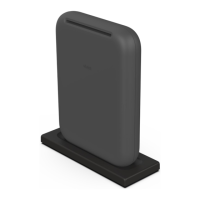
Vivint Air Tower features an LED light located on the front directly above the logo
illuminates different colors in order to indicate various functions and status, as
• (Solid) — Powered on
•
(Blinking) — Searching / pairing (press & hold for 3-5 seconds)
• Green (Solid) — Connected to the hub (successful)
• Green (Blinking) — Firmware update in progress
• Red (Solid) — Error connecting to the hub (failed)
• Red (Blinking) — Not connected to the hub / offline
• Yellow (Solid) >
(Blinking) — Soft reboot (press & hold for 10 seconds)
• Yellow (Solid) > Red (Blinking) — Factory reset (press & hold for 20 seconds)
Standards Certifications & Listings
47CFR Part 15, Subpart B, Subpart C, and Subpart E
CAN ICES-003, RSS-GEN; RSS-247
Standard for Safety for Audio/Video, Information and
Communication Technology Equipment
Standard for Safety for Audio/Video, Information and
Communication Technology Equipment
Troubleshooting Tips
Possible failures with the
Vivint Air Tower and what to do in order to resolve:
• Air Tower is not pairing to the hub (NFC progress stops) –
Factory reset the device, and then try again
• Air Tower is not connecting to the hub –
Ensure the device is close enough to the hub (20 ft. recommended)
and does not have too many obstructions (walls, floors, etc.). Move
the device if possible.
• Camera is not connecting to the Air Tower –
Run the rebalance tool (Installer Toolbox > Vivint Network >
Advanced Networking > Air Tower View > Rebalance
Reboot the hub, then reset both the camera and the Air Tower
*For complete regulatory compliance information,
go to
: vivint.com/legal/fcc.


 To Previous Page
 Loading...