CHARGING
3.
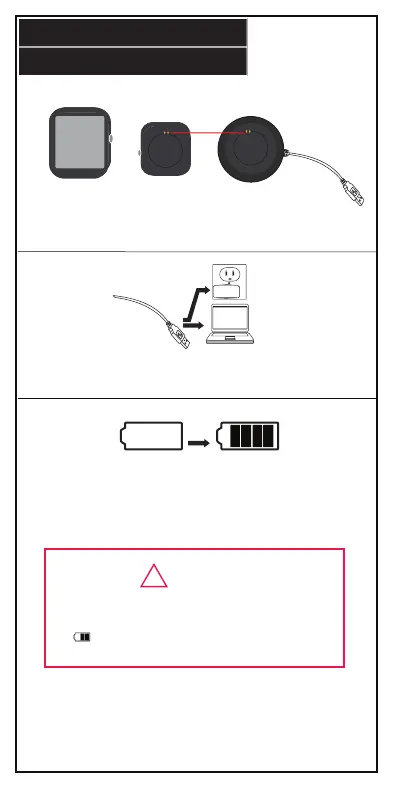
To charge your activity tracker, follow the steps below:
1. Take o your smart watch and fit the back of the head onto the
charging clip. Make sure to connect the charging contacts.
2. Slide the USB plug into a USB port on your computer, or a suitable
DC 5V, 1A USB charging adapter.
3. Once fully charged, the battery status indicator on the display
screen will go from empty to full.
EMPTY FULL
-When connecting to USB port, make sure plug
is inserted correctly.
-If charging icon does not appear, make
sure that the charging clip is fitted properly.
!
WARNING
NOTE: Smart Watch Features may not be accessible while device is
charging. Bluetooth may not connect while battery is insucient.


 To Next Page