The Vivitar Air Rover (item DRC252) is a jumbo remote-controlled (RC) helicopter designed specifically for outdoor flying. It features a lightweight construction, making it suitable for aerial maneuvers. The helicopter is powered by a rechargeable lithium battery, and it comes with a remote control for operation.
Function Description:
The Vivitar Air Rover is an RC helicopter that allows users to experience outdoor flight. The remote control provides comprehensive control over the helicopter's movements, including ascend/descend, forward/backward, and turning left/right. It also features a high-speed conversion mode and light control for enhanced functionality. The helicopter is designed for pilots aged 14 and up, with a recommendation for beginners to practice with experienced pilots.
Important Technical Specifications:
- Length: 625mm
- Width: 148mm
- Height: 238mm
- Weight: 318g
- Battery: 3.7V 1200mAh Rechargeable Lithium Ion
- Charging Time: Approximately 130 minutes
- Flight Time: Approximately 6 minutes
- Remote Control Batteries: 4 AA 1.5V batteries (not included)
Usage Features:
- Pre-Flight Preparation: Before flying, users should familiarize themselves with the controls. The helicopter should be placed in a clear, open field on a secure, flat surface. Flying in extreme temperatures or windy conditions should be avoided. Practice with the throttle stick (ascend/descend) and directional control stick (forward/backward, turn left/right) is recommended.
- Powering ON/Synchronizing: To power on, slide the ON/OFF switch on both the helicopter and the remote control to the ON position. To synchronize, push the throttle stick all the way up and then pull it all the way down. A steady LED indicator light on the remote signifies readiness for flight, while a flashing light indicates a low battery.
- Flight Controls:
- Throttle Stick (Ascend/Descend): Pushing the throttle stick upwards makes the helicopter ascend; pulling it downwards makes it descend.
- Directional Control Stick (Forward/Backward/Turn Left/Turn Right): Pushing the stick upwards tilts the helicopter downwards, causing it to move forward. Pushing it downwards tilts the helicopter upwards, causing it to move backward. Sliding the stick to the left makes the helicopter turn left, and sliding it to the right makes it turn right.
- Adjusting the Trim: The remote control includes a left/right trim button. This feature allows for minor adjustments to correct the helicopter's tilt, ensuring it flies straight. If the helicopter spins to the left, push the trim button to the right until it stops spinning. If it spins to the right, push the trim button to the left until it stops spinning.
- High Speed Conversion: The remote control has a button for high-speed conversion, allowing the helicopter to fly faster.
- Light Control: The remote also features a light control button, presumably to turn on/off lights on the helicopter.
Maintenance Features:
- Battery Charging: The helicopter's built-in 3.7V 1200mAh battery is charged via an included USB charging adapter. Before charging, ensure the helicopter's ON/OFF switch is in the OFF position. Unplug the charging cable from the helicopter's receiving board, connect it to the USB adapter, and then plug the adapter into a suitable USB charging port. An LED light on the helicopter's circuit board will be RED during charging and turn GREEN when complete. After charging, reconnect the cable to the helicopter's receiving board.
- Battery Safety:
- Unplug the charger once charging is complete to prevent battery damage.
- Do not leave the battery unattended while charging.
- Only use the supplied charger.
- Wait at least 30 minutes after using the helicopter before charging to allow the battery to cool down, as immediate charging of a hot battery can cause damage.
- Avoid exposing the battery to excessive heat, flame, or fire.
- Remote Control Battery Installation: The remote control requires 4 AA 1.5V batteries (not included). To install, screw the antenna onto the top of the remote, then use a screwdriver to open the battery compartment on the rear. Insert the batteries, ensuring correct polarity (+,-). Secure the cover with a screwdriver.
- Remote Control Battery Safety:
- Do not mix rechargeable and non-rechargeable batteries.
- Do not mix old and new batteries or different types of batteries.
- Remove exhausted batteries and dispose of them according to local regulations.
- Remove batteries from the remote control if it will not be used for an extended period.
- Cleaning: The helicopter should only be used in a dry environment. To avoid damage to its sophisticated electronic components, keep it away from water and moisture. Use a soft, dry cloth to wipe and clean the surface.
- General Safety:
- Keep the helicopter away from obstacles, crowds, power lines, trees, and bodies of water. Fly in a wide-open, spacious environment.
- Maintain a 7ft (2m) distance from the aircraft during takeoff and landing.
- Keep people and objects at a distance from rotating parts (blades) when the helicopter is in use.
- Recycle or dispose of the helicopter properly based on local laws and rules.
Troubleshooting:
- No response from remote: Check if batteries are correctly inserted and not drained. Insert new, fresh batteries if needed.
- Remote not controlling helicopter: Ensure the remote is pointed directly at the helicopter and brought closer. Move away from direct sunlight. Check for low battery in the remote and replace if necessary.
- Helicopter not flying high enough: Increase rotor speed by pushing the control stick up. Fully charge the helicopter battery if it is drained.

 Need help?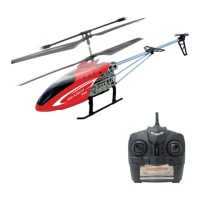

 To Next Page
 General