EasyManua.ls Logo

Vivitar Skyhawk DRC-447 - User Manual

Vivitar Skyhawk DRC-447
28 pages
Print Icon
To Next Page IconTo Next Page
Loading...
Question and Answer IconNeed help?

Do you have a question about the Vivitar Skyhawk DRC-447 and is the answer not in the manual?

Summary

DRC-447 Product Overview

Introduction

Thank you for purchasing the VTI SkyHawk Foldable Video GPS aircraft.

Aircraft Unfolding Instructions

Instructions for unfolding the aircraft before use.

Drone Battery Installation

How to insert the battery securely into the aircraft.

Remote Control Battery Installation

Instructions for inserting batteries into the remote control.

Aircraft Component Identification

Identifies key components of the aircraft using top and bottom views.

Remote Control Functions Overview

Explains the functions of various buttons and sticks on the remote control.

Aircraft Operations and Features

Available Flight Modes

Describes the two flight modes: GPS Mode and Normal flying mode.

Aircraft LED Indicator Guide

Explains the meaning of different LED light combinations for aircraft status.

Rear Light Status in GPS Mode

Details the rear light status under various conditions in GPS mode.

Return to Home (RTH) Explained

Explains the Return-to-Home function and its three types: smart, low battery, and failsafe.

Low Battery RTH Procedure

Describes the automatic return procedure when the aircraft battery is low.

Installing Aircraft Guard Rails

Instructions on how to align and install the aircraft guard rails.

Aircraft Power Switch Usage

How to turn the aircraft on and off using the power switch.

Aircraft Battery Charging Guide

Details the aircraft battery specifications and charging process.

Propeller Attachment and Detachment

Instructions for attaching and detaching the propellers, including safety precautions.

Remote Control and App Usage Guide

Photo;Video Capture Functions

Describes how to use the photo and video functions on the remote and app.

One-Key Unlock and Landing

Explains how to unlock the aircraft and initiate landing using a single button.

Emergency Flight Stop Procedure

Details the emergency button function to stop the flight immediately.

App Download and Device Setup

Phone Holder Installation

Instructions for installing the phone holder onto the remote control.

VTI SkyHawk App Download Guide

Guide on how to download the VTI SkyHawk APP for iOS and Android devices.

App to Aircraft Camera Connection

Steps to connect the VTI SkyHawk APP to the aircraft's camera for live feed.

Flight Operations and Safety Procedures

Flight Environmental Requirements

Important conditions and environments to consider before flying the aircraft.

Flight Limits and GEO Zone Information

Information on flight limitations like altitude and distance, and GEO zones.

Pre-Flight Safety Checklist

A checklist of essential items to verify before each flight.

Aircraft Calibration Steps

Steps and environment recommendations for calibrating the aircraft before flight.

Aircraft Compass Calibration

Detailed procedure for calibrating the aircraft's compass for accurate navigation.

Aircraft Gyroscope Calibration

Instructions for calibrating the gyroscope if the aircraft is not initializing properly.

Aircraft Lock;Unlock Methods

Two methods for locking and unlocking the aircraft using the control sticks.

Operating Aircraft Controls

Explains how to control the aircraft's movements using the remote control sticks.

Aircraft Speed Adjustment

How to change the aircraft's speed modes using the throttle stick.

Point of Interest (POI) Mode

How to activate and control the Point of Interest (circle around a point) feature.

Follow Me Mode Operation

How to activate and use the Follow Me function to track a smart phone.

Test Flight Steps

Steps for performing a basic flight operation and test flight procedures.

Important Statements and Safety Guidelines

General Flight Safety Guidelines

Comprehensive safety rules and guidelines for operating the aircraft.

Heat Source Precautions

Advice on keeping the aircraft away from heat sources to prevent damage.

Environmental Protection

Instruction to recycle the aircraft according to local laws and regulations.

FCC Compliance Statement

Details the FCC compliance for the device and potential interference.

Warranty Information and Compliance

Warranty Coverage Details

Details what is covered and not covered under the product's warranty.

Warranty Service and Support

Provides contact information for obtaining warranty service and troubleshooting.

Camera RF Exposure Compliance

Specifies FCC radiation exposure limits for the camera and operating distance.

Summary

DRC-447 Product Overview

Introduction

Thank you for purchasing the VTI SkyHawk Foldable Video GPS aircraft.

Aircraft Unfolding Instructions

Instructions for unfolding the aircraft before use.

Drone Battery Installation

How to insert the battery securely into the aircraft.

Remote Control Battery Installation

Instructions for inserting batteries into the remote control.

Aircraft Component Identification

Identifies key components of the aircraft using top and bottom views.

Remote Control Functions Overview

Explains the functions of various buttons and sticks on the remote control.

Aircraft Operations and Features

Available Flight Modes

Describes the two flight modes: GPS Mode and Normal flying mode.

Aircraft LED Indicator Guide

Explains the meaning of different LED light combinations for aircraft status.

Rear Light Status in GPS Mode

Details the rear light status under various conditions in GPS mode.

Return to Home (RTH) Explained

Explains the Return-to-Home function and its three types: smart, low battery, and failsafe.

Low Battery RTH Procedure

Describes the automatic return procedure when the aircraft battery is low.

Installing Aircraft Guard Rails

Instructions on how to align and install the aircraft guard rails.

Aircraft Power Switch Usage

How to turn the aircraft on and off using the power switch.

Aircraft Battery Charging Guide

Details the aircraft battery specifications and charging process.

Propeller Attachment and Detachment

Instructions for attaching and detaching the propellers, including safety precautions.

Remote Control and App Usage Guide

Photo;Video Capture Functions

Describes how to use the photo and video functions on the remote and app.

One-Key Unlock and Landing

Explains how to unlock the aircraft and initiate landing using a single button.

Emergency Flight Stop Procedure

Details the emergency button function to stop the flight immediately.

App Download and Device Setup

Phone Holder Installation

Instructions for installing the phone holder onto the remote control.

VTI SkyHawk App Download Guide

Guide on how to download the VTI SkyHawk APP for iOS and Android devices.

App to Aircraft Camera Connection

Steps to connect the VTI SkyHawk APP to the aircraft's camera for live feed.

Flight Operations and Safety Procedures

Flight Environmental Requirements

Important conditions and environments to consider before flying the aircraft.

Flight Limits and GEO Zone Information

Information on flight limitations like altitude and distance, and GEO zones.

Pre-Flight Safety Checklist

A checklist of essential items to verify before each flight.

Aircraft Calibration Steps

Steps and environment recommendations for calibrating the aircraft before flight.

Aircraft Compass Calibration

Detailed procedure for calibrating the aircraft's compass for accurate navigation.

Aircraft Gyroscope Calibration

Instructions for calibrating the gyroscope if the aircraft is not initializing properly.

Aircraft Lock;Unlock Methods

Two methods for locking and unlocking the aircraft using the control sticks.

Operating Aircraft Controls

Explains how to control the aircraft's movements using the remote control sticks.

Aircraft Speed Adjustment

How to change the aircraft's speed modes using the throttle stick.

Point of Interest (POI) Mode

How to activate and control the Point of Interest (circle around a point) feature.

Follow Me Mode Operation

How to activate and use the Follow Me function to track a smart phone.

Test Flight Steps

Steps for performing a basic flight operation and test flight procedures.

Important Statements and Safety Guidelines

General Flight Safety Guidelines

Comprehensive safety rules and guidelines for operating the aircraft.

Heat Source Precautions

Advice on keeping the aircraft away from heat sources to prevent damage.

Environmental Protection

Instruction to recycle the aircraft according to local laws and regulations.

FCC Compliance Statement

Details the FCC compliance for the device and potential interference.

Warranty Information and Compliance

Warranty Coverage Details

Details what is covered and not covered under the product's warranty.

Warranty Service and Support

Provides contact information for obtaining warranty service and troubleshooting.

Camera RF Exposure Compliance

Specifies FCC radiation exposure limits for the camera and operating distance.

Overview

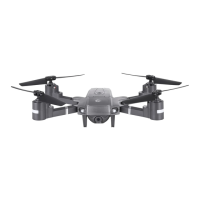
The SKYHAWK DRC-447 is a foldable video GPS drone designed for outdoor flying, offering a range of features for an enhanced user experience.

Function Description:

The DRC-447 is a GPS-enabled drone capable of capturing full HD 1080p video and photos with an articulating view camera. It features auto-hover for stable flight, a 1000ft range, and various flight modes including GPS Mode, Normal Flying Mode, Headless Mode, Follow Me Mode, and Point of Interest (Surrounding Flight Mode). The drone supports one-key return to home, one-key unlock/landing, and an emergency stop function. It is controlled via a remote control and a dedicated mobile application, "VTI SkyHawk," which allows for real-time image transmission and app control.
Important Technical Specifications:

  • Battery: 7.4V 1500mAh high-energy battery cells.
  • Charging Time: Approximately 200 minutes for a full charge.
  • Flight Modes: GPS Mode (default upon power-on), Normal Flying Mode.
  • Speed Modes: Three adjustable speed modes (30% Slow, 60% Medium, 100% Fast), indicated by beeps.
  • GPS Signal: Requires a strong GPS signal (over 7 satellites) for features like Return-to-Home and GPS Mode.
  • Camera: Full HD 1080p, with manually adjustable shooting angles.
  • Motors: Coreless motors.
  • Connectivity: Wi-Fi for app control and real-time image transmission.
  • Remote Control Batteries: 3 AAA 1.5V batteries (not included).
  • FCC Compliance: The device complies with Part 15 of the FCC Rules, ensuring it does not cause harmful interference and accepts any interference received. It also complies with FCC radiation exposure limits for an uncontrolled environment, requiring a minimum distance of 20cm between the radiator and the user's body.

Usage Features:

  • Unfolding the Aircraft: The drone is folded in its package and must be unfolded before use.
  • Battery Installation: The drone battery is inserted into the case at the back of the aircraft until a clicking sound is heard. Remote control batteries are inserted into compartments on the rear, ensuring correct polarity.
  • Power On/Off: Press and hold the power button for 3 seconds to turn on the aircraft (beeping sounds and flashing rear light). Press the button once to turn off. The remote control is powered on by pressing the Power ON/OFF button.
  • Geomagnetic Calibration: Essential for first-time flights in a new location. Involves horizontal rotation until front white lights flash and rear lights shine yellow, followed by vertical rotation until all lights stop blinking and shine steadily. A beep indicates completion.
  • Gyroscope Calibration: Performed by placing the aircraft on a flat surface and moving both control sticks down and to the right/left simultaneously.
  • Lock/Unlock Aircraft: Move both control sticks down and to the right/left simultaneously to lock or unlock the aircraft.
  • One Key Unlock/Landing: Tap the button to unlock and pull up the throttle stick to fly, or tap again to land.
  • Emergency Stop: Press the button for 3 seconds to stop flight immediately (use only in urgent situations to avoid crashes).
  • Photo/Video Capture: Tap the photo/video button on the remote control or app to take photos. Press and hold the button on the remote or tap the video button on the app to start/stop video recording.
  • Follow Me Mode: Activates the drone to follow the smartphone's GPS location. Requires correct GPS and smartphone connection, and a horizontal distance greater than 8 meters.
  • Point of Interest Mode: Allows the aircraft to circle a desired point. Activated by aiming the aircraft at the point and pressing the Surround Flight Mode button on the remote.
  • Speed Adjustment: Cycle through slow, medium, and fast speeds by pressing the right throttle stick down.
  • Mobile Phone Holder: Adjustable holder on the remote control to accommodate various phone sizes.
  • App Download: "VTI SkyHawk" app is available on Apple App Store and Google Play Store.
  • App Connection: Power on the aircraft, connect to its Wi-Fi network (VTI SkyHawk aircraft ****), then open the app and select the aircraft model.

Maintenance Features:

  • Propeller Installation/Detachment: Propellers (A and B) are installed on corresponding motor shafts and fastened with screws in a clockwise direction. Detachment involves counter-clockwise rotation of screws.
  • Battery Charging: Use the included USB cable to charge the aircraft battery.
  • Pre-flight Checklist: Before each flight, ensure the aircraft, remote control, and mobile device are fully charged. Verify propellers are correctly installed and unfolded, and the camera lens is clean.
  • Environmental Care: Keep the aircraft in a dry environment and clean with a soft cloth. Avoid extreme temperatures, strong winds, rain, or fog.
  • Safety Guidelines: Maintain a 7ft (2m) distance during takeoff and landing. Do not fly near obstacles, crowds, power lines, or water. Avoid flying under the influence of alcohol or drugs. Do not touch spinning propellers or motors.
  • Warranty: Vivitar offers a 1-year warranty covering defects in material or workmanship under normal usage. It does not cover damages from unauthorized repairs, tampering, modification, or accidents.
  • FCC Compliance: Users are advised to reorient/relocate the receiving antenna, increase separation between equipment and receiver, or connect equipment to a different circuit to correct any harmful interference.

Vivitar Skyhawk DRC-447 Specifications

General IconGeneral
BrandVivitar
ModelSkyhawk DRC-447
CategoryDrones
LanguageEnglish

Related product manuals