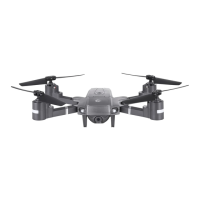
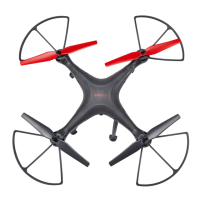
This document is the user manual for the Vivitar DRC-333 WiFi Drone Camera, a miniature remote-controlled six-axis aircraft designed for outdoor flying. The drone is suitable for individuals aged 14 years or older and requires a certain degree of skill to operate.
Function Description:
The Vivitar DRC-333 is a WiFi drone equipped with a built-in camera, allowing users to shoot videos of their flights. The drone can be controlled via a remote control or a smartphone app (Vivitar-UFO app), which connects to the aircraft via WiFi. The app provides a control interface for various flight adjustments and settings, and videos taken by the drone are stored on the user's phone. The drone features 32 LED lights for night flying, enhancing visibility and usability in low-light conditions.
Important Technical Specifications:
- Model: DRC-333
- Aircraft Type: Miniature remote control six-axis aircraft
- Battery (Aircraft): Polymer Battery, 3.7V, 650mAh
- Aircraft Flight Time: 5-7 minutes
- Aircraft Charge Time: Approximately 110 minutes
- Charger Input: 110-240V
- Charger Current: 650MA
- Full Voltage: 4.25 ± 0.03V
- Battery (Transmitter): Carbon-Zinc (Non-Rechargeable), 1.5V (GP 15G R6P)
- Transmitter Operation Time: 18 Hours (Non-Rechargeable)
- Connectivity: WiFi for smartphone control and camera functionality
- Lighting: 32 LED lights for night flying
Usage Features:
- Remote Control: The drone is primarily controlled by a dedicated remote control with various sticks and trim buttons for precise maneuvers.
- Throttle Stick: Controls ascend and descend.
- Directional Control Stick: Controls forward/reverse and left/right movement.
- Throttle Trim: Adjusts rotation.
- Pitch Forward/Reverse Trim: Adjusts elevation.
- Left/Right Roll Trim: Adjusts left/right sliding.
- Speed Switch: Allows selection of slow (30%), quick (60%), or fast (100%) speeds.
- Flipping Button: Enables advanced maneuvers like 3D flips.
- Smartphone App Control (Vivitar-UFO app):
- WiFi Connection: Connects the drone to a smartphone via a dedicated WiFi network (VIVITAR-UFO-xxxxxx).
- Control Interface: Provides on-screen controls including:
- Return to Menu
- Photograph (camera function)
- Perturbation
- Speed Selection
- Gravity Sensor Control Mode
- Show/Hide Control Interface
- Rotate Screen
- Headless Mode
- Key roll
- Throttle
- Directional Control Stick
- Forward/Back Trim
- Rudder Trim
- Left/Right Trim
- Video Recording: The built-in camera records videos of flights, which are stored on the connected smartphone.
- Review Feature: Allows users to access and review captured videos through the app.
- Help Section: Provides further instructions on using the app.
- Settings Menu: Offers various app settings.
- Flight Adjustments and Settings:
- Synchronization: The drone must be synchronized with the remote control before flight. This involves connecting the drone battery, placing it on a flat surface for calibration, pulling the throttle stick down, and powering on the remote control.
- Trim Adjustments: Fine-tuning controls (rotation, elevation, left/right sliding) can be made using the trim buttons on the remote control to ensure stable flight.
- Flying Practice: The manual suggests various practice maneuvers such as fixed-point revolving, flying in a circle, flying in a figure-eight shape, and spot landing to improve piloting skills.
- Safety Features:
- Warning Labels: Clear definitions for "WARNING," "CAUTION," and "FORBIDDEN" instructions.
- Pre-flight Preparation: Emphasizes reading the manual, familiarizing with controls, and practicing in clear, open fields away from obstacles, people, and pets.
- Battery Safety: Specific instructions for Ni-MH and Lithium Polymer batteries, including correct insertion, avoiding mixing battery types, proper disposal, and supervised charging.
Maintenance Features:
- Battery Charging: The aircraft's Polymer Battery is charged using the included USB charger. It's crucial to ensure the aircraft is powered off and the battery is cool before charging. Charging must be done under adult supervision.
- Troubleshooting Guide: A dedicated section helps diagnose and resolve common flight issues, such as:
- Receiver light flashing (unable to sync)
- Aircraft unresponsiveness
- Motor not responding to throttle stick
- Main rotor spins but unable to takeoff
- Strong vibration of aircraft
- Tail still off trim or inconsistent speed
- Aircraft wandering forward after trim adjustment
- Suggested solutions include repeating power-up, checking battery voltage, replacing main blades, charging/replacing batteries, and rebooting.
- Part Replacement: The manual implicitly suggests replacing deformed main blades or damaged tail rotors/drive motors as part of troubleshooting.
- Storage: Advised to store the device in a cool, dry place away from extreme heat to prevent damage or deformation of plastic components. Batteries should be removed from the remote control if not used for an extended period.
The manual also includes a Vivitar One Year Warranty, covering defects in material or workmanship under normal usage, and provides contact information for warranty service and troubleshooting. It also contains FCC compliance information for items purchased in the United States and R&TTE Directive compliance for items purchased in the United Kingdom.

 Need help?

 To Next Page
 General