EasyManua.ls Logo

Vivitar V60027BT - User Manual

Vivitar V60027BT
12 pages
Print Icon
To Next Page IconTo Next Page
Loading...
USER’S MANUAL: V60027BT
Question and Answer IconNeed help?

Do you have a question about the Vivitar V60027BT and is the answer not in the manual?

Summary

Introduction

Important Safety Precautions

Battery Safety and Warnings

Details on integrated lithium battery safety, handling, and disposal precautions.

Package Contents

Specifications

A Quick Look

Charging Your Speaker

Charging Procedure and Notes

Step-by-step guide for charging the speaker and important notes on battery care.

Bluetooth Pairing

Pairing Steps and Device Connection

Instructions for pairing the speaker with a Bluetooth-enabled device.

Speaker Controls

Button Functions and Operations

Details on the function of each button for playback, calls, and volume control.

FCC Statement

Vivitar One Year Warranty

Warranty Exclusions

Details on what damages or malfunctions are not covered by the warranty.

Obtaining Warranty Service

Instructions on how to get warranty service and troubleshooting assistance.

Summary

Introduction

Important Safety Precautions

Battery Safety and Warnings

Details on integrated lithium battery safety, handling, and disposal precautions.

Package Contents

Specifications

A Quick Look

Charging Your Speaker

Charging Procedure and Notes

Step-by-step guide for charging the speaker and important notes on battery care.

Bluetooth Pairing

Pairing Steps and Device Connection

Instructions for pairing the speaker with a Bluetooth-enabled device.

Speaker Controls

Button Functions and Operations

Details on the function of each button for playback, calls, and volume control.

FCC Statement

Vivitar One Year Warranty

Warranty Exclusions

Details on what damages or malfunctions are not covered by the warranty.

Obtaining Warranty Service

Instructions on how to get warranty service and troubleshooting assistance.

Overview

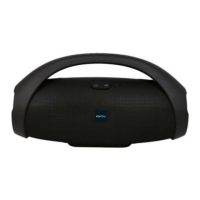
The Vivitar Wireless Party Speaker, model V60027BT, is designed to bring superior premium sound to any event. This Bluetooth-enabled speaker is compatible with most mobile devices and tablets, offering a versatile audio solution for various occasions.

Function Description:

The Vivitar Wireless Party Speaker primarily functions as a portable audio device that connects wirelessly via Bluetooth. Its core purpose is to play music and other audio content from connected devices, delivering a powerful sound experience suitable for parties and gatherings. The speaker features intuitive controls for managing audio playback and calls.

Usage Features:

  • Wireless Connectivity: The speaker utilizes Bluetooth technology for seamless wireless connection to compatible devices such as smartphones and tablets. This allows users to stream audio without the need for physical cables, providing flexibility in placement and usage.
  • Easy Pairing: To initiate use, simply power on the speaker, and it will automatically enter Bluetooth pairing mode. Users can then locate and select "V60027BT" from their device's Bluetooth settings to establish a connection.
  • Audio Playback Controls: The speaker is equipped with dedicated buttons for comprehensive audio control:
    • Power Button: Turns the speaker on and off.
    • Play/Pause Button: This central button serves multiple functions. A single press will play or pause the current audio track. It also manages phone calls, allowing users to answer or end calls with a press. To reject an incoming call, users can press and hold this button for two seconds.
    • Volume Up/Next Track Button (+): A short press on this button advances to the next track in the playlist. Pressing and holding this button will gradually increase the speaker's volume.
    • Volume Down/Previous Track Button (-): A short press on this button returns to the previous track. Pressing and holding this button will gradually decrease the speaker's volume.
  • Portability: Designed for party environments, the speaker's form factor suggests a portable design, making it easy to transport and set up wherever needed. The inclusion of a handle in the design further enhances its portability, allowing users to carry it comfortably.
  • Versatile Charging: The speaker can be charged using a standard USB charging cable. This cable can be connected to a computer's USB port or a suitable USB charging adapter, offering multiple charging options.

Maintenance Features:

  • Battery Charging Indicator: The speaker includes an LED indicator that provides clear feedback on its charging status. The LED turns red while charging is in progress and turns off once the battery is fully charged. This visual cue helps users know when their speaker is ready for use.
  • Battery Care Guidelines: To ensure optimal battery life and performance, several maintenance tips are provided:
    • Prompt Disconnection: Users are advised to remove the charging cable as soon as charging is complete to prevent overcharging.
    • Avoid Overcharging: Overcharging can potentially reduce the overall lifespan of the integrated lithium battery.
    • Regular Usage: A charged battery may lose its capacity if it is not used regularly. Consistent use helps maintain battery health.
    • Periodic Charging for Storage: For periods of extended non-use, it is crucial to charge the speaker at least once every six months. This prevents a complete discharge of the battery, which can be detrimental to its long-term health.
  • General Safety Precautions: The manual outlines several important safety measures to ensure the longevity and safe operation of the speaker:
    • Adult Supervision: Children should not operate the speaker without adult supervision.
    • Temperature Control: Avoid exposing the speaker to extreme heat, flames, or temperatures above 104°F/40°C, and keep it out of direct sunlight.
    • Environmental Considerations: Do not use the speaker in extremely dry environments, as this can lead to static discharge.
    • Physical Protection: Protect the speaker from excessive trauma, such as dropping or puncturing.
    • Professional Service: Users are advised not to attempt repairs themselves. Any service needs should be directed to a qualified service center.
    • Magnetic Fields: Keep the speaker away from objects that generate strong magnetic fields.
    • Unplugging During Non-Use: Unplug the speaker during long periods of non-use or during lightning storms.
    • Proper Disposal: Emphasizes the importance of recycling or disposing of the speaker and its integrated lithium battery properly, in accordance with local laws and regulations. Contacting local recycling facilities or the manufacturer for guidance on disposal is recommended.
  • Integrated Battery: The device is equipped with an integrated lithium battery that cannot be replaced by the user. This design choice simplifies the user experience by eliminating the need for battery swaps but underscores the importance of following battery care guidelines to maximize its lifespan.
  • Commercial Use Restriction: The speaker is not intended for commercial use, suggesting it is optimized for personal and recreational audio experiences.

Vivitar V60027BT Specifications

General IconGeneral
BrandVivitar
ModelV60027BT
CategoryPortable Speakers
ConnectivityBluetooth
Bluetooth Version5.0
Water ResistanceIPX5
Speaker Output5W
Frequency Response100Hz - 20kHz