EasyManua.ls Logo

Vivitar VEC S130 - Page 3

Vivitar VEC S130
20 pages
Print Icon
To Next Page IconTo Next Page
To Previous Page IconTo Previous Page
Loading...
2
1.
1.
1.
1. Power
Power
Power
Power ON/OFF
ON/OFF
ON/OFF
ON/OFF Button
Button
Button
Button 2.
2.
2.
2. Shutter
Shutter
Shutter
Shutter Button
Button
Button
Button 3.
3.
3.
3. LCD
LCD
LCD
LCD Screen
Screen
Screen
Screen
4.
4.
4.
4. W
W
W
W (Zoom
(Zoom
(Zoom
(Zoom Out)
Out)
Out)
Out) 5.
5.
5.
5. Reset
Reset
Reset
Reset button
button
button
button 6.
6.
6.
6. T
T
T
T (Zoom
(Zoom
(Zoom
(Zoom In)
In)
In)
In)
7.
7.
7.
7. LED
LED
LED
LED Indicator
Indicator
Indicator
Indicator 8.
8.
8.
8. OK
OK
OK
OK Button
Button
Button
Button 9.(
9.(
9.(
9.( See
See
See
See below
below
below
below )
)
)
) 10.
10.
10.
10. Menu
Menu
Menu
Menu Button
Button
Button
Button
11.
11.
11.
11. Delete
Delete
Delete
Delete Button
Button
Button
Button 12.
12.
12.
12. Micro
Micro
Micro
Micro SD
SD
SD
SD Port
Port
Port
Port 13.
13.
13.
13. Tripod
Tripod
Tripod
Tripod Socket
Socket
Socket
Socket
14.
14.
14.
14. Wristband
Wristband
Wristband
Wristband hole
hole
hole
hole 15.
15.
15.
15. USB
USB
USB
USB Port
Port
Port
Port 16.
16.
16.
16. Flash
Flash
Flash
Flash Light
Light
Light
Light
17.
17.
17.
17. Microphone
Microphone
Microphone
Microphone 18.
18.
18.
18. Optical
Optical
Optical
Optical Lens
Lens
Lens
Lens 19.Speaker
19.Speaker
19.Speaker
19.Speaker
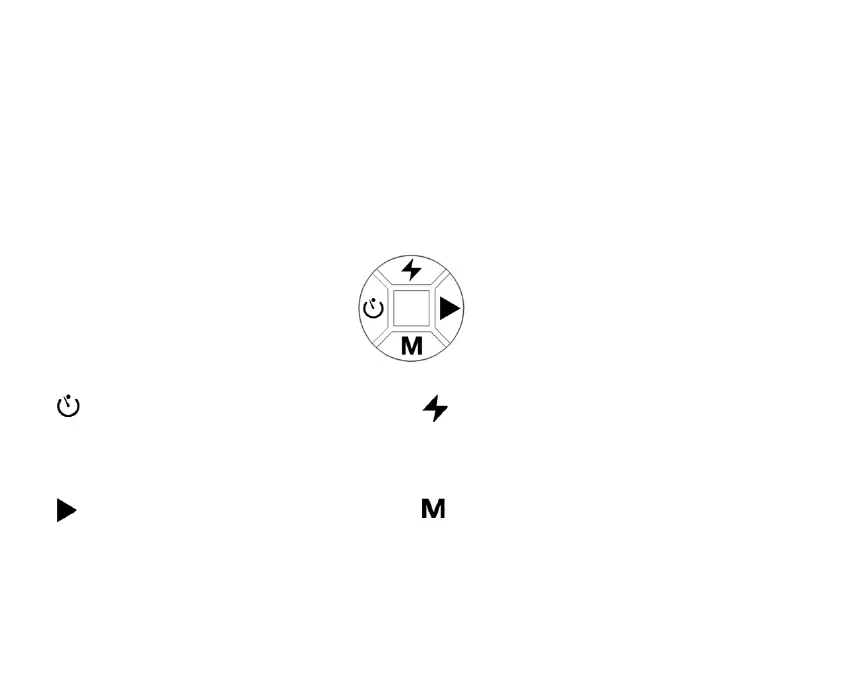
9.
9.
9.
9. Multi-Functional
Multi-Functional
Multi-Functional
Multi-Functional Buttons
Buttons
Buttons
Buttons
You
You
You
You can
can
can
can choose
choose
choose
choose camera
camera
camera
camera settings
settings
settings
settings by
by
by
by pressing
pressing
pressing
pressing the
the
the
the 4-way
4-way
4-way
4-way control.
control.
control.
control.
Left/Self Timer Button:
Scrolls left in menus.
Enable the selfie function.
Up/Flash Button:
Scrolls up in menus.
Toggle through the flash options.
Right/ C ontinuous shoot Button:
Scrolls right in menus.
Quickly enter c ontinuous s hoot mode .
Down/ Mode Button:
Scrolls down in menus.
Toggles between different modes.

Related product manuals